
Pick any busy warehouse, and you will find the same pattern. Something moves too slowly. A scan gets missed. A pallet ends up in the wrong lane. These are not big failures on their own. String them together across a shift, and they cost real money. An automated warehouse control system is built to catch those small failures before they pile up.
A decade ago, automation in warehousing meant a conveyor belt and a barcode reader. Now the bar is much higher. Sensors track every pallet. Software routes every carton. Robots handle entire storage aisles. The question for most operations is not whether to automate but how to connect all those pieces into something that actually works together.
That is exactly the job of an automated warehouse control system. It sits in the middle of the operation and makes sure every tool, every scan, and every handoff stays in sync. When it works well, managers stop firefighting and start seeing the floor clearly.
Most sites do not start there. A label printer here, a pick to light module there. Each one solves a problem. Growth then shows the gaps between those solutions. Orders get faster, SKU counts rise, and the manual handoffs that used to work start causing delays. A proper automated warehouse control system replaces those gaps with one coordinated flow across receiving, storage, picking, and shipping.
The business case tends to be straightforward: shorter cycle times, fewer mispicks, and lower labor costs. Warehouse automation solutions also reduce the need to hire at the same rate every time peak season arrives.
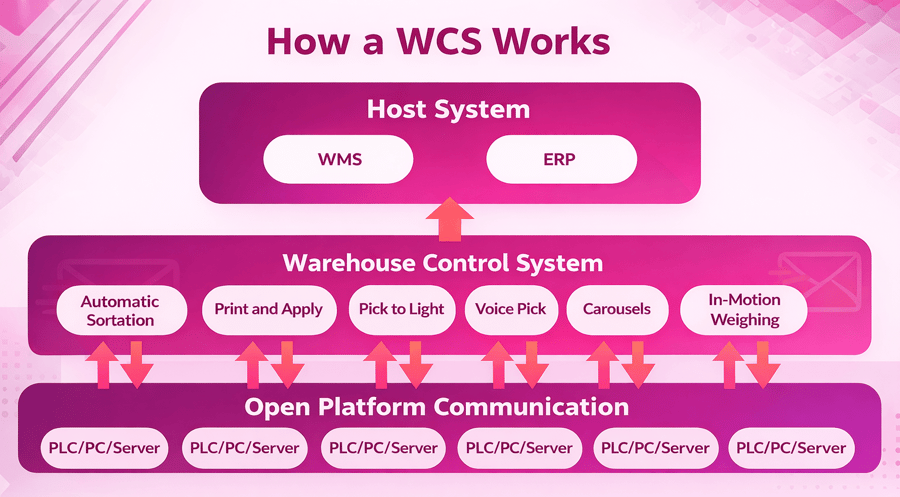
What an Automated Warehouse Control System Does
Think of an automated warehouse control system as the operating layer between your warehouse management system and the physical equipment on the floor. The WMS decides what needs to be picked. The control system decides how the work actually moves, step by step, zone by zone.
That distinction matters a lot in practice. A WMS works in planned cycles. A warehouse control system works in real time. It reads sensor data as it arrives, adjusts routing when a lane backs up, and releases tasks based on what is happening right now rather than what was planned an hour ago.
The four core jobs it handles
- Equipment direction. Routes cartons and pallets based on live conditions in each zone.
- Data sync. Keeps floor device readings aligned with the main inventory records at all times.
- Rule application. Runs routing, picking, and replenishment logic automatically without manual input.
- Exception alerts. Catches faults, jams, and misroutes faster than any manual check could.
Without a central control layer, each tool works in its own silo. A scanner captures data. A conveyor moves a pallet. Nothing coordinates the two. Delays build quietly until a manager notices a backup three zones away. The automated warehouse control system closes that gap.
An important point: full automation is not required. Many operations mix manual work with automated zones, and the control system keeps both sides aligned without a facility rebuild.
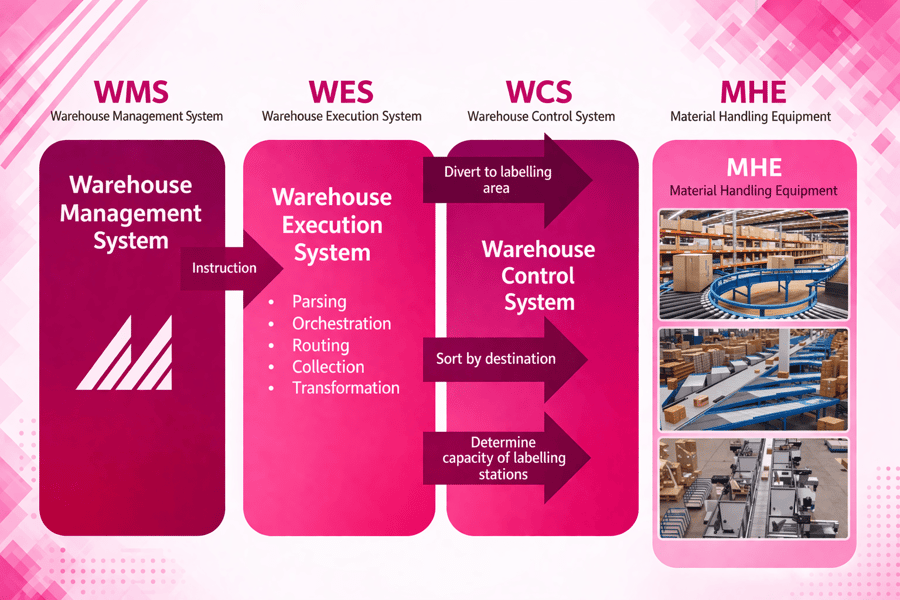
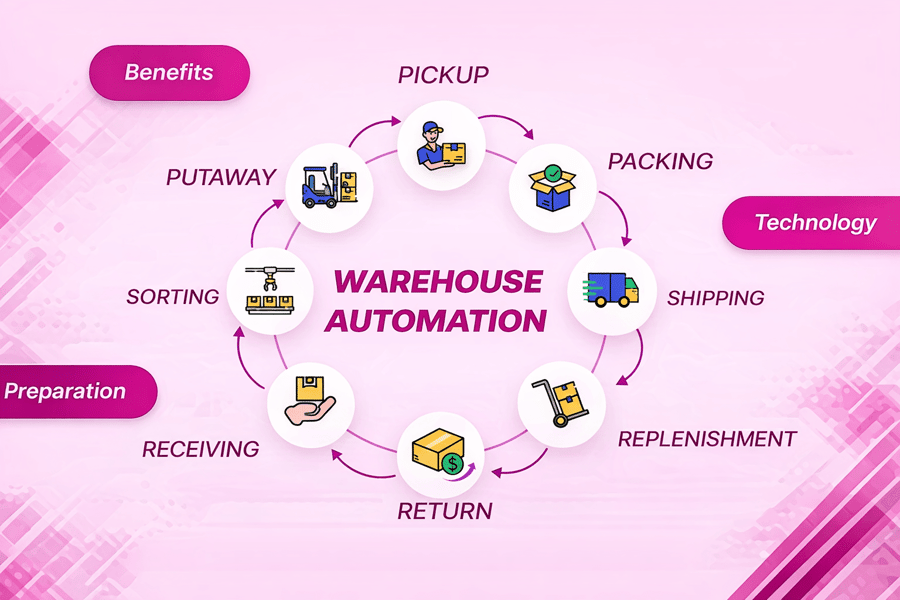
How Warehousing Automation and an Automated Warehouse Control System Improve Daily Work
Warehousing automation improves three things at once: timing, accuracy, and flow. The gains appear at every stage of the shift.
Receiving
Dock assignments go out before a truck backs in. Workers know exactly where to go. Scans confirm each load at entry. Goods route to the correct zone right away. Staff spend less time waiting and less time hunting for open locations.
Storage
Fast sellers stay close to the pick area. Slower items move into reserve space. Travel time drops. Busy aisles stay clear. An automated warehouse control system keeps those slotting rules active even as demand patterns change week to week.
Picking
Task order matches real priority. The system groups work by zone, route, carrier cutoff, or item type. Pickers make fewer repeat trips and spend less time deciding what to do next. Work spreads evenly across teams during peak hours.
Shipping
Cartons, labels, and staging stay aligned. Errors show up early, before a wrong item reaches the dock. The full benefit grows further when the system connects with inventory software for the warehouse to keep records clean at every handoff.
Core Features of Warehouse Automation Technology Inside a Warehouse Control System
Warehouse automation technology works best when its parts connect. A warehouse control system provides that connection. Below are the features that matter most in daily operation.
Real-time equipment control
Commands go to devices as conditions change. Status updates return immediately. When a lane slows, the system adjusts flow before a backup spreads. This keeps the automated warehouse control system ahead of problems rather than reacting to them after the fact.
Full data visibility
Inventory location, order status, machine health, and labor activity all appear in one view. Teams make faster decisions because the data is always current. Manual spot checks drop significantly.
Exception handling
Jams, misroutes, and missing scans trigger alerts right away. Operators act before the issue reaches the next station. Early alerts keep small problems from becoming large delays.
System integration
Clean data flows between ERP systems, order platforms, and shipping tools. That connection is what turns automating warehouse operations into one process rather than several separate tasks. Poor integration is often what stalls a project in the real world.
Rules-based logic
Rush orders get priority. Work balances across zones automatically. Routing shifts during busy periods without manual intervention. The system responds to hourly volume changes on its own. That kind of smart logic supports stronger warehouse management across every shift.
Performance dashboards
Throughput, dwell time, equipment use, and order cycle times all appear in one place. Managers see trends early and improve operations week over week rather than waiting for the end-of-month reports.
Key Benefits of Warehouse Automation Solutions for Accuracy, Speed, and Growth
Warehouse automation solutions create measurable gains where manual work breaks down most. The three areas that show results fastest are accuracy, speed, and scalability.
Accuracy
Every move gets confirmed as it happens. Barcode scans, sensor data, and system rules remove the guesswork that leads to shrinkage and wrong shipments. Each transaction leaves a clear record. Managers trace problems faster and correct root causes before they spread. An automated warehouse control system makes quality control a daily habit rather than a monthly investigation.
Speed
Gaps between tasks disappear when warehouse automation technology connects each stage. Conveyors, sorters, and directed pick paths keep goods moving. Workers receive tasks directly without waiting for paper lists. Cycle times shorten at receiving, picking, and shipping all at once.
Scalability
Manual processes need more labor before they deliver more output. Warehousing automation handles higher volume without that same proportional increase in staff. An automated warehouse control system absorbs peak demand without losing accuracy or speed. Pairing that capability with warehouse optimization tips adds even more headroom over time.
Cost control improves alongside all three. Labor shifts toward exception handling and quality work. Equipment runs with better timing. Idle time and floor congestion both fall.
Use Cases for Automating Warehouse Operations Across Every Stage
Practical automating warehouse operations means solving real problems at each stage. An automated warehouse control system supports specific improvements at receiving, storage, picking, and shipping.
Receiving and cross-docking
Inbound pallets match purchase orders at the dock door. Shortages get flagged immediately. Goods route to the next task without manual checks. Fast-moving stock can skip reserve storage and go straight to outbound staging. That cuts dwell time and speeds up the entire inbound flow.
Storage and slotting with an automated warehouse control system
High-velocity items go to easy-to-reach locations. Slow movers go into reserve space. In sites with automated storage and retrieval systems, shuttles, or carousels, the control system times machine moves with labor tasks so replenishment happens before pick faces run empty.
Picking methods the system supports
Different order profiles call for different pick methods. Common options include:
- Batch picking. Best for small repeat orders with similar products.
- Goods to person stations. Cuts walking time in dense or high-mix environments.
- Pick to light. Supports fast training for seasonal staff with a low learning curve.
- Zone balancing and wave release. Keeps idle time low across the full floor during peaks.
Automated warehouse control system: Shipping and returns
Cartons are released in the correct sequence. Weights get confirmed. Shipping data goes to carrier systems without delay. Missed trailers and wrong shipments drop. The same control logic that handles receiving can guide returns as well. Items reenter stock faster when the system sorts and routes them at entry, which creates cleaner warehouse inventory tracking across the whole operation.
Automated Warehouse Control System vs. Basic Warehouse Automatic Tools
Basic warehouse automatic tools do one job well. A label printer, a barcode scanner, or a simple conveyor trigger each solves one problem at a time. An automated warehouse control system manages all of those tasks as one connected flow with live data guiding every decision.
Where the difference shows up
A basic tool follows fixed rules inside one station. A warehouse control system reads data across all zones and directs work based on current demand, labor, and equipment status. The gap is not minor. It changes how fast problems get caught and how smoothly work moves from one stage to the next.
Warehousing automation works best when software coordinates every move. The system releases waves, routes cartons, balances workloads, and flags exceptions before delays spread. That coordination matters more as volume rises and delivery windows shrink.
A quick side-by-side
- Basic tools support one process or one machine at a time.
- A control system connects many processes and machines all at once.
- Basic tools require manual checks between each step.
- The control system handles handoffs automatically without manual input.
- Basic tools log activity after the fact.
- The control system supports real-time action at every stage.
Automated warehouse control system: What happens without central control
Consider a common scenario. A sorter breaks down for twenty minutes. In a basic setup, supervisors find out when cartons start piling up. They make calls, reroute manually, and hope nothing misses a carrier. In a site with an automated warehouse control system, the fault triggers an alert within seconds. Alternative routing activates. Teams shift workload to open lanes. The carrier cutoff gets hit anyway.
That difference compounds across a shift, a week, and a peak season. Basic tools handle normal conditions reasonably well. An automated warehouse control system handles the exceptions, the surges, and the unexpected breakdowns that define how well an operation actually performs when it matters most.
Cost looks different over time as well. A low-cost tool solves one problem today and adds complexity tomorrow. Companies automating warehouse operations at scale need shared visibility, exception handling, and system-wide priorities. Isolated task automation cannot deliver that. The gap becomes sharper when the next step includes ecommerce fulfillment automation across multiple channels.
How to Choose an Automated Warehouse Control System That Fits Your Business Goals
The right warehouse automation solutions depend on process fit rather than feature lists. Good decisions start with clear goals: shorter pick times, fewer shipping errors, or better labor use. The best solution is the one that addresses the most costly problems first.
Start with four key questions
-
-
- What is the order volume? This shows whether current manual processes can keep up with growth.
- How varied are the SKUs? High variety means the system needs more routing flexibility.
- How tight is the labor market? Labor pressure builds the cost case for deeper automation.
- How clean is the data? Data quality sets the ceiling for how well a control system can perform from day one.
-
Order profile and facility layout
Carton flow, pallet volume, SKU count, and peak swings all point toward different technologies. Some operations need conveyor logic and sortation control. Others gain more from mobile robots and flexible warehouse automation technology that can be repositioned as workflows change.
Automated warehouse control system: Integration and vendor selection
Clean data exchange with ERP, WMS, and shipping platforms is not optional. Poor connections create delays, duplicate work, and blind spots that weaken the whole investment. Strong vendors explain service levels, support response times, and upgrade paths clearly. They show how their warehouse automation solutions handle growth without forcing a full redesign every two years.
Cost review works best when it covers labor, downtime, training, and maintenance together. The lowest price often brings the highest long-term cost when reliability is weak. A well-matched automated warehouse control system supports a clear path toward automated fulfillment at every stage of growth.
Implementation Best Practices for Warehouse Automation and Change Management
A strong rollout starts with process clarity, not hardware selection. Teams need a clear map of current flows before an automated warehouse control system goes live. That map shows where delays and manual handoffs create the most risk.
Phase the deployment
Many sites begin with one zone, one shift, or one workflow before expanding. That approach lets the control system prove accuracy in a controlled setting. Managers get clean feedback before the project scales to the full facility.
Fix the data first
Item dimensions, slotting rules, barcode standards, and location records must all stay consistent. A poor master data set creates routing errors and confuses operators. Waiting until after launch to clean data is one of the most common and costly mistakes teams make.
Match equipment to control logic
Sites that add shuttle storage, goods to person stations, or a 4-Way Pallet Shuttle Warehouse System need message timing and control logic that match real operating speeds. New equipment creates new bottlenecks when the control layer is not ready for it.
Involve frontline staff early
Supervisors and operators who join design decisions early catch travel issues, safety concerns, and screen problems that planners miss. When workers see how the system removes repetitive tasks, adoption moves faster and resistance drops.
Automated warehouse control system: Key steps before and during launch
- Set clear success metrics. Pick rate, error rate, and dock turnaround should all have targets before day one.
- Test exception paths. Normal flows are not enough. Run tests on what happens when things go wrong.
- Train by role. Operators, leads, and technicians each need different training content.
- Review daily results. The first weeks of live production reveal the most important tuning opportunities.
Support plans deserve as much attention as launch plans. The best warehouse automation solutions connect control, labor, and inventory decisions directly with order management software to keep the full operation in sync.
Common Challenges in Warehousing Automation and How to Avoid Them
Most automation projects that fall short share one root cause. The underlying process was not ready. Poor pick paths, bad slotting logic, and unclear task sequences cause delays, whether the system is manual or automated. Fixing workflow gaps before launch matters more than choosing advanced technology.
Data quality
Wrong item dimensions, bad location records, and duplicate SKUs confuse staff and machines alike. Strong master data rules set before go-live help warehouse automation technology run accurately from the start. This is the fix that gets skipped most often and causes the most trouble later.
System integration
A new warehouse control system must exchange clean data with ERP, WMS, and shipping tools. When those connections fail, orders pause, inventory drifts, and managers lose trust in the system. Testing every integration in a staging environment before going live avoids most of these failures.
Labor adoption
Workers sometimes see warehouse automation as a threat rather than support. Clear training, simple screens, and realistic ramp-up plans help people work with the system rather than around it. Involving frontline staff in the design process makes the biggest difference.
Growth limits
A setup that handles one site may struggle when SKU counts, channels, or return volumes increase. Regular reviews after go-live help teams spot recurring exceptions before they become costly patterns. Long-term control improves when automation data connects with a warehouse labor management system that tracks labor efficiency alongside operational results.
Hidden costs that show up later
Every warehouse that has gone through a failed automation project says the same thing afterward. The technology worked. The process around it did not. Integrations were rushed. The data was wrong. The staff was not ready. Those are not technology failures. They are planning failures that better preparation would have caught.
A phased approach reduces risk at every stage. Starting with one zone or one workflow lets teams build confidence before committing the whole facility. It also shows whether the vendor can actually deliver on their promises before the full contract plays out.
A phased approach reduces risk at every stage. It also shows whether automating warehouse operations will produce steady gains before the full investment is committed.
Automated Warehouse Control System: Conclusion
An automated warehouse control system brings real order to fast-moving warehouse work. Connecting people, machines, and data ensures every task moves at the right time. Delays fall. Picking errors drop. Inventory records stay current across every shift.
Strong results come from more than adding new tools. The best warehouse automation solutions fit the operation, the order profile, and the growth plan. When software rules align with floor activity, warehouse automation technology supports steady throughput instead of creating new bottlenecks.
Leaders gain better visibility into every part of the operation. They see where work slows, see how the equipment performs, and spot which processes need attention. That insight turns automating warehouse operations from a technical project into a business advantage.
The gap between basic warehouse automatic tools and a full warehouse control system shows up in daily execution. Standalone tools handle single tasks. A coordinated automated warehouse control system manages flow across receiving, storage, picking, and shipping at once. That broader coordination is where lasting value is built.
Operations that invest in the right control layer tend to see compound returns. Accuracy improves, which reduces rework. Speed improves, which increases throughput without more staff. Visibility improves, which makes planning more reliable. Each gain reinforces the others over time. That compounding effect is why the decision to implement a proper automated warehouse control system tends to look better in years two and three than it did at launch.
The next step is straightforward. Review current process gaps. Map the highest cost delays. Compare those findings against what an automated warehouse control system can address. For more practical ideas that support faster and cleaner execution, explore these warehouse efficiency tips.
Frequently Asked Questions
What is an automated warehouse control system?
An automated warehouse control system is software that manages and coordinates material handling equipment, conveyors, sorters, and other warehouse automation technology in real time. It helps control product movement, improve accuracy, and keep warehouse operations running efficiently by connecting equipment activity with broader warehousing automation processes.
How does an automated warehouse control system work?
An automated warehouse control system works by sending instructions to warehouse equipment and monitoring performance as tasks are completed. It acts as the operational layer between business systems and physical devices, helping warehouse automatic processes stay synchronized, reducing delays, and supporting faster, more reliable automation of warehouse operations.
What are the benefits of using a warehouse control system?
A warehouse control system improves order accuracy, throughput, labor productivity, and visibility across daily operations. It helps businesses respond faster to demand changes, reduce manual errors, and make better use of warehouse automation solutions. For growing facilities, it also supports more consistent performance and better use of available space and equipment.
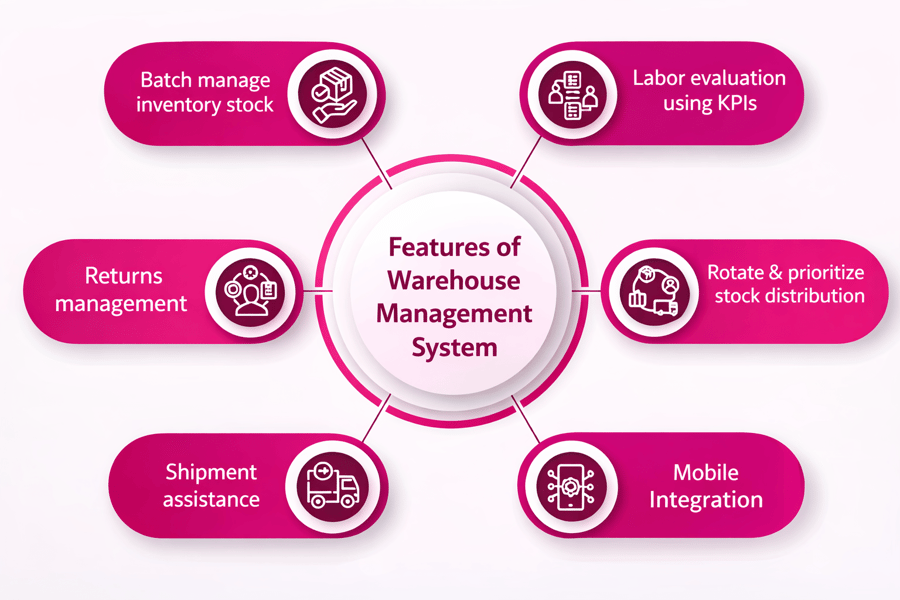
What is the difference between a warehouse control system and a warehouse management system?
A warehouse management system focuses on inventory, order workflows, and planning, while a warehouse control system manages the real-time execution of equipment and movement inside the facility. In many warehouse automation environments, the two systems work together, so planning decisions from the management layer can be carried out efficiently on the warehouse floor.
Who should invest in warehouse automation technology?
Businesses with high order volumes, labor challenges, fast shipping requirements, or complex fulfillment processes often benefit most from warehouse automation technology. Manufacturers, distributors, retailers, and e-commerce operations can use it to improve speed and control. Companies planning long-term growth often adopt warehouse automation solutions to build a more scalable operation.
Can an automated warehouse control system integrate with existing systems?
Yes, an automated warehouse control system can often integrate with existing warehouse management, enterprise resource planning, and material handling systems. This allows companies to expand warehouse automation without replacing every platform at once. Strong integration supports better data flow, smoother equipment coordination, and a more practical path toward modern warehousing automation.


