Starting January 21, 2026, Amazon enforces updated title standards. The new rules push sellers toward shorter, cleaner titles. Following the amazon product title guidelines keeps your listings active and compliant.
Clear titles help shoppers scan results faster. That leads to more clicks and fewer confused visits. Good title structure supports better search results without stuffing extra words.
These changes affect how you write, trim, and review every listing. You need to remove clutter and focus on useful product details. Good titles match shopper intent and follow the current rules.
Sellers should also check each listing against the amazon product naming policy. Small errors can trigger edits, suppressions, or lost traffic. Clean, direct titles give buyers the facts they need before they click.
Summary
Amazon’s updated title rules took effect in 2026. Sellers need clear, compliant titles. The core amazon product title guidelines set a 200-character limit. They also restrict special characters and cap repeated words at two uses.
These rules push sellers to write cleaner titles. Shorter titles scan faster on mobile and desktop. Clear wording helps shoppers spot the right product sooner. Strong titles also lower the risk of suppressed listings.
The update affects search visibility and click-through rate. Good amazon title optimization means removing filler, cutting symbols, and keeping only useful details. Sellers should also check each title against the naming policy before changes go live.
Fast action helps protect rankings and sales. Early updates can prevent traffic drops after enforcement begins. Clean titles also set better expectations, which leads to fewer returns.
What Are the New Amazon Product Title Guidelines?
Amazon’s title requirements now set clearer rules for every listing. Sellers need clean titles that shoppers can scan fast. These updates also support better search results and fewer listing issues.
1. Titles Must Be Under 200 Characters
Keep each title under 200 characters, including spaces. Shorter titles help shoppers spot the product faster. They also reduce the risk of suppressed listings.
2. No Special Characters Allowed
Do not add symbols like !, $, ?, _, {, }, ^, or ¦. Amazon allows them only if the brand name includes them. Clean titles look more professional and match the amazon product naming policy.
3. Word Repetition is Limited
Do not repeat the same word more than twice. Amazon makes exceptions for short words like “and” or “the.” Repeated terms make titles look spammy. They can also weaken trust.
Following these standards keeps your titles compliant. It also helps your listings stay visible and active.
Why These Title Guidelines Matter for Sellers
Clear title rules help sellers write copy that shoppers can scan fast. Good titles cut confusion and help buyers compare products with less effort. Here are the main reasons they matter.
- Better Readability: Short, clear titles show the product fast. Shoppers grasp key details and decide sooner.
- Improved Search Ranking: Titles that follow the rules can rank better in search. Better placement brings more views from ready buyers.
- Avoid Listing Suppression: Titles that break the rules can trigger flags or removal. That stops sales and hurts account health.
Good keyword research shapes strong titles too. Sellers who study search terms can add words buyers already use. That supports amazon title optimization without stuffing extra terms. It also brings more clicks and fewer wasted impressions.
Sellers should track title length and product details closely. Tight copy helps meet the naming policy and keeps listings clean. Consistent titles also make large catalogs easier to manage.
To standardize listings across channels, review how a GTIN Number improves product identification, compliance, and catalog consistency.
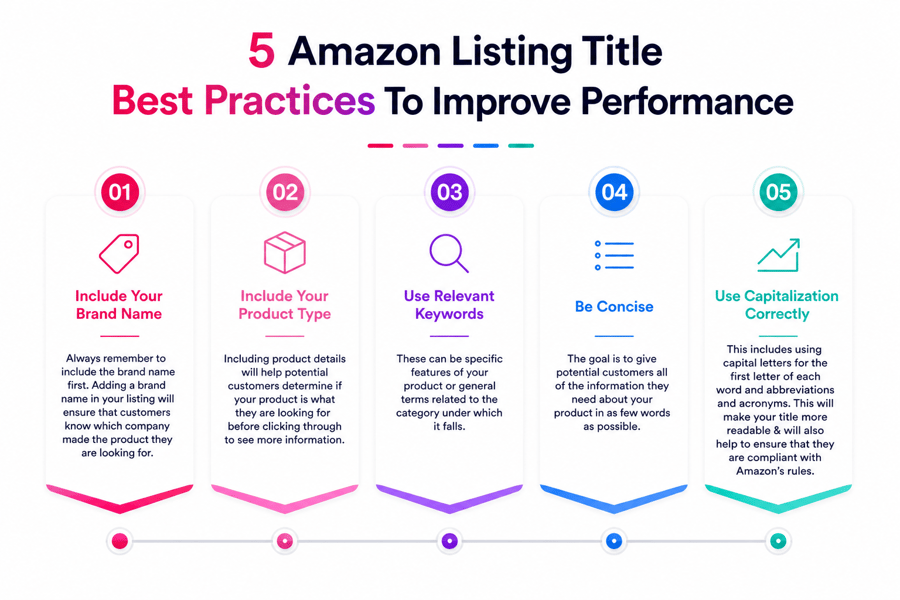
Crafting Compliant Titles: Key Rules and Requirements
Follow the rules with clear, factual wording. Keep titles under the 200-character limit, including spaces. Use proper capitalization and skip all caps. Remove promotional terms like “Best Seller” or “Free Shipping.”
Match the title to the exact item you sell. Shoppers should know what they get right away. Avoid inflated claims and unrelated search terms. Those shortcuts often trigger suppressed listing status.
Strong titles include the details buyers scan first. Add brand, size, quantity, and color when they matter. That structure supports faster clicks and fewer wrong orders.
Check title length and the character limit before you publish. Long titles break on mobile screens and hide key details. Clean wording also supports amazon title optimization without stuffing. Stay consistent with the naming policy to avoid edits or removal.
After your title meets policy, test search terms with an amazon keyword search tool. Use the data to pick terms shoppers already type. That gives your title a better shot at relevant traffic.
Best Practices for High-Converting Titles
Strong titles do more than follow Amazon listing title guidelines. They help shoppers scan fast and find key details. Good titles also support search when they match buyer intent.
Start with your brand name. Follow it with a short product description and key attributes. Put the most useful details first, since shoppers often skim. That order leads to clearer search results.
Here is a good example format:
“XYZ Wireless Bluetooth Headphones, Over-Ear, Noise Cancelling, 30H Battery, Black”
This format shows the product type, core features, and color. It keeps the title easy to read. It also avoids keyword stuffing, which can hurt clicks and trust.
A few more tips to keep in mind:
- Use numerals instead of spelling out numbers, such as “10-Pack”
- Avoid symbols unless they separate useful details
- Keep the title short enough to read on a phone screen
- Lead with the brand, then the product type, then key specs
- Skip filler words and vague claims
Your product title is the first thing shoppers see. A clean title builds trust and sets clear expectations. Better titles often lead to more clicks and fewer confused buyers.
To refine your titles with data-backed keywords and demand insights, compare options in our guide to the best amazon product research tool.
How Good Titles Improve Ranking and Visibility
Following Amazon title guidelines helps your listing rank for the right searches. Clear titles give Amazon stronger signals about your product. That supports better placement in search results.
The guidelines also shape how shoppers read your listing. A clean title looks credible and easy to scan. Strong wording can support clicks. Messy titles often lose them.
Good amazon title optimization works without stuffing extra terms. Titles match shopper intent and stay easy to read. That balance helps you keep visibility in crowded categories.
Ignoring the naming policy can hurt reach fast. Amazon may suppress a listing or limit where it appears. Sellers should review title length, wording, and format often.
Short, precise titles often index more cleanly than long ones. Teams that manage large catalogs should check title performance often. Fix weak titles before traffic drops.
After you tighten your titles, support them with a smart amazon dynamic pricing strategy. Better titles and pricing work together to hold visibility as competition shifts.
How to Optimize Titles Step by Step
Use the current requirements to keep titles clear and easy to scan. Stay under 200 characters, including spaces. Lead with the brand and product type. Add size, color, or one key feature when it helps.
Skip filler words and sales claims. Terms like “best selling” can trigger suppression. Clean titles help shoppers find the item faster. They also make it easier to compare options.
1. Keep Titles Concise and Clear
Stick to the essentials. Put the strongest details first. Remove vague wording. Short titles often earn more clicks because buyers grasp them fast.
Compliant Example:
Men’s Lightweight Running Shoes, Durable and Comfortable for Jogging and Gym Workouts
Non-Compliant Example:
BEST SELLING RUNNING SHOES!!! Comfortable and Durable Lightweight Running Shoes for Men, Perfect for Gym, Jogging, and Casual Wear.
2. Avoid Special Characters and Symbols
Keep punctuation simple. Amazon blocks extra symbols, emojis, and repeated marks in most cases. Use them only when your brand name requires them. Clean formatting looks trustworthy on mobile and desktop.
Correct Format:
Men’s Super Shoes, Comfortable and Stylish for Everyday Use
Incorrect Format:
Super! Shoes for Men!!!
3. Limit Word Repetition
Do not repeat the same phrase to chase rankings. Repetition hurts readability and can break the rules. Swap in natural alternatives that still describe the item well.
Better Approach:
Jogging Footwear for Men, Lightweight, Cushioned Running Design
Once your titles read cleanly and comply with policies, boost visibility further by pairing them with amazon ppc management strategies to maximize ROI.
Tools to Stay Compliant With Title Rules
The right tools make the guidelines easier to follow. They also help you catch issues before Amazon suppresses a listing.
Amazon Seller Central
Start with the Listing Quality Dashboard in Seller Central. It flags title errors fast. You can spot missing details, policy issues, and weak formatting in one place. That makes managing many SKUs much easier.
Fiftify Optimization Tool
Fiftify AI-powered tools help teams write titles faster. They keep wording consistent too. You can review key terms, length, and order before publishing. That saves editing time and supports better results.
Amazon’s Official Help Pages
Amazon’s official seller guide explains current title standards with clear examples. Use it to check edge cases and category-specific rules. It also helps sellers stay aligned when rules change.
Review title length often, especially when you update catalog data. Check character limits, naming order, and banned terms during routine audits. A simple review process cuts errors, lowers rework, and keeps listings live.
Benefits of Following Amazon’s Guidelines
Increased Visibility
Following the title requirements helps your listings rank for the right searches. Clean titles also work better when your listing includes a valid GTIN Number. Strong titles match shopper intent and can bring more views from search results.
Higher Conversion Rates
Clear titles tell shoppers what you sell in seconds. Buyers click faster when key details appear first. Good titles also avoid sounding stuffed or awkward. That often means more clicks and more orders.
Avoid Listing Suppression
Amazon may flag titles that break its standards. A suppressed listing can lose traffic the same day. Following the amazon product naming policy lowers that risk. It also protects account health and keeps products live.
Sellers who follow the rules waste less time fixing errors. Teams can update listings faster and keep catalogs consistent. Clear titles also cut shopper confusion, which can mean fewer returns. Small title fixes often lead to steady sales gains.
Optimizing Listings for Long-Term Success
A strong title supports the rest of your listing. Apply good title practices across every product page. Your bullets, images, and search terms should match the same promise.
Write bullet points that state features and clear buyer benefits. Keep each point easy to scan and quick to grasp. Strong bullets add context and cut confusion.
Match your copy to real customer searches. Use terms naturally in the title, bullets, and description. Good keyword use works without making copy sound forced.
Stay within Amazon’s standards as your catalog grows. Breaks in the naming policy can hide listings fast. Regular checks help you catch risky wording before sales drop.
Want more tips? Explore our amazon dynamic pricing strategy or reach out to our team for personalized support.
Understanding Amazon Product Title Requirements and Naming Policy
Follow the amazon product title guidelines to keep listings live and visible. Broken titles can trigger flags, suppression, or search removal. Clear titles also help shoppers scan products faster.
Amazon applies strict rules across categories. Write titles that describe the item with plain facts. Include brand, product type, size, count, or key feature when needed. Skip claims like “Best Seller” or “Free Shipping.”
Character count matters. Many categories allow up to 200 characters. Shorter titles often work better in search. Aim for under 80 characters when possible. That keeps more of the title visible on mobile screens.
Use title case formatting, not ALL CAPS. Capitalize the first letter of each main word. Clean formatting makes titles easier to read.
Avoid adding:
- Pricing details
- Seller information
- Subjective phrases like “Top Rated” or “Best Quality”
Use search terms that match the product and buyer intent. Do not stuff repeated words into the title. Strong titles follow the naming policy and still sound natural.
Check Amazon’s category-specific style guides before you publish. Limits can change by category. Staying current cuts edits, avoids suppression, and helps buyers trust your listing.
Character Limits: Titles and Descriptions in 2026
Character limits shape how your listing appears in search and on mobile. Break those limits, and Amazon may suppress the product. Following the guidelines helps you keep listings live and easy to read.
Product Title Character Limit
As of 2026, Amazon recommends titles stay under 200 characters. Many categories set lower caps than that. Check your product type before you write.
Shorter titles usually perform better on mobile. Aim for 80 to 120 characters when possible. That range cuts truncation and keeps key details visible. It also supports stronger title performance.
Pro Tip: Review category-specific title limits in Amazon Seller Central. A title that runs too long can lose search exposure fast.
Amazon Product Description Character Limit
Amazon often allows up to 2,000 characters in product descriptions. More space does not mean more value. Use the room to explain features, use cases, and clear benefits.
Keep the wording tight and specific. Match the description with your bullet points and title. That keeps your message consistent with the naming policy.
Keep an Eye on Listing Updates
Amazon changes listing standards often. Check for updates on a regular schedule. Small policy shifts can affect title length, wording, and compliance.
Conclusion
The 2026 amazon product title guidelines set clear limits for every seller. Follow them to keep listings live and easy to read. Strong titles also support better search matching and fewer listing issues.
Review your catalog now and fix titles that break the rules. Check length, banned symbols, and repeated words first. That simple audit helps you stay compliant with less rework later.
Good title writing also supports amazon title optimization when done with care. Use clear product details that match the item exactly. Keep every title consistent with your brand and the naming policy.
If you manage many SKUs, use tools that speed up edits. Fiftify can help you build clean titles faster. That saves time, cuts errors, and keeps your catalog ready for review.
Frequently Asked Questions
What happens if my product title exceeds 200 characters?
If your title goes over the character limit, Amazon may suppress or remove your listing until the issue is corrected. This can reduce visibility and hurt sales.
Can I use special characters in Amazon titles?
No. Special characters, symbols, and emojis are not allowed unless they are part of your registered brand name. Using them can lead to listing suppression.
How can I reduce title length without losing important details?
Focus on essential information like brand name, product type, key features, and size or quantity. Remove unnecessary words and avoid repetition to stay concise.
What are Amazon’s product title guidelines in 2025?
Amazon’s updated guidelines recommend:
-
Keeping titles under 200 characters (check category-specific limits)
-
Using Title Case (capitalize the first letter of each word)
-
Avoiding promotional terms like “Best Seller” or “Free Shipping”
-
Including relevant keywords and clear product information
-
Avoiding all caps (except for brand names and acronyms)
Why is following Amazon’s title guidelines important?
Complying with the guidelines keeps your listings active and visible in search results. It also improves buyer trust and ensures your listings meet Amazon’s quality standards.
Can I use all capital letters in my product title?
No. Amazon discourages the use of all capital letters. Use Title Case instead, unless you’re writing a brand name or acronym.
Should I include symbols or emojis in product titles?
No. Symbols, emojis, and decorative characters are prohibited. They may result in poor user experience and listing suppression.
What should be included in a compliant Amazon product title?
A compliant title should include:
-
Brand name
-
Product type
-
Key features (such as size, color, quantity)
-
Relevant keywords that match customer search behavior
Avoid promotional claims or unrelated terms.
How long should my Amazon product title be?
Amazon recommends keeping titles between 80 and 200 characters. For mobile-friendly display, it’s best to aim for 120 characters or fewer.
Can I include terms like “best seller” or “free shipping”?
No. Amazon prohibits the use of subjective or promotional language in titles. These phrases violate listing policies and can result in suppression.
How often should I update my product titles?
Update titles only when necessary—such as during policy changes or SEO updates. Avoid frequent edits, as they may impact indexing or confuse returning customers.
Do title mistakes affect sales performance?
Yes. Non-compliant titles can result in reduced visibility, suppressed listings, and lower conversion rates. Proper formatting helps maintain traffic and trust.
How strict is Amazon about the title character limit?
Amazon enforces the 200-character limit strictly, with some categories having even lower limits. Always check your category-specific requirements to stay compliant and avoid suppression.
How long does it take for Amazon product title changes to take effect?
Most title updates appear within a few hours, but in some cases, it can take up to 14 days for the changes to reflect across all listings and search results. Factors such as category review, listing history, and backend indexing speed can influence the timeline. It’s important to monitor your listing during this period to ensure updates are applied correctly.