
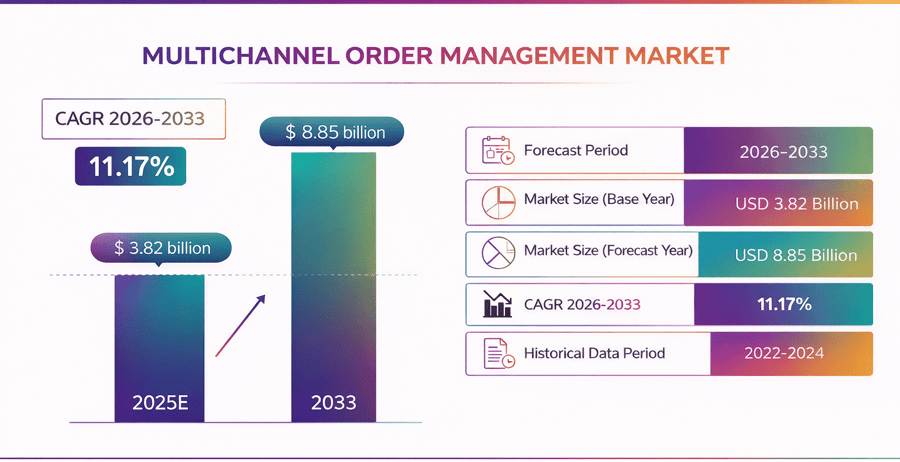
What Is Multichannel Order Management Software?
Multichannel order management software collects orders from every sales channel and puts them in one tool. Teams get one view of order status, stock, and shipping progress. As a result, they do less manual work, make fewer errors, and reply faster when something needs fixing. This multichannel order management software explained approach helps businesses keep operations clear as sales volume grows.
A strong multichannel order management system links your web store, markets, and social shops in real time. When one item sells, stock updates across all linked channels right away. That link between orders and stock helps stop oversells, missed orders, and backorders before they hit.
The goal is simple. For example, you want to see each order, check its status, and act fast if it is off track. A good tool makes that easy. It also keeps a log of every step, so you can go back and check what went wrong if a problem shows up later.
What does multichannel order management cover each day
Most tools cover the core steps your team runs each day. Orders come in from each channel and go to the right site or store. Stock stays current through multichannel inventory management software or a built-in stock module. Labels, tracking, and customer notes all flow from one place. Returns follow a clear path that your team can close fast.
Some brands also use multi-channel inventory management software for tighter stock control. Others rely on multichannel inventory control software or multi-channel inventory software to keep counts right across fast-moving SKUs. The tool may have many names, but the job stays the same.
To see how an order management system drives growth, read our guide on building a scalable fulfillment workflow.
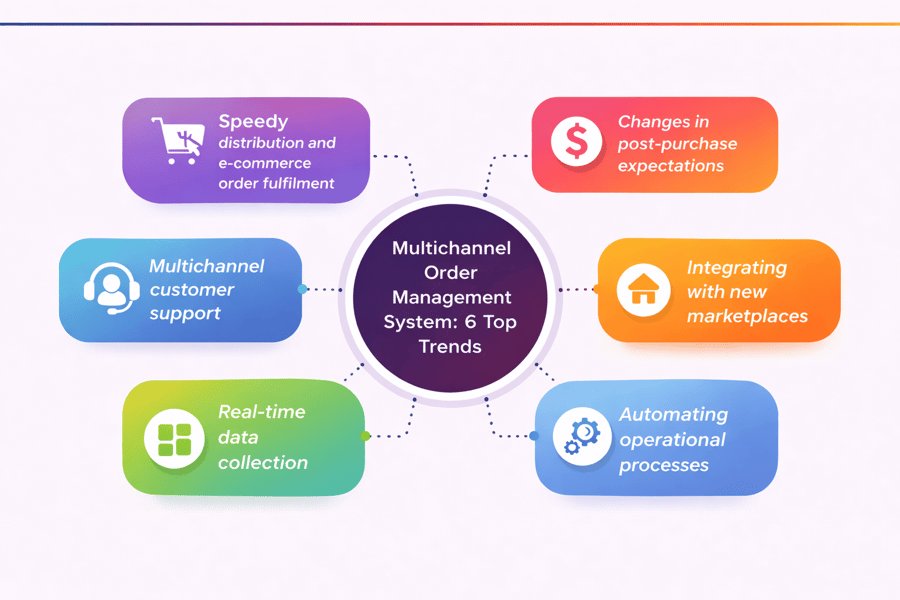
How Multichannel Order Management Works
Selling in many places means a steady flow of orders and stock changes. Multichannel order management software brings those updates into one view, so teams can see orders, stock, and shipping at once without switching tools.
Each rule you set saves time. For instance, you can tell the tool to hold an order if the address looks wrong. The tool will flag it and wait for your team to check. That one rule can stop a lot of bad shipments before they go out the door.
From capture to ship with multichannel order management
Order automation pulls new orders from each channel as they come in. The tool checks SKUs, prices, taxes, and shipping rules before release. It then holds stock fast, which helps stop overselling and last-minute cancellations.
Routing logic also runs inside the tool. A multichannel order management system can send each order to a site, a store, or a 3PL based on your rules. Smart split logic and near-location shipping cut delivery time and freight cost.
Multichannel inventory management software keeps stock counts in line as sales, returns, and restocks happen. For brands with bundles and kits, multi-channel inventory management software tracks each part correctly. Meanwhile, multichannel inventory control software watches reorder points and count accuracy.
Finally, shipping closes the loop. A good multichannel order manager handles split orders, back-orders, returns, and refunds in one flow. For a closer look at reporting, read our guide on order management software.
Multichannel Order Management vs Stock Tools: Key Differences
Teams often mix up order tools and stock tools. Both connect, but each covers a different job.
Think of it this way. Your order tool is the front end. Your stock tool is the back end. Both need to stay in sync. If one falls behind, the other one breaks too. That is why it helps to know what each tool does before you pick a plan.
What each one does
Multichannel order management software runs the order path from capture to delivery. It pulls orders from every channel into one flow. That flow covers routing, picking, packing, shipping, tracking, returns, and back-orders. For brands using multi-channel order management, this cuts manual checks and channel switching.
Multichannel inventory management software tracks stock levels across sites and channels. It logs receipts, transfers, edits, and sales in real time. Accurate counts stop overselling and keep listings current. Many sellers rely on multichannel inventory control software to hold safety stock and trigger reorders before shortages spread.
The core gap is simple: order tools manage customer orders, while stock tools manage item counts. A multichannel order management system may show stock levels, but its main job is moving orders forward. A multi-channel inventory management software platform may link to channels, yet its main job is keeping counts clean.
Most growing sellers need both to work together. Some use one platform. Others link two tools. For a practical guide, read our post on multi-channel inventory management across sites and markets.
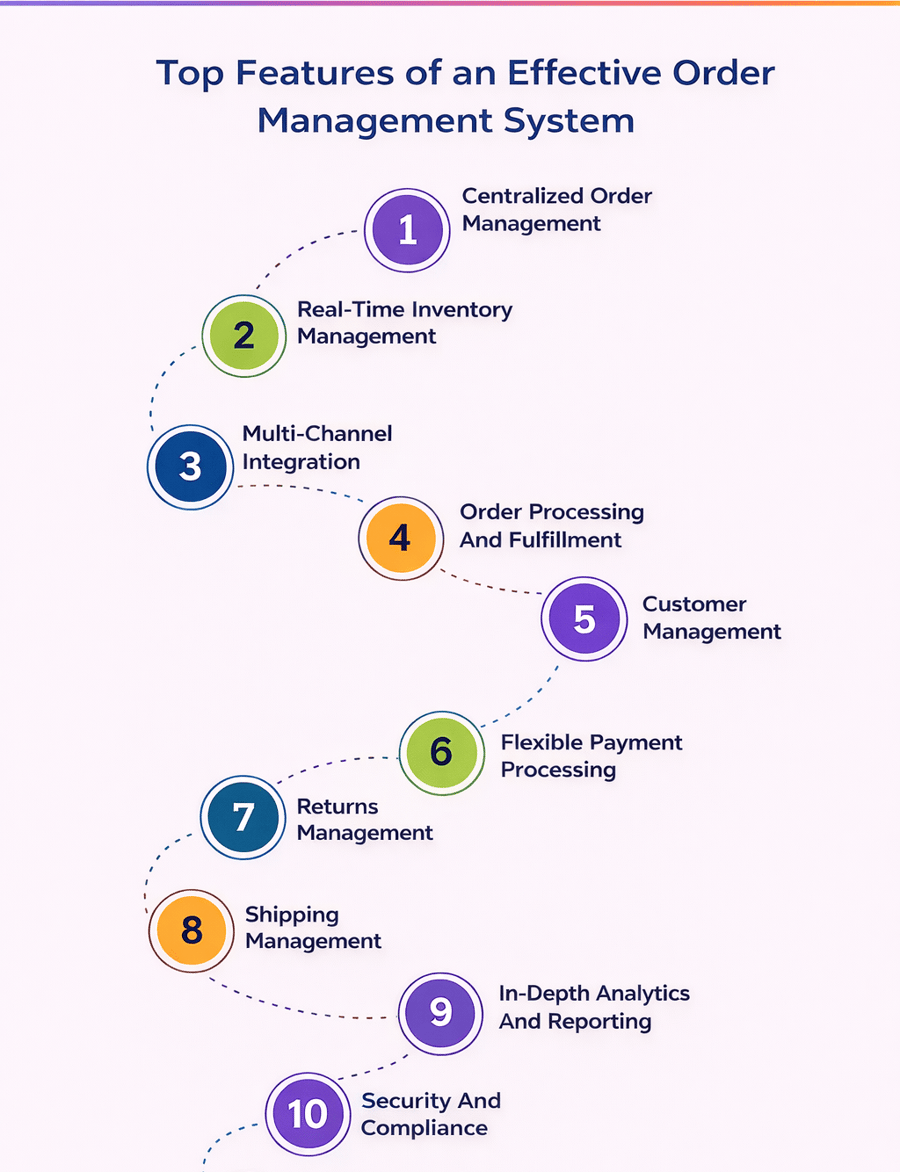
Key Features of Multichannel Order Management Software
The best multichannel order management software keeps orders, stock, and shipping in one flow. Teams move faster when every channel feeds one board. Simple search and filters help staff find any order by customer, SKU, channel, or status in seconds.
Furthermore, a good tool should be fast to set up. It should not take months to go live. Look for one that your team can learn in a few days. The best tools guide you through the key steps and do not leave you on your own once the setup is done.
Stock accuracy and automation
Stock accuracy drives every task that comes after. Strong multichannel inventory management software updates stock across channels in near real time. It also supports safety stock, low-stock alerts, and channel buffers. If you sell kits or bundles, multi-channel inventory management software should track each part correctly.
Automation cuts manual work and costly errors. A reliable multichannel order management system routes orders to the right site and splits shipments when needed. It can also apply hold rules, sync cancels, and push refund updates back to each channel.
Shipping tools and reports
Shipping tools often set basic tools apart from those that can scale. Good multi-channel order management software compares carrier rates, prints labels in bulk, and sends tracking on its own. A strong tool also links to your accounting platform, ERP, and support tools. That full view helps a multichannel order manager track cycle time, fill rate, and back-order trends with ease.
To keep fulfillment accurate as you scale, see how the right inventory management software supports real-time stock data across every channel.
The Role of Stock Control in Multichannel Order Management
Stock control keeps every channel in line. Counts can shift by the minute across stores, markets, and direct sites. Without one live view, teams oversell, split orders incorrectly, and create avoidable cancellations. That is why multichannel order management software depends on clean stock data.
Clean stock data is not a nice-to-have. It is a must. For example, when the count is off by one unit, you risk a bad sale. When it is off by ten, you risk a bad day. Get the counts right, and the rest of the process gets much easier.
How accurate stock data helps daily ops
A central stock record gives teams one number they can trust. It updates after each sale, return, and transfer. Customers see real counts, and staff spend less time fixing errors. Many brands use multichannel inventory management software to keep product data clean and current.
Location-level accuracy also shapes how fast orders ship. Knowing which site has the item means the order goes to the right place the first time. That cuts pick delays, lowers shipping costs, and reduces split orders. Strong multichannel inventory control software also supports safety stock, reorder points, and reserved units.
Also, the link to multi-channel order management software is direct. When an order enters the tool, stock is held right away. If payment fails or an item changes, the tool frees that stock quickly. In this way, a reliable multichannel order management system limits manual edits and stops double-selling.
Reports also get better when the stock stays accurate. Teams spot fast movers, dead stock, and channel demand shifts early. A capable multichannel order manager logs stock changes, which helps during audits and supplier reviews. For a deeper look, see how an inventory management system can improve decisions across every channel.
Benefits of Using a Multichannel Order Manager
A multichannel order manager puts orders, stock, and shipping into one view. Teams spend less time switching tabs and fixing avoidable errors. That saves hours each week and makes daily work more predictable.
In fact, the tool does not slow your team down. It speeds them up. Staff can close more orders per hour. They can spot and fix an issue in a few clicks. That is a big win for any team that ships a lot of orders each day.
Faster flow with a multichannel order manager
Order flow becomes faster and easier to control. Multi-channel order management gives clear routing rules for each sales channel. Staff can pick, pack, and ship with fewer delays. Customers get updates sooner, which cuts support tickets.
Stock data stays more accurate when all channels share one record. Multichannel inventory management software syncs counts across listings and sites. A solid multi-channel inventory software setup also handles bundles and kits with fewer oversells. Early alerts from multichannel inventory control software help buyers restock before counts hit zero.
Margin protection and growth
Multichannel order management software also protects margin in practical ways. Better data means fewer refunds tied to late or wrong orders. Shipping rules cut wasted labels and split orders. Over time, a solid multichannel order management system gives leaders a clearer view of sales trends, channel output, and order issues that need attention.
Growth is also easier as new channels come online. The tool keeps one flow in place instead of creating a new process for each store. To add smarter stock control, read our guide to inventory software for warehouses and warehouse tools.
Common Challenges in Multi-Channel Order Management
Multi-channel order management gets harder as you add more sales channels. Each one sends different order data, service rules, and customer messages. Small breaks in that flow create late orders, stock errors, and extra support work.
The key is to spot the break early. A late alert means a late fix. A late fix means a late order. Eventually, a late order means a lost sale or a bad review. Good tools flag the issue the same day it starts, so your team can act before the customer feels it.
Stock accuracy and order routing
Stock accuracy often slips first. Slow updates can trigger oversells, cancellations, and missed reorder windows. Spreadsheets and manual imports leave too much room for error. Multichannel inventory management software keeps one live count across channels, while control software flags low stock before shelves run dry.
Order routing creates another common problem. When you use multiple sites, stores, and 3PL partners, the right fulfillment choice gets harder to make. The wrong location raises freight costs and slows delivery. A strong multichannel order management system picks the best source based on stock, distance, and shipping method.
Returns and dashboard view
Returns also need attention. Customers may buy in one channel and return in another. Without synced updates, teams can issue double refunds or restock the wrong items. A reliable multi-channel order management system tracks each return step and keeps records clean.
Separate boards make problems harder to catch early. Instead, a unified multichannel order manager shows back-orders, delays, and issues in one place. To go deeper, see how order fulfillment software can cut bottlenecks and speed up shipping.
How Multichannel Inventory Software Supports Orders
Accurate stock data drives fast, reliable fulfillment. Multichannel inventory management software keeps counts current across every sales channel. One shared view helps teams accept orders with confidence and cut oversells, back-orders, and manual stock checks.
Real-time data is the keyword here. In other words, data that is one day old can lead to a bad call. Data that is live gives your team the best chance to act fast and get it right. That is what good stock tools are built to do.
Real-time updates in multichannel inventory software
Multi-channel inventory management software updates stock as soon as a sale happens. It also tracks reserved units tied to open orders. That view stops two buyers from claiming the same item and gives pick teams numbers they can trust.
Multichannel inventory control software also improves routing. Rules can send each order from the nearest site, a store with extra stock, or the lowest-cost location. Those choices shorten delivery windows and protect margin on every shipment.
Handling complex catalogs
Also, complex catalogs need tighter stock control. Multi-channel inventory software can adjust stock for bundles, kits, and variants in real time. When inventory links with multi-channel order management, product data, stock levels, and order records stay aligned across all stores and markets.
Multichannel order management software adds order status, exceptions, and tracking to that stock view. Paired with a multichannel order management system or multichannel order manager, teams spot fast sellers early, plan reorders sooner, and keep customers updated. For more, compare leading sales order software options in our review.
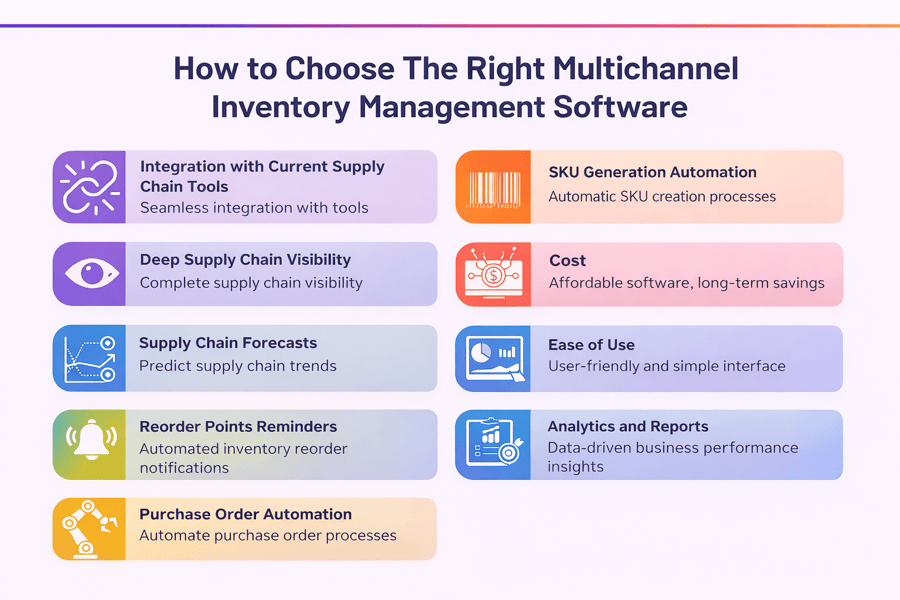
How to Choose the Right System
A good software choice starts with your real order flow. List each sales channel, daily volume, peak volume, and site count. That review shows whether multichannel order management software fits your current needs and near-term growth.
Do not rush the pick. First, take the time to test the tool before you go live. Run it on a small set of orders first. Check that the routes work and the stock counts are right. Then scale up once you feel good about the output.
What matters most when comparing tools
Workflow coverage matters most. A reliable multichannel order management system pulls orders from every channel, routes them fast, and keeps status data current. It should also support returns, cancellations, split orders, and back orders with no extra manual work. For brands with more than one location, strong multi-channel order management depends on routing rules based on stock, speed, and shipping cost.
Stock accuracy protects margin. Real-time updates reduce oversells and help teams trust the numbers. That is where multichannel inventory management and control software earn their value. If your catalog includes kits, bundles, or variants, the tool should track them cleanly across channels.
Usability and connections shape daily output. A capable multichannel order manager gives teams clear boards, fast search, and simple filters. Clean links with stores, markets, shipping tools, and accounting systems cut rework and data errors. Before you decide, compare support terms, onboarding help, and pricing so the platform can grow with you.
Future Trends to Watch
Retail keeps moving faster, and tools need to keep pace. Multichannel order management software is shifting toward faster decision-making, cleaner data, and fewer manual steps across all sales channels.
The tools of today will not be the same in two years. However, the core job will stay the same. You want fast orders, clean stock, and happy customers. Keep that goal in mind as you pick and use your tools going forward.
Smarter automation and real-time stock control
Smarter automation is shaping the next wave. Better multi-channel order management software can route orders based on stock position, delivery promise, and shipping cost. That cuts split orders, shortens delivery windows, and reduces avoidable support tickets.
Real-time stock control is becoming standard. Strong multichannel inventory management software updates count the moment a sale, return, or transfer happens. That gives stores, sites, and markets the same view. As a result, multichannel inventory control software helps reduce oversells and slows the build-up of dead stock.
Analytics and connected workflows
Analytics are also getting more useful. A modern multichannel order management system can show margin by channel, common return reasons, and recurring delivery delays. Those insights support better pricing, listing changes, and fulfillment rules.
Connected workflows are improving, too. A capable multichannel order manager links carriers, ERPs, accounting tools, and service platforms with less friction. This gives teams one place to manage BOPIS, ship-from-store, and back orders with clearer control.
Security and accountability matter more as brands grow. A reliable multi-channel order management system includes role-based access, audit trails, and strong data handling. That foundation helps multichannel order management software scale without losing accuracy.
Conclusion
Selling across channels works best with one clear operating view. Multichannel order management software brings orders, stock, and shipping into the same flow. That structure cuts manual entry, lowers errors, and helps teams respond faster.
A strong multichannel order management system captures every order and routes it correctly. It also sends tracking updates without extra handoffs. Paired with multichannel inventory management software, it keeps stock counts aligned across markets, stores, and sites.
Complex catalogs need tighter control. Brands with bundles, kits, or many SKUs often compare multi-channel inventory management software and multichannel inventory control software based on order volume and site depth. The right fit supports accurate stock data, cleaner restock choices, and fewer oversells.
Day-to-day work matters just as much as system features. For example, a capable multichannel order manager gives one view for address issues, split orders, and back-orders. Teams that need routing rules often choose multi-channel order management software that supports partial fulfillment, multiple sites, and 3PL coordination.
Multichannel order management software delivers the most value when goals stay clear. Track order accuracy, shipping speed, and stockout rates each month. Then refine the rules as sales channels, sites, and customer needs grow.
