
Manual order work has a cost. Someone types the wrong address, a stock count is off, or a shipping note gets skipped. By the time the problem shows up, the order has already left the building. Order automation improves these processes and stops gaps before they turn into refunds. Businesses use order automation to boost efficiency and reduce repetitive work across daily operations.
Order automation gives teams more control over routine tasks while keeping people focused on work that needs judgment and quick decisions. When digital order processing handles the basic steps, staff can spend more time on complex returns, key accounts, or supplier delays.
We cover how order automation works, what it includes, and where it adds the most value. Whether you run an e-commerce shop or a B2B operation, the core ideas apply the same way.
What Is Order Automation?
Order automation uses software to handle the steps between a customer placing an order and the package leaving your door. Instead of staff copying data from one tool to another, the system captures it once and routes it through your processes on its own. Businesses use order automation to boost efficiency and reduce repetitive work across daily operations.
Think of it as a set of rules your business runs on. When an order comes in, the system checks stock, confirms payment, creates a pick list, and sends a confirmation email. Each step then triggers the next one. Your team only steps in when something needs a real decision.
Core parts of order automation and digital order processing
Automated order processing handles routing and task assignment. Orders go to the right team or warehouse without someone moving them by hand. Order entry automation pulls data from carts, emails, or EDI and puts it in the right fields. Meanwhile, sales order automation connects with your CRM and ERP so pricing, taxes, and stock stay in sync.
Together, these tools streamline your entire process. For example, they can flag a bad address before a label prints, block a sale when stock hits zero, and pick the right carrier based on weight and delivery promise. As a result, customers get a confirmation right away, and your team sees fewer complaints about late or wrong orders.
Order automation scales well, too. You can add channels, products, or warehouses without adding the same amount of manual work. To see how a good platform supports this, check our guide to the right order management system for e-commerce.
A good way to think about it: every order your system handles without a human touch is time your staff can spend on something that needs real judgment. That is the shift that matters most.
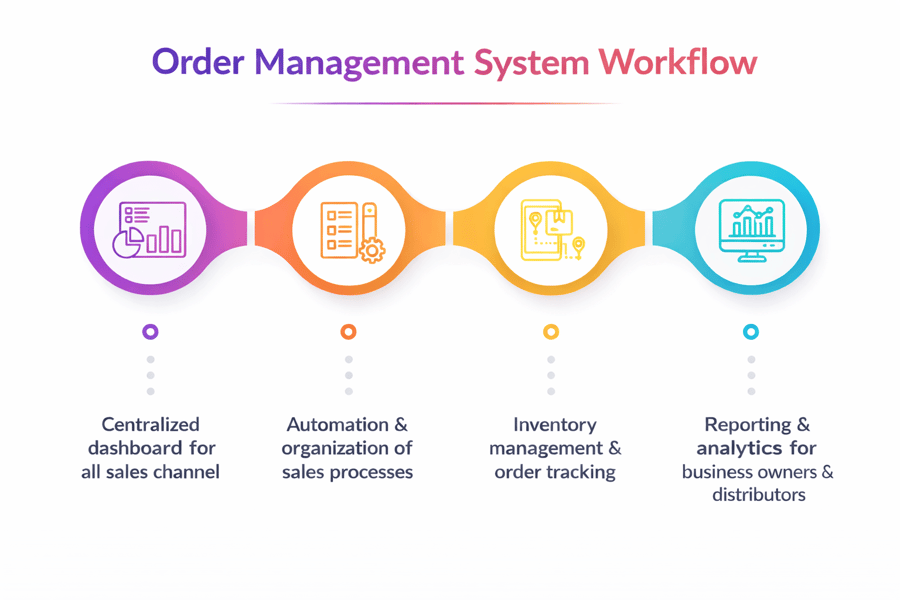
Key Components of a Modern Fulfillment System
A working order automation system is made up of a few key parts. Each one removes friction from your processes, so orders move faster with fewer handoffs.
Order Management System (OMS)
The OMS is the hub. It keeps every order in one place, from entry to delivery. Your team can see status changes, add notes, and pull up order history without switching tools. As a result, when something goes wrong, they know exactly where to look.
Integration with your existing tools
Your system needs to talk to your ERP, CRM, and shipping tools. When it does, sales, finance, and the warehouse all see the same order data at the same time. No one waits for a CSV export or a forwarded email. In addition, workflow automation for sales can trigger quotes, sync customer records, and route approvals without manual steps.
Real-time inventory tracking
Stock levels should update across every channel the moment a sale happens. For example, if an item sells out on your website, it should disappear from your marketplace listing too. This prevents overselling, which is one of the top causes of bad reviews and refund requests.
Automated invoicing
Invoices go out when the order is placed or shipped, depending on your rules. Nobody needs to create them by hand. For B2B accounts, moreover, the system can apply tax rules, payment terms, and customer pricing automatically.
Reporting and analytics
Good reporting shows you where things slow down. You can see order volume by day, pick-and-pack time, return rates, and top-selling items. Over time, this helps you build better smart order workflows by pointing to the steps that need a rule change or an extra check.
Most teams are surprised by what the data shows. A step that feels fast often has a hidden wait time. Exceptions often cluster around one product type that seems simple on the surface. These insights are hard to spot without a proper report pulling from real order data.
- Centralized order management
- Clean ERP and CRM integration
- Live stock updates across all channels
- Automatic invoice creation
- Reports that help you act on real data
When these parts work together, order automation handles more orders with less effort. For platforms that bring all of this together, see our roundup of e-commerce tools for online businesses.
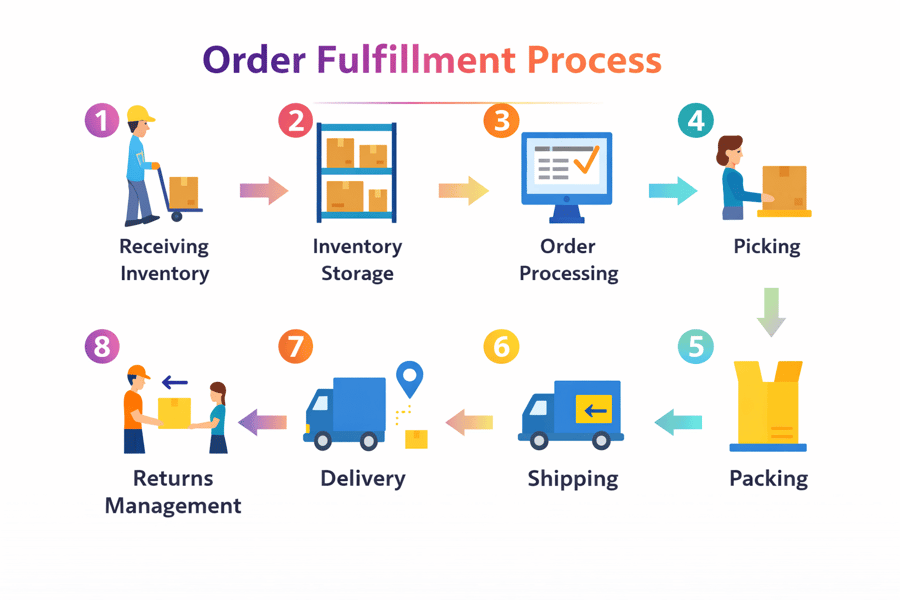
How Sales Order Processing Automation Works
Sales order processing automation starts the moment a customer checks out. The system pulls order details into digital order processing, checks stock levels and pricing, and matches everything against current inventory. When stock runs low, it flags a reorder point. When stock is gone, it blocks the sale before the order is confirmed.
Next, it checks the customer side. It looks at the shipping address, contact info, tax rules, and payment status. A missing apartment number, a failed payment, or a billing mismatch triggers an alert right away. Your team can fix it before it affects picking and shipping. This step also runs basic fraud checks on orders that look unusual.
What happens after an order is approved
Once an order clears, the system updates its status and routes it to the right warehouse or team. With smart order workflows, you can split orders by location, item type, or delivery method. Pick lists are created, packing tasks are triggered, and customers get a confirmation. Internal teams get the same update at the same time.
After the order ships, the system tracks it and shares updates. It logs data for reporting, flags delays, and notes common error patterns. Returns and refunds can also flow back through automated purchase handling, which updates stock and closes the accounting loop without manual steps.
To see how this fits into a broader sales strategy, read our guide on ecommerce automation tools for faster selling.
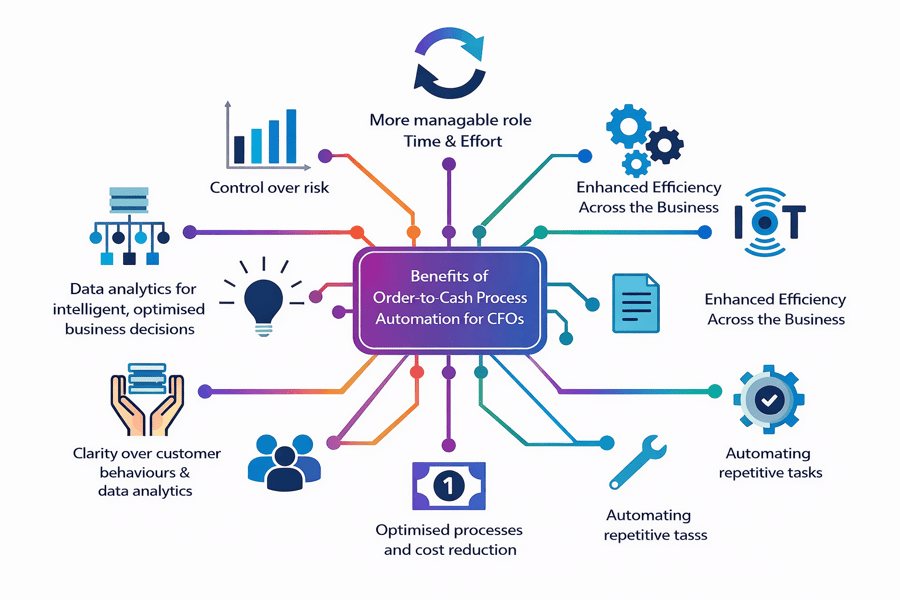
Benefits of Order Automation for Businesses
The case for order automation is simple: it removes the steps that slow you down and make you look bad in front of customers. In practice, here is where the gains show up most.
Fewer errors, fewer returns
When staff type order details by hand, mistakes happen. Wrong SKUs, bad addresses, missing notes. Each one can mean a return, a refund, or a customer complaint. Digital order processing captures the right data at the source and checks it before the order moves forward.
Faster cycle times
Orders that once took hours to process can move in minutes. Smart order workflows route each task to the right person or system without someone manually pushing it forward. As a result, customers get tracking details sooner, and your team answers fewer questions about order status.
Lower cost per order
You process more orders with the same headcount because the system handles the routine work. Automated purchase handling cuts rework and frees your staff for higher-value tasks like support, buying, and quality checks.
Better visibility
You see every order in one place. You can set alerts for low stock, split shipments, or high-risk orders. Instead of reacting when something breaks, you can act before the customer even notices.
Easier scaling at peak times
When peak season hits, the system keeps up. Orders move through the same workflow whether you have 100 or 10,000 in the queue. That consistency is hard to match with manual processes.
- Fewer errors and higher accuracy
- Faster processing from checkout to delivery
- Lower labor cost per order
- Clear alerts and reports for better planning
- Scales without adding proportional headcount
For a look at where this is all heading, read our take on automated fulfillment and the future of order operations.
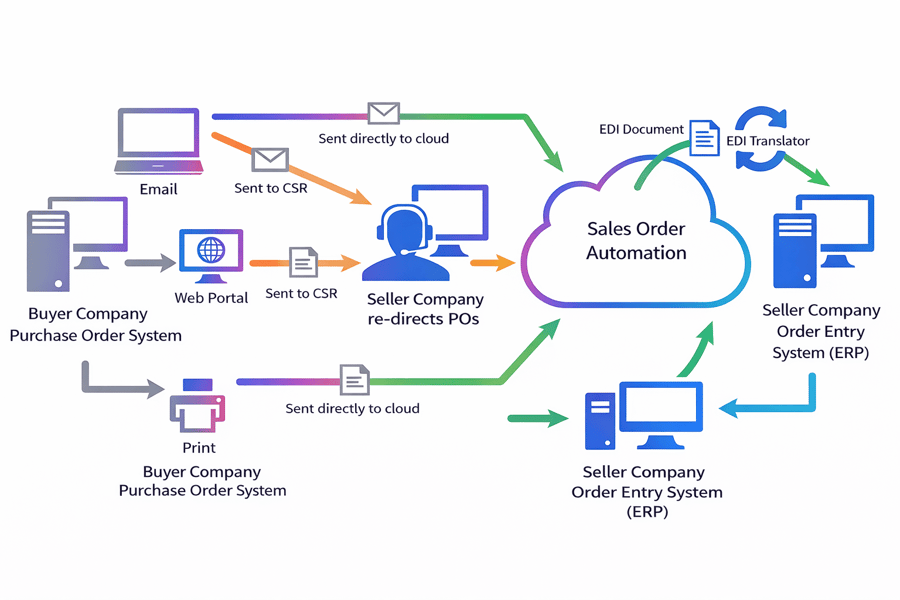
Order Entry Automation: Reducing Manual Work and Errors
Order entry is one of the highest-risk steps in any fulfillment process. It is where bad data enters the system. For instance, a wrong SKU, a skipped discount code, or an address copied from the wrong spreadsheet row can each create big problems downstream.
Order entry automation pulls data from carts, emails, EDI files, and web forms and puts it directly into your system. The data comes in clean and lands in the right fields from the start, with no retyping or copy-paste work. As a result, the risk of bad data entering your workflow drops significantly.
What order entry automation means for your team
Staff spend less time entering data and more time reviewing exceptions. They stop fixing address errors after labels have already been printed and stop chasing missing PO numbers from B2B clients. Instead, the system flags those issues before the order moves forward. Workflow automation for sales also means reps close deals instead of tracking down order status.
- Less manual entry and fewer repeat tasks
- More accurate order data from the start
- Faster processing with fewer back-and-forth steps
- Consistent rules for pricing, tax, and shipping
- Better customer updates because orders move faster
The system also checks as it goes. Duplicate orders, missing fields, and out-of-stock items each get flagged and routed to the right person for a quick fix. That shared view keeps sales, stock, and shipping in sync. Automated purchase handling sends clean orders to the next step with no delays.
For a comparison of tools that support this, see our review of sales order software solutions.
Ecommerce Order Automation: Meeting Modern Customer Demands
Online shoppers have short patience. They want to know their order shipped, expect a tracking number the same day, and look for easy returns. When you cannot deliver that, however, they go somewhere else and often say so publicly.
Order automation helps you meet those expectations without burning out your team. During peak days like Black Friday, the system keeps moving while your staff handles edge cases and quality checks.
How order automation works in ecommerce practice
Real-time stock updates prevent you from selling items you do not have. Low-stock alerts let you reorder before you run out. Digital order processing keeps product data, customer details, and shipping info consistent from checkout to delivery.
Smart order workflows route each order to the best warehouse, pick the right carrier, and create packing slips in seconds. Automated purchase handling flags risky orders, confirms payments fast, and reduces chargebacks. High-value orders get an extra review step, while routine orders move without delays.
When your system links to payment tools and CRM data, customers see confirmations, tracking updates, and delivery notices right away. That communication builds trust, and customers who trust you come back.
To see how order fulfillment software supports this at scale, read our detailed guide.
Keeping Visibility and Control Across Your Workflow
When you cannot see what is happening with your orders, small problems grow into big ones. A shipment sits in a queue without anyone noticing, a payment fails silently, and before long a customer contacts support with no one having a quick answer.
Order management automation puts everything in one view. You see live status on every order, stock level, and shipment. Your team can answer customer questions in real time, not after digging through emails and spreadsheets.
Better control across the whole workflow
Combine order automation with digital order processing, and you get data that flows cleanly from checkout to your ERP, WMS, and shipping tools. This removes rework and prevents mismatched records.
Smart order workflows route orders to the best location, split shipments when needed, and send alerts when something looks off. A payment issue, a stock mismatch, or a delivery delay all get flagged before your customer notices.
- Real-time order status for the whole team
- Better coordination between sales, warehouse, and support
- Automated inventory management tied to live order flow
Add workflow automation for sales, and you can trigger confirmations, invoices, and follow-ups based on order status. Rules handle approvals, returns, and exceptions consistently. Less manual entry means fewer errors over time.
For more ways to expand these gains, see our guide to business automation tools for scaling operations.
Implementation Steps for Order Automation
Before you set anything up, map your current order process end-to-end. Follow an order from the moment it arrives to the moment it ships. Note every step, every tool, every handoff. Then ask: where do errors come from? Where do orders wait longest? Where do staff spend the most time on low-value tasks?
That review tells you where to start. Most teams begin with the step that causes the most rework, such as manual data entry, address errors, or slow approval flows. In many cases, fixing just one of those steps shows results within the first week.
Choosing the right system
Look for a tool that fits your current setup and can grow with you. It should connect to your sales channels, payment tools, and shipping accounts. Check how fast it can handle peak volume. Confirm it supports digital order processing and syncs data cleanly so your team does not fix errors by hand.
Setting up your workflows and rules
Build smart order workflows around how your team actually works. Route high-value orders for approval, flag unusual orders for review, and auto-send tracking details after shipment. Set clear rules for automated purchase handling, such as how to handle backorders, apply discounts, and split shipments.
- Set clear goals: faster processing, fewer refunds, or better stock accuracy
- Include your team so you capture real daily needs
- Roll out in stages, starting with one channel or warehouse
- Train staff so they know what to do when an order needs a review
Test before you go live. Run sample orders that cover normal and edge cases: backorders, partial shipments, returns, and discounts. After launch, track cycle time, error rate, and support tickets. Fix rules quickly when staff flag a step that causes confusion.
Revisit your setup every few months. Products change, suppliers shift, and customer habits evolve. Keeping your order automation tuned to those changes is what makes it useful long-term.
Common Challenges and How to Overcome Them
Team resistance
People worry about learning a new system. Some worry about what automation means for their role. The best response, therefore, is to be direct: explain what will improve for them today, such as fewer manual tasks, fewer angry customer calls, and fewer late-evening order fixes. Ask your team which steps slow them down most and use that input to build the first set of rules. When staff shape the workflow, they support it.
Integration problems
When your automation tool does not connect well with your ERP or CRM, data splits across systems. Staff re-enters the same order in two places, and inventory drifts. To avoid this, list every system that needs to share data before you pick a tool. Map who owns each data field and confirm how digital order processing will sync across all of them. See how other businesses have handled this by checking ERP vs CRM comparisons.
- Explain the benefits with real examples from daily work
- Offer hands-on training and simple guides for common tasks
- Test key workflows before launch
- Start with one channel or product line, then expand
Assign someone to own the system day to day. They handle questions, log bugs, and push updates. Without that person, small issues stack up and staff start working around the tool instead of with it. With order streamlining tools in good hands, the whole team ships faster and complains less.
Conclusion
Order automation is not a one-time project. It is an ongoing part of how you run your business. The companies that get the most from it treat it that way. They test new rules, review their data, and update their workflows as the business changes.
Start with the part of your order process that causes the most pain today. Build one clear workflow around it, measure what changes, then move to the next step. That approach keeps the rollout manageable and shows your team quick wins before the bigger ones arrive.
When digital order processing, smart order workflows, and automated purchase handling all work together, the result is a process that handles growth without adding chaos. Orders move faster, errors go down, and customers get the updates they expect. Your team can then focus on the work that actually takes judgment.
One more thing worth saying: automation does not fix a broken process. If your order flow is unclear today, a new tool will only make the same mess move faster. Take the time to clean up your rules, your data, and your team roles first. Then let the system do the heavy lifting.
The businesses that win on fulfillment are not always the ones with the biggest budgets. They are the ones who run clean, consistent processes and improve them over time. Order automation gives you the foundation to do that at any scale.
