
Sales order software: features, top tools and how to choose
 Fiftify Team
·
· 13 min read
Fiftify Team
·
· 13 min read

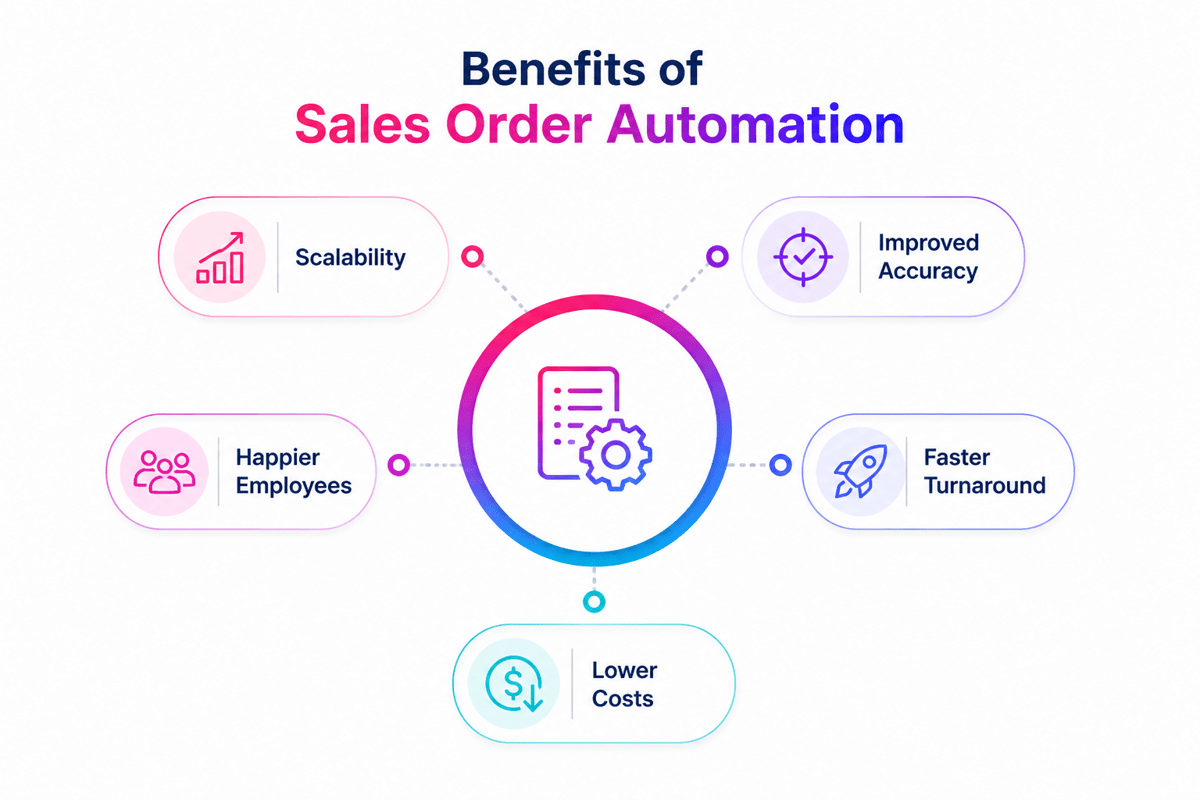
Sales order software keeps orders moving from quote to invoice. It reduces manual data entry and cuts order mistakes. These are key benefits of sales order automation, helping teams ship faster and spend less time fixing avoidable issues.
Many tools claim to be a sales order system. Real differences show up in daily work. Some fit simple order entry and approval steps. Others support full sales order management with contract pricing, multiple warehouses, and large order volumes. Businesses handling high-volume transactions often need process automation and workflow controls to maintain accuracy and speed.
These reviews compare features, pricing, and business fit. You can quickly see where each tool works best. Look for easy setup, clear reports, and support that solves problems fast.
Better order processing
Many organizations process hundreds or thousands of purchase orders every month. Connecting sales orders and purchase orders in one system improves visibility, reduces manual work, and helps teams send orders faster.
Companies that handle high-volume order activity benefit from automated routing, approval workflows, and real-time inventory updates that help send orders more efficiently. Modern sales order management software also improves the customer experience. Faster order processing, accurate delivery information, and fewer fulfillment errors create a better customer experience throughout the buying journey. A positive customer experience often leads to repeat purchases and stronger customer loyalty.
Implementing effective sales order processing software streamlines operations and enhances customer satisfaction. When sales orders, inventory records, and purchase orders work together in one platform, teams gain better control over daily operations with less human intervention. This is especially valuable for businesses managing high-volume sales environments where speed, accuracy, and customer experience directly affect revenue and growth. Orders are processed faster, orders confirmed more quickly, and teams can focus on higher-value work.
Summary
Top Sales Order Software Solutions Reviewed shows how sales order software speeds each order step. Teams spend less time on manual data entry. They also catch fewer pricing, stock, and customer data errors.
Clear dashboards help staff track orders as they move. Reports show delays, backorders, and order volume fast. ERP and CRM links support process automation, reduce rework, and keep sales order data aligned across teams.
Mobile access helps reps check status during calls or site visits. A strong sales order automation software setup also supports approvals and user roles. Managers can enforce pricing rules and discount limits with less effort.
A modern sales order system connects sales, warehouse, and finance teams. That link supports full sales order management and speeds picking, packing, and shipping. Good sales order processing systems also trigger invoices on time. Faster billing helps cash flow and cuts disputes.
Implementing robust sales order processing software streamlines operations and boosts overall efficiency.
Connect Shopify, draw your floor, pick an order - free plan, 7-day full trial, no credit card, no sales call.
What is sales order software?
Sales order software tracks each order from quote to delivery. Teams use it to enter details, confirm prices, and send work to the right staff.
Sales order automation software cuts manual entry and repeat tasks. Fewer keystrokes lead to fewer wrong SKUs and shipping addresses. Real-time status shows stock levels, customer notes, and promised ship dates.
Common features include
-
Automated sales order processing
-
Integration with CRM and inventory systems
-
Real-time order tracking and updates
-
Cloud-based access for flexibility and scalability
A sales order system keeps orders moving with fewer handoffs. Mobile access lets reps check stock and pricing fast. Managers spot bottlenecks early and prevent shipping delays.
Sales order processing systems create a standard path for every order. That helps teams handle more volume without extra confusion. A sales order program also keeps sales and service aligned.
To scale beyond basic processing, see how an order management system supports e-commerce success with inventory sync, fulfillment coordination, and real-time updates.
Modern tools keep order data in one place for quick lookup. Teams can track line items, changes, and approvals without digging through email. Some systems also flag errors before they reach the warehouse. Some systems also support customized orders and help teams manage each customer relationship more effectively.
Implementing sales order processing software enhances accuracy and efficiency throughout the entire order cycle. This also helps in eliminating manual processes, reduces costs, and improves customer service by shortening processing times and supporting a more efficient business process.
Key features to look for in sales order automation software
Pick sales order automation software that fits your daily workflow. Look for speed, accuracy, and clean handoffs. The wrong tool adds clicks, delays, and costly mistakes.
Real-time data access keeps orders, stock, and pricing current. Teams spot backorders before customers do. Fast updates also cut status checks and internal follow-up.
Integration with ERP and CRM systems keeps records aligned across teams. Sales, finance, and ops work from the same numbers. That cuts re-entry, pricing errors, and ship-to mistakes.
User-friendly interface helps new reps learn faster. Clear screens reduce missed fields and wrong quantities. Your team spends less time fixing orders.
Mobile access helps reps work from anywhere. A solid sales order system lets them check stock and submit orders fast. Managers can review changes without delay.
Here’s a quick list of essential features
-
Real-time order tracking and reporting
-
Smooth integration with ERP and CRM tools
-
Simple interface for fast onboarding
-
Mobile-friendly access for on-the-go use
Choose sales order software that matches your process. It should cut manual steps and speed approvals. A good sales order program should also support custom pricing, terms, and approval rules.
Sales order processing systems help teams handle more volume with fewer errors. They flag missing fields, bad addresses, and duplicate entries. Orders move faster, and returns drop.
For more ways to streamline every step from entry to fulfillment, see how order management software can maximize efficiency across your operations.
Strong tools also organize line items and order history in one place. Reps can answer account questions faster. Built in checks catch errors before orders reach the warehouse while supporting customized orders and strengthening the customer relationship.
This approach uses process automation to eliminate manual processes, reduce costs, and improve customer satisfaction. It also speeds up processing times and supports an AI powered business process with better customer service.
Benefits of using a sales order system
A sales order system gives growing teams tighter control. It cuts manual entry and routine admin work. Fewer errors reach customers, warehouses, and finance teams.
Real-time order data keeps work moving. Teams catch stock gaps early and act fast. Customers get clearer ship dates and fewer backorders.
Sales order automation software speeds up daily tasks. It keeps order data consistent across teams. Sales reps spend more time selling and less time fixing mistakes.
Faster invoicing helps cash flow stay steady. Finance teams bill soon after shipment goes out. Clear records cut disputes and short payments.
Here’s how sales order software helps
-
Automates repetitive tasks and reduces errors
-
Gives real-time insights for accurate order tracking
-
Cuts manual work so teams process more orders
-
Speeds up payments with automatic invoicing
Sales order software keeps order handling clean and fast. Teams react quicker when buyers change quantities. Managers spot delays early and fix issues before costs rise.
Sales order processing systems support growth without extra chaos. A strong sales order program keeps service teams aligned. Reps find accurate order details and solve problems faster.
To extend these gains beyond order capture, see how order fulfillment software streamlines picking, packing, and shipping to accelerate delivery times. This also helps in eliminating manual processes, reduces costs, and improves customer service by shortening processing times and creating a more efficient business process that improves customer satisfaction.
Top sales order software solutions compared
The right sales order software cuts entry mistakes and speeds daily work. It also keeps stock counts current across stores and channels. Picking the best fit gets hard when tools look similar.
NetSuite and Zoho serve very different teams. Some companies need deep ERP links. Others want a simple tool with fast setup.
1. NetSuite order management
NetSuite Order Management handles orders from many sales channels in one place. Teams see live order and inventory status. That helps prevent backorders and shipping delays.
Many companies choose it as sales order automation software for complex order flows. It connects with CRM and ERP tools. Managers can set approval rules and route orders by need.
Key features of NetSuite include
-
Real-time tracking of sales and inventory
-
Automated order workflows
-
Seamless integration with CRM and ERP systems
NetSuite fits growing teams that need a flexible sales order system. It handles high order volume well. Setup often takes longer and costs more. Setup often takes longer and costs more, but it supports customized orders and helps build a stronger customer relationship through better data control.
2. Zoho Inventory
Zoho Inventory works well for small teams with limited budgets. The interface stays clear, so staff learn it quickly. Many teams use it as a simple sales order program.
Zoho tracks stock in real time across channels. Reports show slow items and stockouts fast. Support teams answer order questions with less digging.
Key features of Zoho Inventory include
-
Multi-channel sales management
-
Advanced reporting and analytics
-
Real-time inventory tracking
Zoho keeps daily order work simple. It suits teams with basic rules and approvals. Complex pricing needs may push larger teams elsewhere.
3. Salesforce sales cloud
Salesforce Sales Cloud suits teams that need deep customization. It supports long sales cycles and detailed workflows. Many companies connect it with sales order processing systems.
Reps can view customer records and order history together. Managers track pipeline and forecasts in one dashboard. That helps teams follow up at the right time.
Key features of Salesforce sales cloud include
-
Scalable and customizable to fit business growth
-
Built-in CRM functionality
-
Powerful analytics and reporting tools
Salesforce handles large data sets and detailed routing rules. Teams can assign work by region or product. Costs can climb with add-ons and admin work.
4. QuickBooks Commerce
QuickBooks Commerce fits small firms that need orders and books together. It pairs accounting with an order management system. Sales and finance records stay aligned.
The tool cuts manual invoice and stock entry. Fewer typing errors lead to fewer credit memos. Finance teams can close the month faster.
Key features of QuickBooks Commerce include
-
Seamless integration with QuickBooks accounting
-
Automated invoicing for faster cash flow
-
Real-time inventory updates
QuickBooks Commerce keeps payment and order records easy to check. Support staff can find invoice status fast. It works best for simple product catalogs.
5. Cin7 Orderhive
Cin7 Orderhive supports many industries and sales models. It automates routine order tasks and cuts manual entry. Teams spend more time fixing exceptions.
Its inventory tools help with multi-warehouse control. Integrations connect marketplaces and shipping apps. That helps teams ship faster and miss fewer orders.
Key features of Cin7 Orderhive include
-
Advanced inventory management
-
Multi-channel sales order support
-
Seamless integration with third-party platforms
Cin7 Orderhive suits ecommerce and wholesale teams well. It brings multi-channel order control into one view. Setup can take time with many connected tools.
How to choose the right sales order program for your business
Start with the problems that slow orders today. Note where staff retype data or fix mistakes. Then match features to those pain points. A strong sales order program should cut steps and reduce entry errors.
Team size affects what matters most. Small groups often need fast setup and simple pricing. For sellers who run their own warehouse, our SKULabs alternative comparison looks at setup time and plans. Larger groups need sales order software that shares data across teams. They also need clear user roles and approval rules.
Ease of use matters more than long feature lists. Ask vendors to show your real order flow live. Watch how the tool handles edits, discounts, and rush requests. Good screens help staff work faster with less training. Good screens help staff work faster with less training while supporting customized orders and improving the overall customer relationship.
When comparing options, focus on these core factors
-
Integration with existing systems (CRM, ERP, accounting)
-
Pricing that fits your budget
-
An intuitive, easy-to-use dashboard
-
Flexibility to grow with your business
-
Responsive customer support
Reviews can reveal setup time, support speed, and common issues. The right sales order system should fit current work and future growth. Many firms choose sales order automation software to cut manual rework. Strong sales order processing systems also keep order data clean as volume rises.
Use one system of record for every order. Keep pricing, terms, and status in one place. That helps sales and ops stay aligned.
To keep fulfillment accurate as orders grow, pair your system with inventory management software to track stock levels and prevent backorders.
This approach helps in eliminating manual processes, reduces costs, and improves customer satisfaction by shortening processing times and supporting a more efficient, AI powered business process with better customer service.
Implementation tips and best practices
Rolling out new sales order software takes planning and teamwork. Set a clear timeline for each phase. Assign owners for tasks, testing, and approvals. A simple plan keeps work moving and cuts confusion.
Train users with real orders and common exceptions. Run short sessions and record them for new hires. Pick a few power users for daily questions. That support cuts delays during the first weeks.
After launch, track speed, error rates, and rework. Review those numbers each week for one month. Fix one issue at a time and retest. Keep notes so your team follows the same steps.
Strong rollouts share a few habits. Teams set clear goals and track progress. Managers keep updates simple and regular. They also check the system on a set schedule while ensuring it supports customized orders and strengthens the overall customer relationship.
-
Set clear goals and track progress
-
Keep communication open with your team
-
Schedule updates and regular system checks
Plan for a ramp-up when you move to sales order automation software. Keep the old process ready for rare edge cases. Align the tool with your sales order system to keep order entry consistent. A solid sales order program should also support higher order volume.
To extend these gains beyond order handling, see how Ecommerce Automation Tools can streamline marketing, inventory, and checkout to boost revenue.
Conclusion: streamline your sales process with the right sales order software
The right sales order software keeps orders moving without delays. It cuts rework and stops common entry mistakes. Teams spend less time fixing issues and more time closing deals.
A dependable sales order system shows order status in real time. Clear reports help managers spot slow steps fast. Shared data keeps sales, finance, and shipping on the same page.
Choose sales order automation software that fits your current process. Pick a sales order program your team can learn fast. Strong approval rules keep pricing, discounts, and terms consistent. Good support helps when order volume jumps or tools change.
The best tools also connect with inventory and billing systems. That link helps teams avoid stock errors and invoice delays. Many buyers also compare sales order processing systems before they decide.
To explore more benefits, learn how businesses are improving workflows through order automation.
 Google AI
  OpenAI ChatGPT
 Frequently Asked Questions
How does sales order software help streamline operations?
Sales order software automates the entire order process—from order creation to fulfillment. It reduces manual tasks, speeds up order processing, improves accuracy, and provides real-time inventory and sales tracking for better decision-making.
What security measures protect sensitive sales data?
Most sales order systems use encryption, secure cloud storage, access controls, and regular backups to safeguard sensitive data. Businesses should also ensure the software complies with relevant data protection regulations.
Can the software handle multiple sales channels?
Yes, many sales order automation software solutions are designed to support multi-channel sales. They can sync orders from platforms like Shopify, Amazon, and eBay, helping businesses manage everything in one place.
Can you create a sales order within Healthtec software?
Healthtec software allows users to create and manage sales orders, depending on the version and modules installed. Check your software documentation or contact support to confirm availability and functionality.
How to see who generated a sales order in Peachtree software?
In Peachtree (now Sage 50), you can track user activity through audit trails or specific report settings. This helps identify which user created a particular sales order.
Should document software include a sales order number?
Yes, documenting a unique sales order number is a best practice. It ensures proper tracking, helps with auditing, and simplifies communication between departments and customers.
What software does Trunk Club use to track sales orders?
While specific details may not be publicly available, Trunk Club, as a Nordstrom company, likely uses a custom-built or enterprise-level sales order system integrated with their supply chain and CRM platforms.
Sync inventory in real time, manage orders, and run warehouse operations across Amazon, eBay, Etsy, Shopify, and other sales channels. From barcode scanning to organized storage and faster fulfillment, Fiftify helps reduce errors, prevent overselling, and support business growth. Explore our articles for insights on warehouse management, inventory control, and multichannel operations.
You may also like

How to choose an ecommerce marketplace service provider for scalable growth
Learn how an ecommerce marketplace service provider helps businesses launch, manage, and scale a profitable ecommerce marketplace. Platform choices, vendor operations, software tools, management services, costs, and practical selection tips.

Ecommerce software solutions: features, costs and how to choose
Learn how to evaluate ecommerce software solutions for online stores, marketplaces, and retail teams. Essential features, vendor comparisons, implementation tips, and practical ways to choose software that supports growth, operations, and customer experience.

Multi-carrier shipping software: features and how to compare options
How multi carrier shipping software compares rates, prints labels, tracks orders and handles returns, and which features to check before you choose one for your store.