
Amazon product title guidelines: character limits, format and mistakes
 Emily Carter
·
· 15 min read
Emily Carter
·
· 15 min read
Your product title is the first thing a buyer reads on Amazon. A clear title helps buyers find your item and click. That is why Amazon product title guidelines matter so much for any seller.
Amazon sets strict rules for titles. These rules protect buyers and keep search results clean. When you follow them, your listing ranks higher. When you ignore them, Amazon may block your listing.
In this guide, you will learn the full set of Amazon guidelines for 2025. You will see good and bad title cases, tips by product type, and steps to fix usual mistakes. For a wider view of how listings work, see also Amazon listing tools.
Connect Shopify, draw your floor, pick an order - free plan, 7-day full trial, no credit card, no sales call.
How to structure an Amazon product title
A well-built title follows a clear pattern. Most skilled sellers use the same basic form for their Amazon guidelines compliance:
Brand + Item Type + Key Feature + Size/Color/Quantity + Fit (if right)
For case: ‘AquaPure Stainless Steel Water Bottle, 32 oz, Leak-Proof, for Gym and Hiking.’
This form puts the most keywords first. Buyers see the brand and product type before all else. Also, the key feature and size help buyers decide fast whether the item fits their needs.
Keyword placement in Amazon product title guidelines
Put your main keyword early in the title. Amazon gives more weight to words at the start of a title when matching search queries. So if a buyer searches for ‘leak-proof water bottle,’ your title should include those words near the front.
Also, do not repeat the same keyword more than once. Keyword stuffing looks bad to buyers and does not lift rank. Furthermore, Amazon may flag listings that repeat the same phrase more than once. One well-placed keyword beats three repeats.
Long-tail keywords also play a role. A long-tail phrase like ‘non-stick ceramic pan for induction stovetop’ is clearer than just ‘pan.’ These longer phrases tend to have fewer rivals and attract buyers who are close to a buy. So adding one long-tail keyword to your title can lift both rank and result rate.
Semantic words: potential buyers, product categories, products on Amazon
Good titles speak to target buyers directly. Think about the words your target buyer would type into the search bar. Then match those words in your title.
Also, think about how your item sits within its product types on Amazon. Each type has its own buyer language. A title that works in Electronics may not work in Baby Items. Research top sellers in your type and study their title patterns.
When you look at other products on Amazon in your niche, you learn what terms work well. That research shapes your own title choices. To learn more about how sellers use listing tools, see also how to look up Amazon sellers.
Amazon product title guidelines by product type
Amazon has type-clear rules that go beyond the general guidelines. These rules reflect the unique needs of each product type and its buyers.
Electronics and tech products
Electronics titles need to include fit and tech specs. Buyers in this type search with clear terms like model count, voltage, or port type. For case: ‘USB-C Charging Cable, 6 ft, Compatible with iPhone 15 and Samsung Galaxy S24.’
Also, include the brand name first. Amazon buyers of electronics tend to search by brand. So, placing the brand early helps your listing match those searches.
Clothing, shoes, and accessories
For apparel, titles should follow this pattern: Brand + Dept + Item Type + Material + Size/Color. For case: ‘Nike Men’s Running Shorts, Dri-FIT, 7-Inch, Black.’
Furthermore, size and color belong in the title for clothing. Buyers filter by these, and having them in the title lifts click-through rates. Do not use decorative symbols or sales words in apparel titles.
Home and kitchen products
Home and kitchen titles benefit from clear use cases. Buyers tend to search for an item that solves a clear problem. For case: ‘Non-Stick Ceramic Frying Pan, 10 Inch, Oven Safe to 500F, PFOA-Free.’
Also, include the material and size. These details help buyers compare products on Amazon and make a confident choice. They also cut returns from buyers who expected a varied size or material.
Toys and games
Toys and games titles should include the brand, item name, and age range. For case: ‘LEGO City Police Station Building Set, Ages 7 and Up, 668 Pieces.’ Age range is key as parents filter by this detail. Also, include the piece count or count of items when right.
For multi-variant toys, each variant should have its own title with a clear color, size, or theme. Never try to list all variants in a single title. Amazon product title guidelines need each ASIN to have a unique and clean title.
Books and media
Books follow a plain form: Title + Subtitle (if any) + Author. Do not add extra keywords to book titles. Amazon guidelines for books are strict about matching the actual posted title.
For more on managing an item list that includes books, see free bookstore inventory software as a starting point.
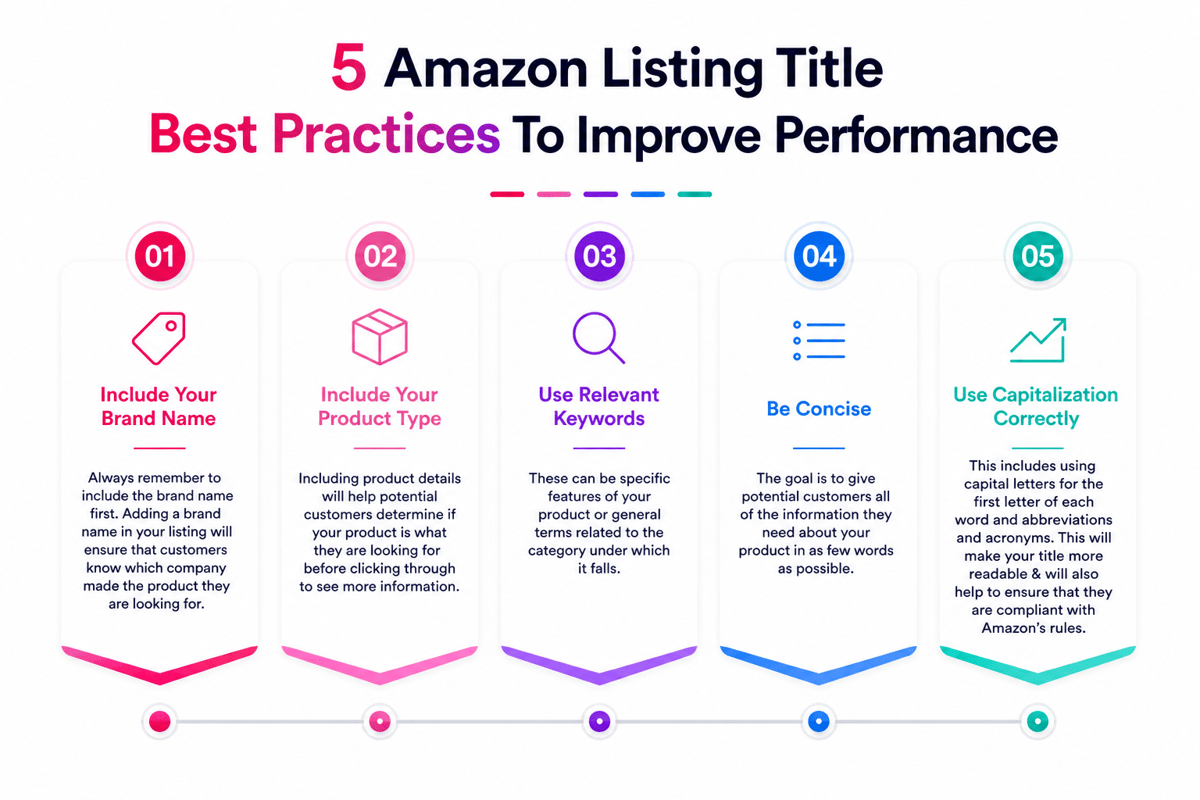
Common Amazon product title mistakes to avoid
Even skilled sellers make title errors. These mistakes cost views and sales. So, checking your titles against guidelines is a smart habit.
Overloading the title with keywords
Keyword stuffing is one of the most common errors. Sellers try to rank for every possible search term by cramming them all into the title. The result is a title that reads like a word list, not a item text.
For example, a bad title might look like: ‘Water Bottle BPA Free Stainless Steel Insulated Vacuum Flask Thermos Sports Gym Hiking.’ This title has many keywords but tells the buyer nothing clear. A better version: ‘BPA-Free Insulated Water Bottle, 32 oz, Stainless Steel, for Gym and Hiking.’
Missing key information
Some sellers write titles that are too short. They miss the brand, size, or key feature that target buyers need to decide. A title like ‘Water Bottle’ gives buyers nothing to work with.
Also, missing the brand name is a usual error. Buyers tend to search by brand, above all for repeat buys. The brand at the start of the title captures those searches and builds brand trust on the site.
Using blocked content
Many sellers do not know the full list of blocked content. They include phrases like ‘Best Value,’ ‘Fast Delivery,’ or ‘Guaranteed Results.’ These violate Amazon guidelines and can trigger a block.
Furthermore, using a rival’s brand name in your title is also not allowed. It misleads buyers and may result in a policy warning. Always tell your own item, not what it replaces or competes with.
Ignoring mobile buyers
Most Amazon searches now happen on mobile devices. On a phone, only the first 70 to 80 characters of a title show in search results. If your most key data appears after character 80, most mobile target buyers will never see it.
So structure your title with mobile in mind. Put the brand, product type, and top feature in the first 70 chars. The rest of the title can hold extra details. That way, your listing works well on both desktop and mobile.
When you list like items, check that each ASIN has a unique title. Double or near-identical titles confuse both buyers and Amazon’s search system. They may also cut the rank of all affected listings. So treat each item as its own title challenge. Each ASIN needs its own unique title.
For the latest requirements and restricted content rules, review the official Amazon Product Title Requirements before updating your listings.
How to optimize Amazon product titles for search and conversion
Following guidelines is the first step. Optimizing for search engines and results is the next. These two goals work as one when you build titles with the buyer in mind.
Research before you write for the Amazon guidelines
Start by searching for your item on Amazon. Look at the top three listings in your product type. Study how they structure their titles, which words they use, and how long they are. These titles have proven results — so they are your best guide.
Also, use a keyword tool to find the search terms that target buyers tend to use most. Include your top two or three keywords in the title. Place the most important keyword first. The rest can go in bullet points and the item text.
Also, look at what search engines show for your main keyword. If Google shows product pages with some title formats, those formats tend to work on Amazon, too. Search engines can reveal what title patterns get the most clicks. Use that data when you write your next title.
Using backend keywords alongside titles
Amazon gives every listing backend keyword fields. These do not show to buyers. But they affect search rank. So you do not need to fit every keyword into the title. Use the title for the most valuable two or three search terms. Put the rest in the backend fields.
This approach follows Amazon product title guidelines and keeps the title clean and buyer-friendly. A short, clear title with strong backend keywords tends to beat a long, stuffed title with no backend terms. In practice, the mix of a clean title and full backend fields gives you the best of both worlds.
One more tip: do not add made-up words or brand names you do not own. Each word in the title must match the real item. Also, avoid terms like best or top. These violate Amazon guidelines and may lead to a block.
A/B testing your guidelines compliance
Amazon lets sellers test varied title versions through A/B testing in Seller Central. This tool shows which title gets more clicks and results. So after you set a within-rules title, you can test small changes to lift results.
For example, test whether adding a color or size earlier in the title lifts click-through. Or test whether a varied brand spot changes results. Small changes tend to make clear gains over time. See marketing automation for small businesses for tools that help you test and track these changes.
Keeping titles current with Amazon guidelines
Amazon product types and buyer search behavior change over time. Check your titles at least twice a year. Check if new keywords have become popular in your type. Also, check that your title still follows the latest Amazon guidelines, as Amazon syncs them.
In practice, setting a calendar reminder to check titles every six months stops slow rank decay. Old titles that miss live search terms lose ground to rivals who sync their listings often.
When in doubt, keep the title short and clear. Include the most important information in the title, such as the brand, product type, and key feature. A plain title that covers these details tends to win over a long one packed with extra words. In fact, many brand owners review titles regularly to improve visibility and manage all inventory more effectively.
Amazon product title guidelines: quick reference checklist
Use this list to check any title before posting. If your title passes all points, it follows guidelines and is ready to go live.
- The title is under the Amazon character limit for your type.
- Uses title case: first letter of each main word is capped.
- Starts with the brand name.
- Includes the main keyword near the start.
- Has product type, key feature, and size or color if right.
- Has no sales phrases, vague claims, or price data.
- Has no HTML, special marks, or decorative symbols.
- Does not repeat keywords more than once.
- Does not include a rival brand name.
- Reads naturally as an item text, not a keyword list.
A second test is to show the title to someone who does not know the item. If they can tell what it is and who it is for, the title works. If they look confused, revise it.
Also, run a quick test: read the title out loud. If it sounds natural and tells the item clearly, it is on track. If it sounds forced or confusing, revise it.
Conclusion
One final tip: sync your titles when Amazon releases new rules. This happens a few times a year. A brief check each quarter keeps your listings clean and within the latest guidelines.
Amazon product title guidelines exist to protect buyers and keep the site trustworthy. When you follow them, your listings rank better, turn more clicks, and stay active with no block risk.
The key is to write for buyers first and search engines second. A title that clearly tells your item, includes the right keywords, and follows Amazon’s format rules will serve both goals at once. In short, the best title is both within the rules and compelling.
Start by checking your live titles against the list above. Fix any breaches. Then look at the top performers in your product types for ideas on how to lift your structure and keyword spot.
Over time, keep a log of your title changes and the rank or result shifts that follow. This log becomes a guide for your whole catalog. It helps you write stronger titles faster as you add new products on Amazon.
As you grow your Amazon presence, keep titles as a set part of your listing work. They are small details that make large results over time. For a full view of your Amazon listing plan, explore Amazon listing tools and broader inventory management solutions.
 Google AI
  OpenAI ChatGPT
 Frequently Asked Questions
What happens if my product title exceeds 200 characters?
If your title goes over the character limit, Amazon may suppress or remove your listing until the issue is corrected. This can reduce visibility and hurt sales.
Can I use special characters in Amazon titles?
No. Special characters, symbols, and emojis are not allowed unless they are part of your registered brand name. Using them can lead to listing suppression.
How can I reduce title length without losing important details?
Focus on essential information like brand name, product type, key features, and size or quantity. Remove unnecessary words and avoid repetition to stay concise.
What are Amazon’s product title guidelines in 2025?
Amazon’s updated guidelines recommend:
-
Keeping titles under 200 characters (check category-specific limits)
-
Using Title Case (capitalize the first letter of each word)
-
Avoiding promotional terms like “Best Seller” or “Free Shipping”
-
Including relevant keywords and clear product information
-
Avoiding all caps (except for brand names and acronyms)
Why is following Amazon’s title guidelines important?
Complying with the guidelines keeps your listings active and visible in search results. It also improves buyer trust and ensures your listings meet Amazon’s quality standards.
Can I use all capital letters in my product title?
No. Amazon discourages the use of all capital letters. Use Title Case instead, unless you’re writing a brand name or acronym.
Should I include symbols or emojis in product titles?
No. Symbols, emojis, and decorative characters are prohibited. They may result in poor user experience and listing suppression.
What should be included in a compliant Amazon product title?
A compliant title should include:
-
Brand name
-
Product type
-
Key features (such as size, color, quantity)
-
Relevant keywords that match customer search behavior
Avoid promotional claims or unrelated terms.
How long should my Amazon product title be?
Amazon recommends keeping titles between 80 and 200 characters. For mobile-friendly display, it’s best to aim for 120 characters or fewer.
Can I include terms like “best seller” or “free shipping”?
No. Amazon prohibits the use of subjective or promotional language in titles. These phrases violate listing policies and can result in suppression.
How often should I update my product titles?
Update titles only when necessary—such as during policy changes or SEO updates. Avoid frequent edits, as they may impact indexing or confuse returning customers.
Do title mistakes affect sales performance?
Yes. Non-compliant titles can result in reduced visibility, suppressed listings, and lower conversion rates. Proper formatting helps maintain traffic and trust.
How strict is Amazon about the title character limit?
Amazon enforces the 200-character limit strictly, with some categories having even lower limits. Always check your category-specific requirements to stay compliant and avoid suppression.
How long does it take for Amazon product title changes to take effect?
Most title updates appear within a few hours, but in some cases, it can take up to 14 days for the changes to reflect across all listings and search results. Factors such as category review, listing history, and backend indexing speed can influence the timeline. It’s important to monitor your listing during this period to ensure updates are applied correctly.
I am an eCommerce expert with a strong focus on marketplaces like Amazon, eBay, and Etsy. Over the past decade, I have helped both startups and $1M+ revenue brands scale their sales through listing optimization, marketplace SEO, and AI-driven strategies. I also share articles and insights about eCommerce growth, marketplace operations, and multichannel selling.
You may also like

eBay stock management software: prevent overselling across channels
Choosing the right eBay stock management software helps sellers effortlessly avoid overselling, sync multi-channel listings in real time and improve order accuracy. Discover the essential integration features and practical tips to scale your business.
Starting an online business on Amazon or eBay: pros and challenges
Starting an online business on Amazon or eBay. Compare pros and cons, and learn tips to pick the right platform for your e-commerce journey.

Ecommerce marketplace management: channel mix, listings and operations
Ecommerce marketplace management helps brands centralize listings, inventory, pricing, orders, and advertising across major channels. This guide explains online marketplace management workflows, tools, and KPIs to reduce errors, protect margins, and scale revenue.