
ERP Warehouse Management System: Benefits, Features, and When to Upgrade
 Emily Carter
·
· 16 min read
Emily Carter
·
· 16 min read

A wrong bin, a missed scan, a late update… Each one can cause a lost sale or a short order. These are not rare events. They grow more frequent as volume climbs. An ERP warehouse management system ties warehouse work to your sales, finance, and buy data. That gives every team one clear view of stock and orders.
The real strain is not floor space. It is manual work, split tools, and slow data. Each one costs time and cash. When sheets and habits start to break down, an ERP warehouse management system moves from nice-to-have to need-to-have.
What Is an ERP Warehouse Management System?
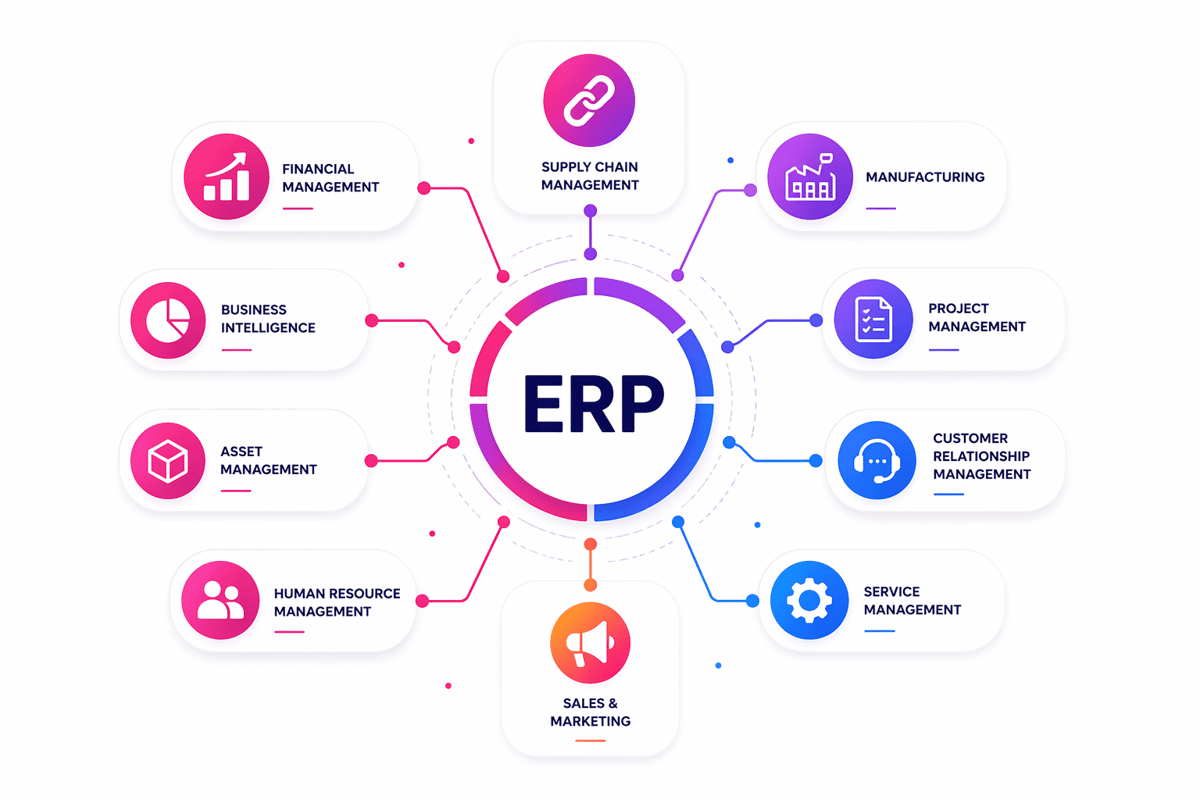
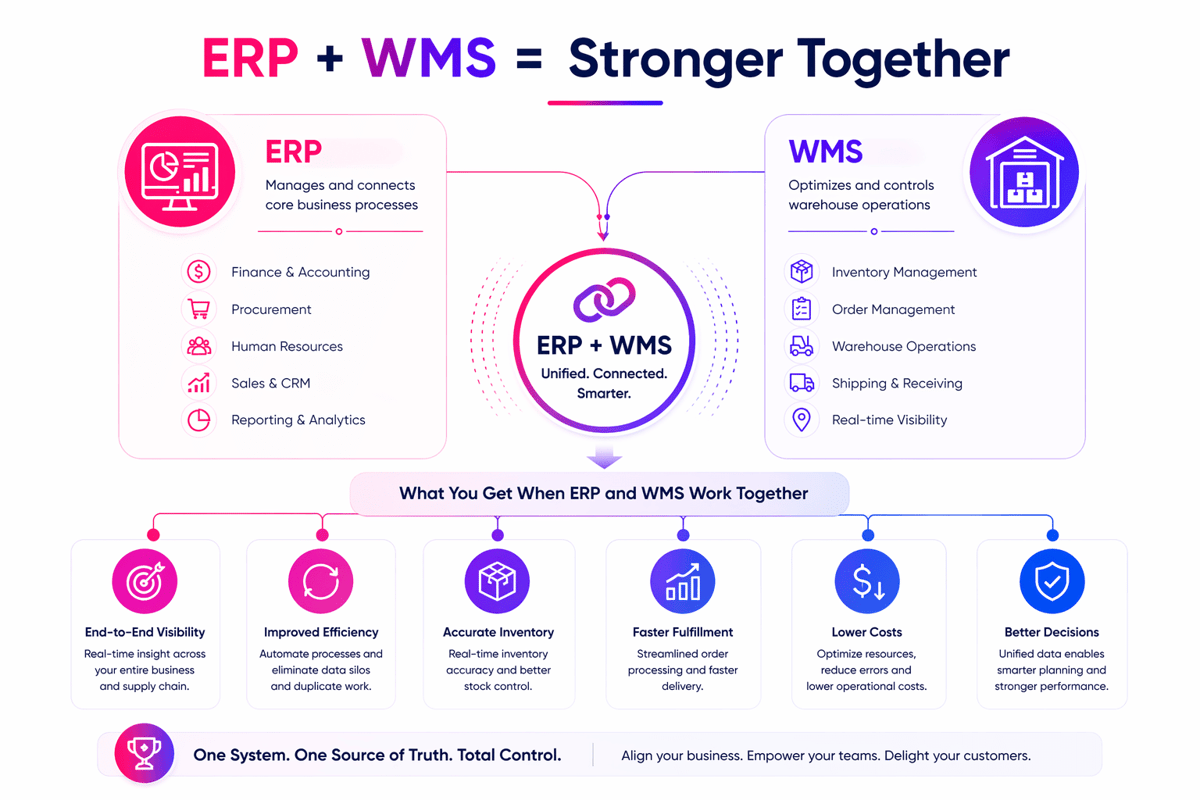
An ERP warehouse management system links your floor work to your core data. It ties stock, buy orders, sales, shipping, and finance in one place. As a result, your team works from one clean record instead of many tools.
It goes deeper than a basic stock tool. An ERP warehouse management system tracks each receipt, putaway, pick, transfer, count, and ship as it happens. That live flow means less manual work and fewer gaps between teams.
How it works day to day
An ERP warehouse system logs each move against live data. When goods come in, stock and bin details update at once. When a picker clears an order, stock changes across sales and plan views, too.
In practice, warehouse ERP software runs barcodes, bin spots, lot tracking, and cycle counts. For example, one scan can update a bin record, a lot log, and a ship note all at once. That cuts workarounds and stock errors.
Per Gartner WMS reviews, real-time view and ERP link are the top two reasons teams pick their tool. That tracks with what most ops teams say once they drop the sheets.
What makes ERP warehouse management software different
A standard ERP stock module tracks counts and costs well. But it gives less control over floor work. An ERP warehouse management system adds the rules, tasks, and bin details you need for fast, clean fulfillment.
That gap shows up when a firm asks when do you need a WMS. More SKUs, more staff, more bins, and tighter ship times push a basic warehouse ERP past its limits. For growing firms, it is the next step past simple inventory software for a warehouse.
How Warehouse ERP Improves Stock Accuracy and Order Fill
An ERP warehouse management system links stock records, floor work, and order data in one flow. That cuts manual updates and closes the gaps that cause errors. Teams see what came in, what moved, and what went out in real time.
Most accuracy problems start when receipts, picks, and moves live in split tools. That split is the root cause. A solid warehouse ERP fixes that with one shared data trail. As a result, there are fewer double entries, fewer lost items, and faster count checks.
Real-time stock control
Live scans change accuracy at the source. When staff scan during receipt, put, pick, and pack, each move logs at once. No step is lost. An ERP warehouse management system keeps on-hand counts tight because fewer steps rely on memory or paper.
Bin control also matters. A solid ERP warehouse system tracks where each pallet, case, or unit sits. That cuts search time and lowers the risk of picking from the wrong spot.
Cycle counts get easier when the tool stores live counts by bin. Leads can count high-value or fast stock more often with no floor shutdown. Over time, that steady count rhythm helps warehouse management ERP teams catch issues before they hit buyers.
Faster and more accurate order fulfillment
Order fill gets better when floor tasks run on the same data as sales and buy orders. An ERP warehouse management system can send picks based on real stock, not old counts. That cuts backorders from records that looked right but were wrong.
Pick accuracy goes up when the tool guides staff to the right bin and count. Pack also moves fast because order data, item facts, and ship status stay in sync. With the right ERP warehouse management software, teams spend less time fixing shortages and shipping errors.
Speed matters. But as volume grows, consistency matters more. A linked warehouse ERP software runs wave picks, priority rules, and ship checks with no extra sheets. For more on this, see our guide to warehouse management.
Connect Shopify, draw your floor, pick an order - free plan, 7-day full trial, no credit card, no sales call.
Key Features of ERP Warehouse Management Software
The right ERP warehouse management system gives teams speed, control, and clean data. It should link stock, orders, labor, and shipping in one flow. That link matters most when volume climbs, and manual work slows the floor.
Core features of ERP warehouse management software
Live stock tracking sits at the core of any solid ERP warehouse system. Barcode scans, lot control, serial tracking, and bin spots cut count errors. Those tools help teams find stock fast and ship the right item.
Order tools shape how well the system handles daily demand. Good warehouse management ERP software runs wave picks, batch picks, pack rules, and ship checks. These cut walk time and rework at the pack bench.
Receipt and putaway tools deserve a close look. The best warehouse ERP software logs receipts fast and sends goods to the right spot. That stops overflow in busy zones and keeps high-turn items close to pack.
Visibility and control in ERP WMS software
Reports should go beyond static exports. A strong ERP WMS software setup shows live views of stock moves, backorders, fill rates, and labor output. Fast access to those facts helps spot jams before service drops.
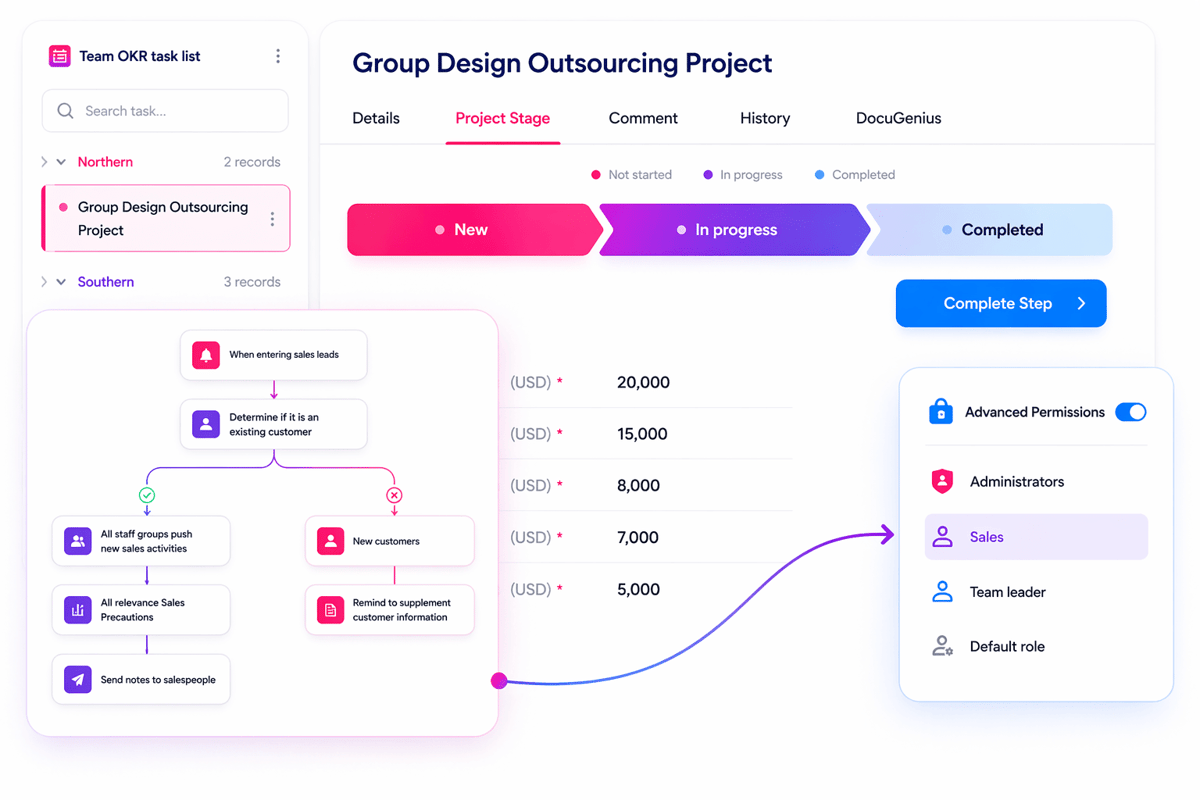
Workflow rules also matter as ops grow complex. An effective ERP warehouse management system supports user rights, audit trails, and exception flags. Those features protect data and make process issues easier to trace.
Scale often answers when you need a WMS. Growth brings more SKUs, more bins, and tighter dates. At that stage, an ERP warehouse management system should run multi-site ops and fit your warehouse management strategies.
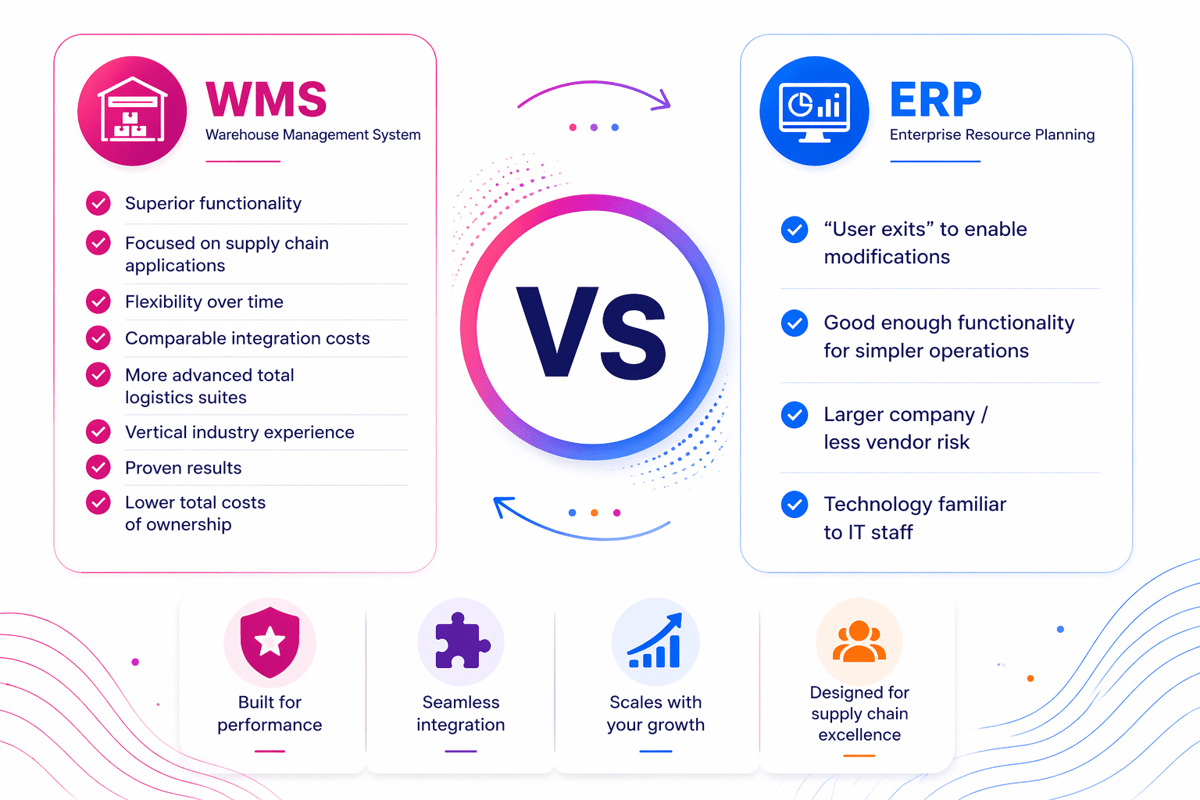
ERP Warehouse System vs Standalone WMS
An ERP warehouse management system runs core floor tasks within one business tool. It works well when the stock flow is steady, the order rules are simple, and the staff can manage work with basic picks and receipts.
A standalone WMS goes deeper. It runs directed putaway, wave picks, slot rules, labor tracking, and live floor control. Per SAP’s WMS guide, the key gap is execution depth: a standalone WMS acts on the floor in real time, while an ERP module records what happened. That gap matters when a growing firm starts to outpace a basic ERP warehouse system.
Where warehouse ERP handles the job well
A solid warehouse ERP fits firms with one site, a few SKU types, and simple fill rules. In that case, built-in tools can keep stock clean and link orders, buy, and finance with no extra layers.
Many teams start here because all data stays in one place. An ERP warehouse management system also eliminates double-entry and gives leads a clear view of stock, sales orders, and restock needs. If basic bin tracking and barcode scans cover daily work, full ERP warehouse management software may be enough for now.
Signs you have outgrown basic warehouse ERP tools
The need for a WMS grows clear when errors rise with volume. Missed picks, late shipments, crowded aisles, and slow receipts often point to limits in basic warehouse management ERP tools.
Multi-site ops add fast pressure. So do lot controls, serial tracking, kit builds, cross-dock, and buyer-specific pack rules. In these cases, deeper ERP WMS software gives supervisors tighter control over each floor move.
If the team often asks when you need a WMS, the answer shows up in daily friction. Staff may rely on sheets, tribal knowledge, or manual fixes because the current warehouse ERP software cannot direct work in real time. At that point, the site often needs something that acts like an automated warehouse control system.
Top Benefits of Warehouse Management ERP
Growth puts pressure on every floor process. More orders, more stock, and more sites expose gaps that sheets and manual checks cannot handle. A strong ERP warehouse management system brings those parts into one flow. Teams stop managing exceptions and start preventing them.
Lower costs and better daily control
A growing firm often feels rising costs before it sees the cause. Pick errors, rush shipments, and excess stock drain margin quietly. An ERP warehouse management system surfaces those issues early, before they become the norm.
Livestock records cut double buys and rush transfers. Barcode scans cut manual entry and the errors that follow. A well-fit warehouse ERP also cuts cycle count time, which saves labor hours each month.
Space use gets better when the tool tracks item moves and slot patterns. Fast-turn items stay close to the pack. Slow stock gets easy to spot and clear before it ties up cash.
Stronger service as volume increases
Buyers want correct dates, full orders, and fast answers when issues hit. A solid ERP warehouse management system supports that with tighter links across sales, buy, and fill teams.
Order processing speeds up when the floor data updates the ERP live. Teams can promise stock with more confidence. That makes ERP warehouse management software key for firms that ship more lines per order or serve more channels.
Leads also gain better views of labor and output. They can check pick rates, backlog levels, and ship delays before service drops. For many firms, that is when ERP WMS software shifts from useful to vital. The strongest results come from linking it with order management software.
Real-Time Visibility With Warehouse ERP Software
Warehouse ERP software links stock, orders, receipts, and shipping data in one flow. Teams see live stock counts, not batch updates from two hours ago. That speed matters when demand shifts fast, or a supplier is late.
An ERP warehouse management system logs each scan, move, and step as work happens. Leads can spot short picks, slow putaway, or low stock before those issues spread. Finance and ops also work from the same numbers, which cuts report conflicts.
Live data across warehouse activity
Live views start on the floor. Scans, mobile devices, and rules update the warehouse ERP as items move through receipt, storage, pick, and pack. That gives a clear view of what is open, on hold, or in transit.
A strong ERP warehouse management system also shows bin-level detail. Staff can see which bin has the item, how long it has sat there, and if another order has claimed it. That cuts search time and speeds up order release.
For growing firms, that view goes past stock counts. A modern warehouse management ERP can show open tasks, staff status, ship cutoffs, and flags in one view. Leads spend less time chasing updates.
Reporting that supports faster decisions
Reports get better when data enters the tool once and stays linked. An ERP warehouse system can tie floor activity to sales orders, buy, production, and returns. That gives leads a fuller view of margin, service levels, and demand trends.
Useful reports include fill rate, pick accuracy, dock-to-stock time, and order cycle time. With ERP WMS software, those reports show live data, not last night’s close. Teams can check shifts, spot jams, and adjust labor before service drops.
- Stock aging reports flag slow items before costs rise
- Exception reports catch missed scans, count gaps, and ship delays
- Order dashboards help support teams give fast, clear answers
If staff rely on sheets or manual checks, an ERP warehouse management system gives the live data needed for better control. That view gets even more useful when paired with a warehouse labor management system.
Common Use Cases for ERP WMS Software
Many firms adopt ERP WMS software when volume outgrows sheets and manual scans. A strong ERP warehouse management system links stock, buy, ship, and production in one flow. That matters most in fast-moving distribution sites and manufacturing floors.
Distribution workflows that need speed and accuracy
Wholesale and ecommerce teams often use an ERP warehouse management system for directed picks and packing. The tool assigns tasks by zone, priority, or ship cutoff. As a result, it cuts walk time and stops late orders from piling up.
Cross-dock is another strong use case for ERP warehouse management software. Goods arrive, get sorted fast, and leave with little or no storage time. This fits distributors with seasonal demand or high-turn items.
Returns also benefit from a linked warehouse ERP. Staff can check items, restock good units, and trigger credit updates in one tool. That speeds up refunds and gives support teams cleaner status data.
- Multi-site stock control across warehouses and overflow spots
- Wave picks for large order batches during peak periods
- Lot and serial tracking for regulated or high-value items
Manufacturing scenarios with tight material control
Makers often choose an ERP warehouse management system when material errors break production. The tool links receipts, bin spots, and work orders live. Teams know what is in stock, where it sits, and which job needs it next.
A linked ERP warehouse system also stages parts before the build starts. It helps issue materials as work moves forward. That keeps stock records close to real floor activity.
Many plants use warehouse ERP software to manage finished goods after production. Items can move from line-side storage to quality checks and outbound shipment with full trace. This matters when recalls or shelf-life rules shape daily work. These use cases show where an ERP warehouse management system drives gains in warehouse KPIs.
How to Choose the Right ERP Warehouse Management System
The right ERP warehouse management system should fit your volume, product mix, and floor layout. A small team with simple pick paths needs different tools than a multi-site firm. Fit matters more than a long list of features.
Most teams start with current pain points. Cycle counts may take too long. Order errors may spike at peak weeks. A good warehouse management ERP choice fixes those first and grows from there.
Match the ERP warehouse management system to your operations
Floor processes should guide your software pick. Receipt, putaway, restock, pick, pack, and returns all need review. If a vendor cannot map those flows clearly, the fit may be weak.
A strong ERP warehouse management system runs your rules with no workarounds. That means bin logic, wave picks, barcode scans, and mobile access. In regulated fields, it should also run trace and audit records.
Reports deserve a close look during review. Leads need live stock status, order queues, and exception flags. Useful reports in a warehouse ERP help teams act fast and cut delays.
Assess scale, support, and total cost
Growth plans should shape the final pick. A tool that works for one site may not scale to three. If growth is likely, the ERP warehouse system should handle more users, more steps, and more sites without slowing down.
Support quality often matters as much as software design. Training, setup, and issue response affect adoption on the floor. Good vendors show how their ERP WMS software handles upgrades, fixes, and user help.
Total cost goes past license fees. Hardware, data cleanup, scan devices, and test runs all add cost. When teams ask when do you need a WMS, the answer often shows up when manual work, stock errors, and late shipments cost more than the new tool. The best ERP warehouse management system gives clean data, steady flow, and fewer manual steps. It also works well with warehouse stock location systems.
Implementation Tips for ERP Warehouse Management Software
A good rollout starts with process clarity, not software settings. Teams often buy ERP warehouse management software before they map receipt, putaway, pick, and cycle counts. That gap creates workarounds on day one and weakens trust in the tool.
A strong ERP warehouse management system works best when floor rules match daily reality. Bin logic, unit measures, reorder points, and exception handling all need clear owners. Clean data also matters. Poor item records can trigger wrong picks, double stock, and late shipments.
Build around data, workflows, and training
Data cleanup takes more time than most teams plan for. Item sizes, pack sizes, lot rules, and bin codes must stay in sync across the warehouse ERP. When records conflict, scanners return bad data. Users stop trusting the screen.
Workflow design should match how people move through the building. A good warehouse management ERP supports practical steps for receipt, restock, pick, pack, and returns. It should also define what happens when stock is damaged, short, or unscannable.
Training works best when it fits each role. Pickers need fast practice on devices and exceptions. Leads need deeper knowledge of dashboards and queue management inside the ERP warehouse system. The best training cuts hesitation at the moment of work.
Test in real conditions and track early signals
Room tests rarely show real floor risk. Teams need live runs with partial receipts, split orders, rush shipments, and barcode fails. That is where an ERP warehouse management system proves it can handle real throughput.
Pilot testing also helps lead to answering when you need a WMS beyond basic ERP tools. If staff still rely on sheets or manual fixes, the need is already showing up in daily friction.
Early tracking keeps the project grounded. Watch pick accuracy, dock-to-stock time, order cycle time, and stock variance in the first weeks. A modern ERP WMS software setup should show gains fast, even before every flow hits full stride.
Short review cycles help teams fix issues before they spread. Daily feedback from floor leads can show scan friction, screen issues, or poor slot logic. Those small fixes often decide whether an ERP warehouse management system becomes a trusted tool or one that staff work around.
Conclusion
An ERP warehouse management system gives growing firms tighter control over stock, orders, and labor. It links floor work with finance, buying, sales, and planning in one tool. That link helps teams cut manual work, reduce errors, and respond fast when demand shifts.
The right tool also supports better calls. Live data shows what is in stock, what is late, and where jams start. For many firms, warehouse management ERP gets most valuable when volume rises, product lines grow, or accuracy problems start to hit margins.
The choice between a basic warehouse ERP setup and deeper ERP WMS software depends on how complex your ops are. A simple site may work well with core ERP tools. A busy site with multi-location stock, high volume, or strict trace often needs more advanced floor logic.
Focus on fit, not feature count. A well-matched ERP warehouse system gives clean data, steady fill, and fewer manual steps. If your ops include online orders, this guide to ecommerce WMS software is a useful next step.
 Google AI
  OpenAI ChatGPT
 Frequently Asked Questions
Does the Manhattan Warehouse Management System work with SAP ERP?
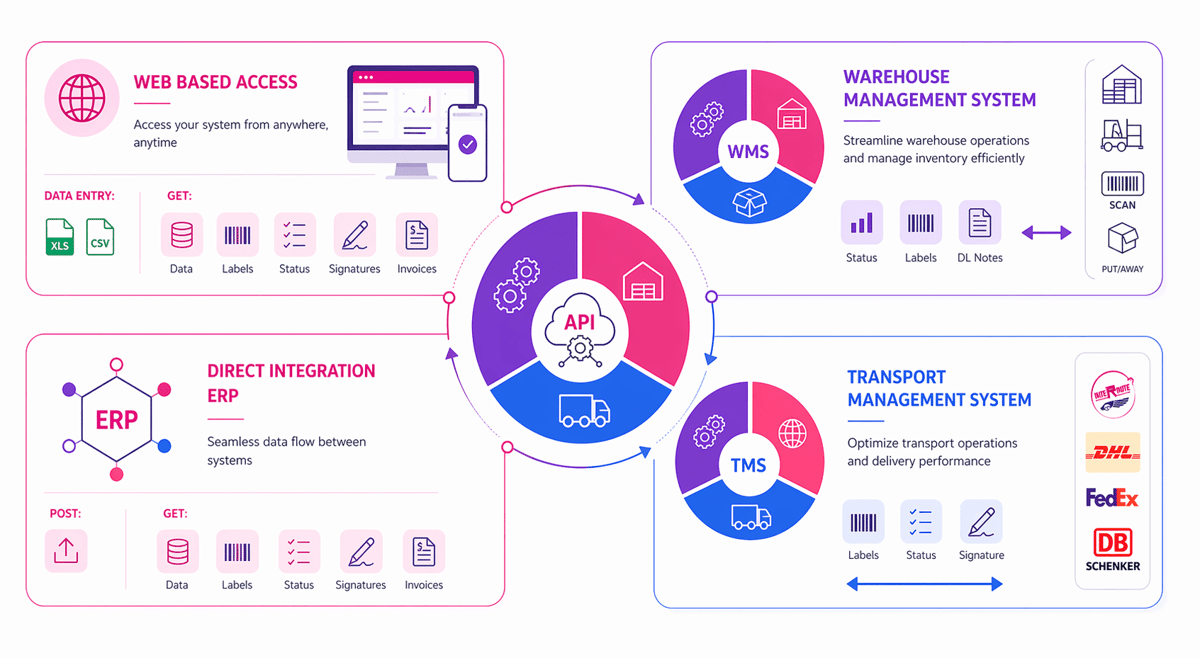
Yes, Manhattan WMS can work with SAP ERP through standard connectors, APIs, or middleware. The quality of integration depends on your version, processes, and data structure. Many companies integrate order management, inventory updates, shipping, and receiving to keep the warehouse ERP and SAP environments aligned across operations.
How do warehouse management systems compare for ERP integration?
Warehouse management systems differ in how easily they connect with finance, purchasing, sales, and inventory modules. A strong ERP warehouse management system offers real-time data exchange, fewer manual entries, and better visibility. When comparing options, review API support, implementation effort, reporting, and how well the warehouse management ERP fits your workflows.
What is an ERP warehouse management system?
An ERP warehouse management system combines warehouse operations with core business processes such as inventory control, purchasing, order management, and accounting. Instead of using disconnected tools, businesses manage stock movement and business data in one system. This helps improve accuracy, visibility, and decision-making across the supply chain.
What are the benefits of ERP warehouse management software?
ERP warehouse management software helps businesses reduce inventory errors, speed up order fulfillment, and improve stock visibility. It can support barcode scanning, receiving, putaway, picking, packing, and shipping while connecting data to broader business functions. For growing companies, warehouse ERP software can also improve planning, reporting, and operational consistency.
When do you need a WMS?
You may need a WMS when manual processes, spreadsheets, or basic inventory tools no longer support your order volume and warehouse complexity. Signs include frequent stock discrepancies, slow picking, shipping mistakes, and limited visibility. If operations are expanding, an ERP warehouse system or ERP WMS software can help create better control and efficiency.
How do you choose the right warehouse ERP software?
Start by reviewing your warehouse size, order volume, product complexity, and integration needs. The best warehouse ERP software should match your workflows, support future growth, and connect smoothly with finance, sales, and purchasing. Compare usability, reporting, automation features, vendor support, and total implementation cost before selecting an ERP warehouse management software solution.
I am an eCommerce expert with a strong focus on marketplaces like Amazon, eBay, and Etsy. Over the past decade, I have helped both startups and $1M+ revenue brands scale their sales through listing optimization, marketplace SEO, and AI-driven strategies. I also share articles and insights about eCommerce growth, marketplace operations, and multichannel selling.
You may also like

Enterprise Parcel Shipping Software: A Practical Guide to Multi Carrier Shipping
Choosing the right enterprise parcel shipping software lowers logistics costs, boosts delivery performance, and simplifies complex carrier operations at scale. Explore the essential features, benefits, and selection criteria to optimize your multi-carrier strategy today.

Warehouse Order Fulfillment Software: A Practical Guide for Faster, Smarter Operations
Warehouse order fulfillment software helps businesses streamline inventory, picking, packing, shipping, and returns from one connected platform. This brief outlines key benefits, features, use cases, and buying criteria for choosing fulfillment software that scales.

Inventory Management Cloud for Smarter Stock Control
An inventory management cloud helps businesses track stock, automate workflows, reduce errors, and make faster decisions from anywhere. Benefits, use cases, selection criteria, and practical steps for adopting cloud-based inventory tools with confidence.