
Modern Warehouse Management System: Features, Benefits, and Best Practices
 Emily Carter
·
· 17 min read
Emily Carter
·
· 17 min read 
Order volume rises. Labor stays tight. Stock moves across more channels each month. A modern warehouse management system gives teams a clear way to handle that load. Also, it connects stock, labor, and order data so leads can act on facts, not guesswork.
In fact, older tools often track stock in parts. For example, one screen shows receipts, another shows picks, and neither reflects the floor live. A modern warehouse management system ties those parts into one view. Teams spot issues fast. As a result, teams spot issues fast and fix them before they spread.
Strong warehouse management system functions reduce errors by linking each task to live data and clear rules.
What Is a Modern Warehouse Management System?
A modern warehouse management system controls daily floor work with live data. Furthermore, it tracks stock, directs labor, and records each move from receipt to ship. Also, unlike sheets or basic tools, it links tasks across sites, teams, and devices.
In practice, the system acts as the main layer inside the warehouse. Also, it assigns work, checks stock status, and updates each step as it happens. Therefore, that view helps lead to spotting delays early and keeping orders on track.
How it works day to day
A modern warehouse management system runs receiving, putaway, picking, packing, and shipping. For instance, workers scan codes, confirm bin spots, and follow tasks on mobile screens. Furthermore, those steps cut manual entry and limit stock errors.
For example, many firms also use a warehouse management application on handheld devices. Therefore, that app gives each worker the next task based on rules, priority, and spot. As a result, walk time drops and task accuracy goes up.
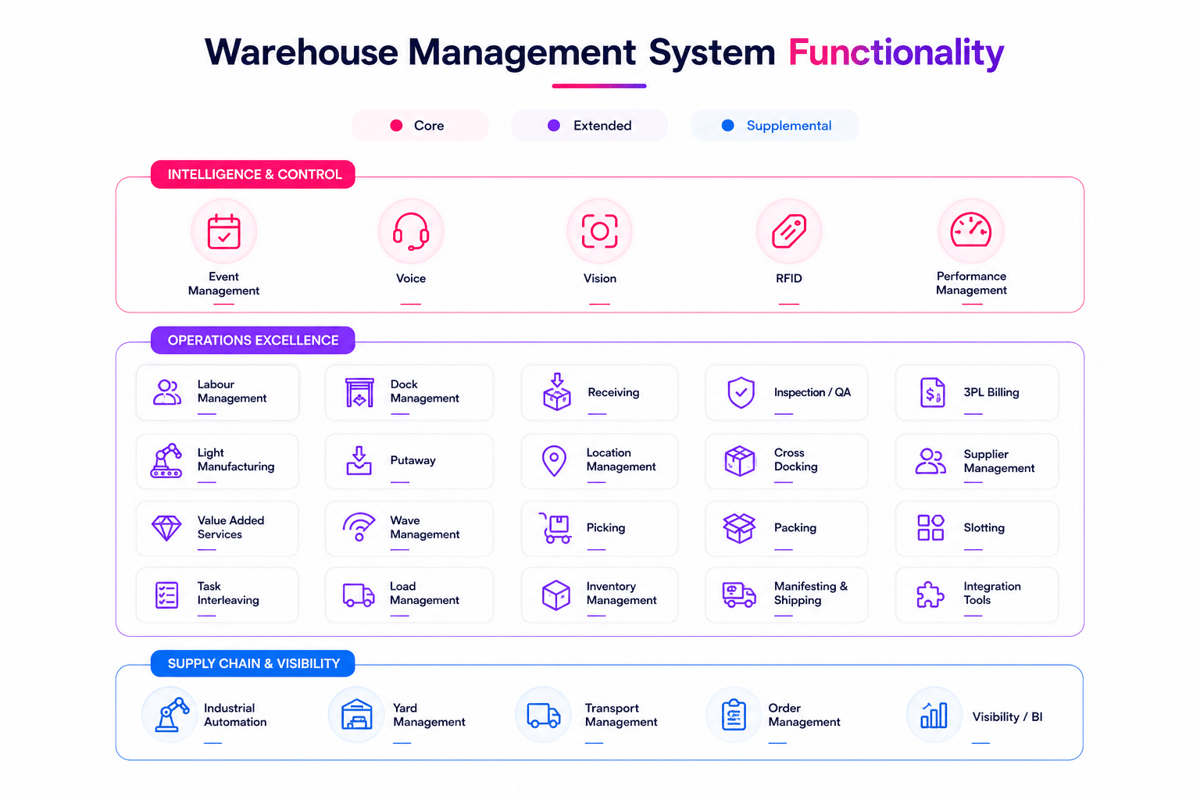
Core warehouse management system functions include slot control, restock, cycle counts, and wave plans. These WMS system functions help warehouses process more orders with no added labor. For a broader view, see What Warehouse Management System & WMS Solutions.
What makes it modern
A modern warehouse management system differs from old tools in speed, links, and scale. It often connects with ERP, transport, and ecommerce tools in real time. That link gives one shared view of stock, orders, and labor.
A basic standalone WMS may fit one site with simple flows. Enterprise warehouse management supports larger networks and more complex rules. In those settings, an enterprise WMS can run multiple sites, user roles, and buyer needs from one tool.
When firms compare the types of WMS systems, the modern model stands out for flexibility. It handles changing volume, tighter service targets, and better reports across the site. At its core, the functions of WMS bring structure and speed to warehouse management.
Core Warehouse Management System Functions Every Business Needs
A modern warehouse management system controls the daily flow of goods, labor, and data. Furthermore, its value comes from clear work across receipt, storage, pick, pack, and ship.
Strong warehouse management system functions cut manual checks and close time gaps. Teams know what came in, where it sits, what moved, and what still needs action. In short, no one has to guess anymore.
Inventory, location, and order control
- Live stock tracking across bins, zones, and docks
- Barcode or RFID scans to confirm each move
- Directed putaway based on space, rules, and demand
- Pick path guidance to cut walk time
- Pack and ship checks that catch order errors early
Furthermore, the best WMS system functions link stock records to real floor moves. That link matters. Because errors often start when data lags, it is key. When data lags behind real activity.
A modern warehouse management system assigns bin spots, tracks lot numbers, and logs serial data when needed. It also runs cycle counts so teams can fix issues before they grow into missed orders. For more, see inventory software for a warehouse.
Labor visibility and system fit in the WMS system functions
Labor tracking gives leads a clear view of daily output. A modern warehouse management system shows who did each task, how long it took, and where delays began.
That view helps lead staff better during peak periods. It also helps firms set real targets instead of guessing.
System fit matters as much as features. A small site may prefer a standalone WMS, while larger firms often need enterprise warehouse management tied to buy, transport, and finance. In complex networks, an enterprise WMS supports multiple sites, shared stock rules, and broader reports.
Connect Shopify, draw your floor, pick an order - free plan, 7-day full trial, no credit card, no sales call.
How WMS System Functions Support Accuracy and Speed
A modern warehouse management system turns floor data into daily control. It links receipt, putaway, pick, pack, and ship in one flow. That link cuts manual checks. As a result, it closes the gaps where errors start.
Strong WMS system functions also give teams a clear view of work in motion. Also, leads can see stock levels, order status, labor, and bin use live. A delay on one shift becomes visible before it hits the next wave.
Accuracy starts with real-time control
In fact, stock accuracy depends on clean data at each step. Scans, directed putaway, and bin rules confirm each move as it happens. That makes core warehouse management system functions far more valuable than a simple stock count.
For instance, when a picker scans the wrong item, the tool flags it at once. When inbound stock lands in the wrong bin, the record shows the gap fast. A modern warehouse management system cuts write-offs, recounts, and avoidable returns.
However, this matters even more in multi-site ops. In enterprise warehouse management settings, one error can affect restock, transfers, and buyer promises across several sites. In addition, clean records support better buy choices and steadier service.
Speed and visibility shape better decisions
Also, speed comes from fewer gaps between tasks. A warehouse management application can assign work by priority, path, or labor spot. As a result, teams spend less time waiting and more time moving orders forward.
Visibility gives leads a way to manage exceptions. They can spot aged orders, missed picks, dock jams, or low-stock risks early. That view helps an enterprise WMS respond fast during demand spikes.
Not all types of WMS systems offer the same depth. A standalone WMS may run core work well, while broader tools link floor data with transport, buy, and finance. A modern warehouse management system creates the most value when its data supports both floor work and planning. For more, see warehouse management strategies.
Types of WMS Systems: Cloud, On-Premise, and Hybrid
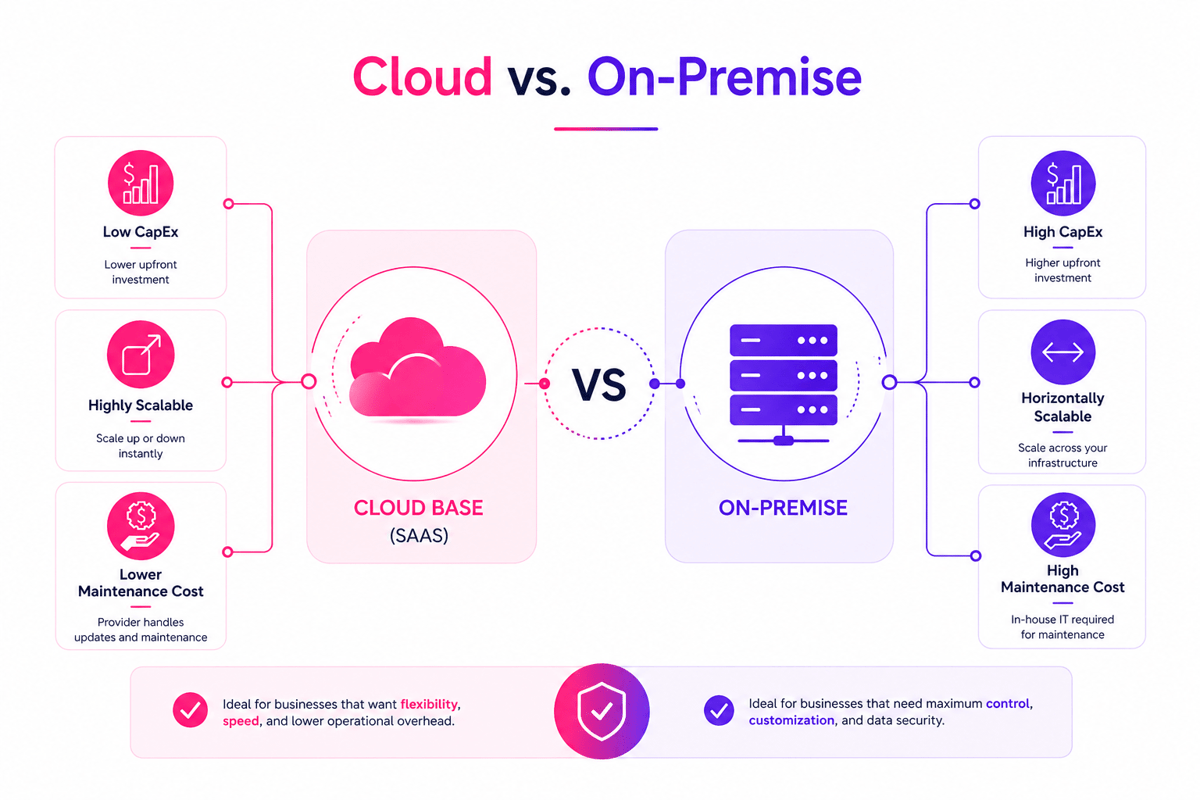
The main types of WMS systems differ in where the software runs and how teams manage it. A modern warehouse management system may be cloud-based, on-site, or hybrid. Each model shapes cost, control, updates, and IT load in different ways.
Cloud and on-premise models
A cloud-based modern warehouse management system runs on the vendor’s servers. Teams access it via browser or mobile. Therefore, this model often cuts upfront costs and speeds up setup.
Also, cloud tools make updates easy. New features, security fixes, and changes arrive on a set schedule. That helps firms keep core warehouse management system functions current with no long IT cycle.
However, an on-site modern warehouse management system runs on the firm’s own servers. This gives firms more control over data, custom rules, and release timing. It often fits sites with strict compliance demands or complex internal systems.
However, the trade-off is in upkeep and speed. Internal teams handle servers, backups, and upgrades. For firms with deep IT, that control can still outweigh the added cost.
When hybrid WMS fits best
A hybrid model mixes cloud services with local control. For instance, some firms keep sensitive data on-site while moving standard tasks to the cloud. This can support gradual change with no full system swap.
Hybrid setups often appeal to firms with older software and growing floor space needs. They can link an enterprise WMS to finance, transport, and labor tools while keeping key old systems in place. That balance helps protect past spending and cut move risk. Overall, it is a practical middle path.
When leads compare models, they should look past price alone. The right warehouse management application supports daily work, future growth, and the full functions of WMS across the network. It also works best when it links to an automated warehouse control system.
Standalone WMS vs Enterprise Warehouse Management
A standalone WMS focuses on core floor control. It handles receipt, putaway, pick, pack, and ship with less system depth. For smaller sites, that narrow scope can cut costs and speed up setup.
An enterprise warehouse management tool links floor work with broader business systems. It often connects stock, labor, transport, buy, and order data in one place. That wider view helps multi-site ops manage change with fewer blind spots.
Where standalone WMS fits best
A standalone tool works well when floor tasks stay fairly contained. One site, stable product lines, and simple fill rules usually match that model. In those cases, core warehouse management system functions cover most daily needs.
Also, many teams choose this path for speed and budget reasons. The tool can deliver scans, task direction, and stock accuracy fast. That makes a modern warehouse management system easier to justify for firms with clear goals but limited IT support.
However, limits show up when data must move across many departments. A separate tool can create double records, manual updates, and report gaps. Those issues grow when sales channels expand or service levels tighten.
Why enterprise warehouse management supports scale
An enterprise WMS supports more complex ops. It can run multiple sites, varied flows, buyer-specific rules, and deeper reports. That structure gives leads a stronger base for planning labor, stock, and service.
Furthermore, the difference shows up in how well the tool links data. A warehouse management application inside an enterprise stack can share data with ERP and transport tools in near real time. That helps teams act on the same stock view and cut avoidable delays.
Selection should match current needs and near-term growth. The strongest choice supports today’s core functions of WMS while leaving room for broader WMS system functions later. That balance becomes clearer when teams tie system scope to service goals and warehouse KPIs.
Why Enterprise WMS Matters for Growing Operations
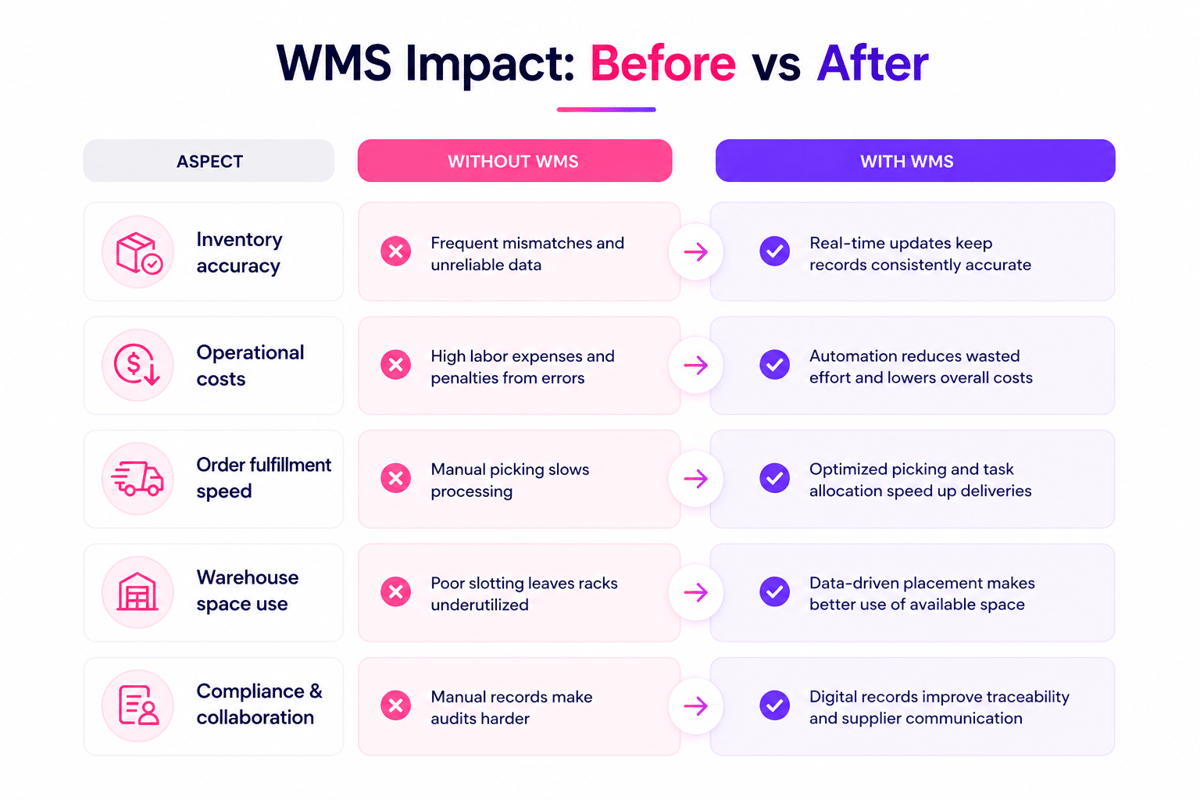
Overall, growth adds pressure to every floor process. More orders, more sites, and more stock create gaps that basic tools cannot close. A modern warehouse management system gives larger ops the control needed to keep work accurate and fast.
A standalone WMS can support one site with steady demand. However, complex networks need broader links across buy, transport, labor, and finance. That is where enterprise warehouse management becomes key. In fact, it is often the only option that fits.
Control across sites, channels, and inventory
An enterprise WMS links floor work across multiple sites. Teams can see stock levels, order status, and flags in one place. That shared view cuts down on double work and helps planners move stock before gaps show up.
A growing firm often serves stores, wholesale buyers, and online buyers at once. Also, each channel has different pack, ship, and service rules. A modern warehouse management system helps run those rules with no added manual checks at each step.
However, many firms outgrow basic warehouse management system functions when volume rises. They need wave plans, slot rules, task links, and live restock. These functions of WMS support higher output with no loss in stock accuracy.
Better decisions in more demanding operations
Complex ops depend on timing as much as stock counts. Also, delays in receipt or pick can affect labor costs and carrier cutoffs within hours. A modern warehouse management system gives leads live data, so they can act before small issues spread.
Furthermore, enterprise teams also need stronger system links. An advanced warehouse management application can share data with ERP, TMS, and order tools. That flow keeps buyer promises in line with real floor output.
Once a firm runs several sites or complex flows, enterprise depth matters more than basic tracking. In short, scale changes the call. At that point, a modern warehouse management system supports not just stock control, but also labor via a warehouse labor management system.
Key Functions of WMS in Daily Warehouse Workflows
A modern warehouse management system supports the work that happens each hour on the floor. It links receipt, putaway, pick, pack, and ship in one flow. That link cuts delays, saves search time, and gives teams a clear view of stock moves.
Also, the daily value comes from how the tool guides calls in real time. A warehouse management application can assign tasks by zone, order rank, and labor spot. In larger sites, enterprise warehouse management adds tighter control across multiple sites and channels.
Inventory control and order flow
First, the receipt starts with fast item capture and bin assignment. A modern warehouse management system records counts, lot numbers, and serial data as goods arrive. Therefore, that accuracy stops stock errors before they spread into picks and ships.
Also, putaway rules shape how space gets used each day. The tool can send fast-turn items to easy-reach spots and reserve bulk stock elsewhere. These warehouse management system functions cut walk time and keep restocking steady.
Finally, the pick depends on speed and control. A modern warehouse management system builds pick paths, groups orders, and flags exceptions early. Those functions of WMS help teams avoid short picks, double picks, and missed scans.
Task management and operational visibility
Labor becomes more precise when tasks flow through one tool. Leads can see who is picking, who is restocking, and where work is backed up. In an enterprise WMS, that view often extends to wave plans, dock activity, and carrier cut-off times.
Furthermore, cycle counts fit into daily work with no ops shutdown. The tool can trigger counts by move, value, or risk level. Among the key WMS system functions, this one helps protect stock accuracy while keeping outbound work on track.
- Livestock updates support better order promises
- Directed tasks cut idle time and needless walking
- Exception flags help lead to fixing issues before orders slip
Different types of WMS systems handle these needs with varying depth, from a standalone WMS to broader enterprise tools. The strongest results appear when daily workflows match system rules and warehouse layout planning.
How a Warehouse Management Application Improves Team Output
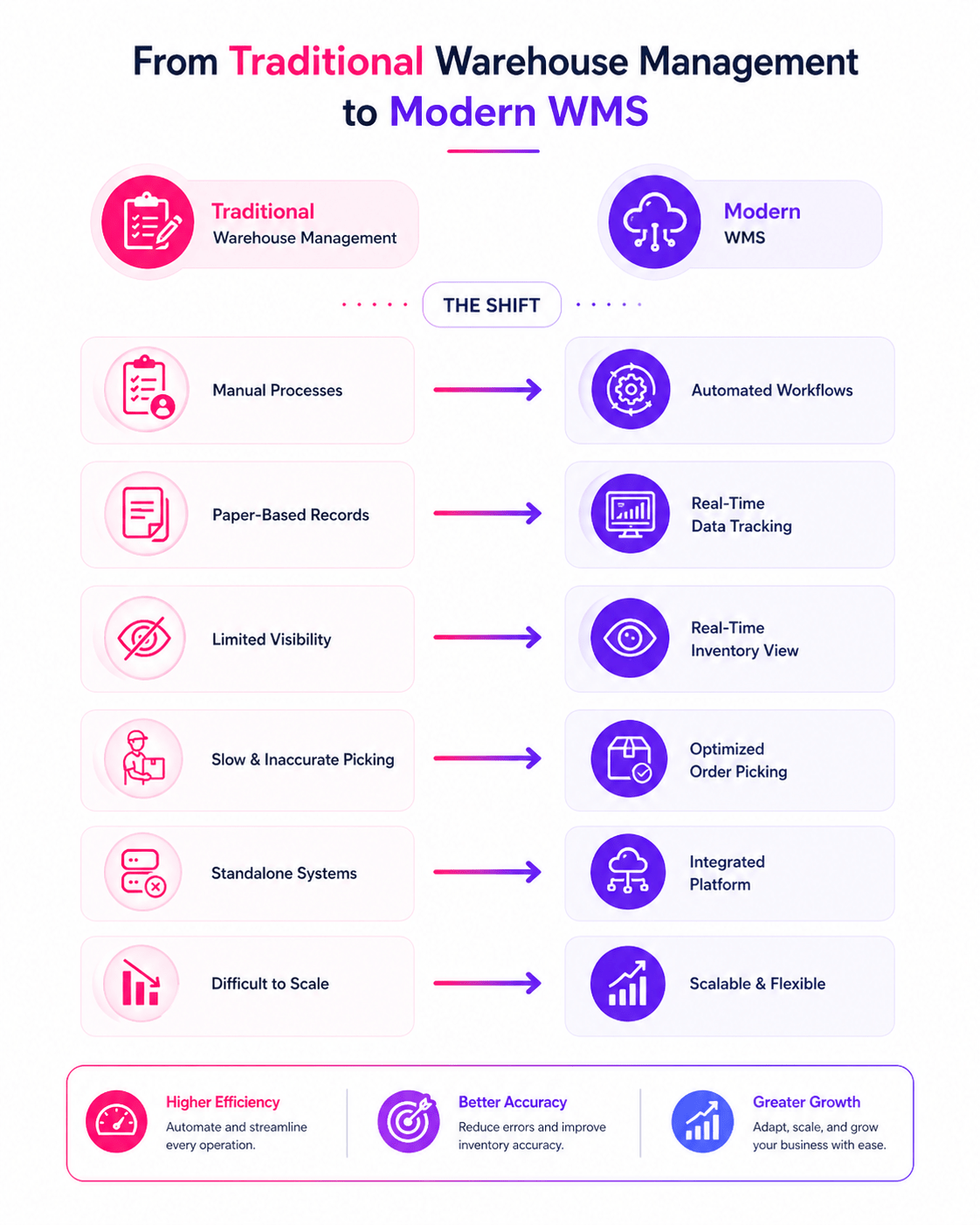
A strong warehouse management application gives teams clear tasks and fast feedback. Workers spend less time searching, checking paper lists, or waiting for updates. A modern warehouse management system also keeps work moving across receipt, putaway, pick, and pack.
As a result, output rises when people can trust the next step. For instance, mobile screens show the right bin, item, and count at the right time. As a result, that cuts rework and helps new staff hit target rates sooner.
Faster workflows with fewer breaks
Many delays come from small breaks in the process. A missing bin spot, a double pick, or a late stock update can slow an entire shift. The best warehouse management system functions remove those gaps by keeping each task linked.
Also, live updates help lead to a balance of labor during busy periods. If one zone falls behind, they can shift people before orders pile up. In larger sites, enterprise warehouse management tools give that view across several teams and workflows.
A modern warehouse management system also cuts back and forth between the floor and the office. Staff can confirm receipts, print labels, and log exceptions from handheld devices. That saves minutes per task. Over time, those minutes add up across hundreds of steps each shift.
Better visibility builds stronger team performance
In fact, clear data helps teams work with more confidence. Pickers know where stock should be, receivers know what arrived, and leads can see where delays start. Those shared facts matter more than guesses in fast-moving ops.
For growing firms, an enterprise WMS supports standard work across sites. That matters when one building runs a simple flow and another handles complex orders. It also helps leads compare output, error rates, and labor time with less guesswork than a standalone WMS.
Overall, teams often see the strongest gains when a modern warehouse management system connects daily work with reliable warehouse stock location systems.
How to Choose the Right Modern Warehouse Management System
Choosing a modern warehouse management system starts with fit. A tool should match order volume, stock complexity, and labor model. Fast-growing teams often outgrow basic tools when returns rise, channels expand, or slot rules grow more detailed.
Also, the right choice depends on the business structure. A single-site firm may do well with a standalone WMS. A firm with multiple sites, ERP links, and strict compliance may need stronger enterprise warehouse management tools.
Match the modern warehouse management system to your operations
First, a clear list of needs shows which tool fits best. Leads often compare current pain points with future needs. That view helps split useful tools from features that look good but add little value.
- Order volume by day, week, and peak season
- Number of users, sites, and sales channels
- Stock rules for lot, serial, or expiry tracking
- Integration needs across ERP, ecommerce, and carrier tools
- Report depth needed for labor, stock, and service levels
A modern warehouse management system should also support change. Many firms start with core pick and receipt, then add automation later. A rigid tool can slow that path and raise costs when new flows appear.
Also, review the vendor’s approach to mobile. A strong warehouse management application gives leads and floor teams access on handheld devices. That access cuts delays and keeps task updates close to real time.
Assess scalability, support, and total cost
Also, growth changes what a warehouse needs from software. A smaller firm may compare types of WMS systems based on price alone. Larger firms often need broader control, stronger reports, and deeper links across an enterprise WMS setup.
Also, scale depends on more than user count. The tool should handle more SKUs, more bins, and more complex rules with no slowdown. Reliable warehouse management system functions become key when labor costs rise, and service windows tighten.
Furthermore, support quality often shapes long-term results. Furthermore, good vendors offer clear setup, real training, and fast issue response. That matters when key WMS system functions affect ship cutoffs and buyer commitments.
Finally, the total cost should include software, setup, links, hardware, training, and support. A lower entry price can hide higher costs later. The best modern warehouse management system earns its value through cleaner stock data, fewer shipping errors, and faster floor calls.
Conclusion
A modern warehouse management system gives teams better control, faster work, and cleaner data. It links daily tasks with stock accuracy, labor views, and order flow. That matters for firms that need fewer errors, shorter cycle times, and steadier service.
Furthermore, the right tool fits the shape of the business. Some firms need a standalone WMS for focused floor control. Others need enterprise warehouse management that links buy, transport, finance, and fill in one model.
Strong warehouse management system functions run receipt, putaway, pick, pack, and ship with no guesswork. Clear rules and live data help teams make faster calls on the floor. A good warehouse management application also cuts manual updates and saves time spent fixing avoidable errors.
Finally, selection works best when leads tie software choices to real floor demands. Review the current pain points, needed links, and report needs first. Then compare vendors against the functions of WMS that matter most in daily ops. If your firm is reviewing options for digital fill, start with this look at ecommerce WMS software.
 Google AI
  OpenAI ChatGPT
 Frequently Asked Questions
What is a modern warehouse management system?
A modern warehouse management system is software that helps businesses control inventory, receiving, putaway, picking, packing, and shipping in real time. It improves visibility across warehouse operations, reduces manual errors, and supports faster order fulfillment. Many companies use it to streamline workflows and make better operational decisions.
What is the best warehouse management system for a small e-commerce business?
The best warehouse management system for a small e-commerce business should be easy to set up, affordable, and able to scale as order volume grows. Look for features such as real-time inventory management, barcode scanning, order fulfillment, multiple sales channel integrations, and warehouse location tracking. Fiftify is built for multichannel sellers and helps small e-commerce businesses manage inventory, orders, and warehouse operations from one system.
What are the main warehouse management system functions?
Core warehouse management system functions include inventory tracking, barcode scanning, order management, labor planning, replenishment, cycle counting, and shipping coordination. These WMS system functions help warehouses improve accuracy, reduce delays, and maintain stock visibility. Advanced tools may also include analytics, automation support, and reporting for better performance management.
How does a modern warehouse management system improve efficiency?
A modern warehouse management system improves efficiency by automating routine tasks, guiding workers to the best picking routes, and providing live inventory updates. This reduces errors, shortens fulfillment times, and lowers operating costs. It also helps managers respond quickly to demand changes and maintain consistent service levels across warehouse operations.
What are the common types of WMS systems?
Common types of WMS systems include standalone WMS, cloud-based platforms, and enterprise warehouse management solutions. A standalone WMS focuses mainly on warehouse operations, while broader enterprise WMS tools often connect with ERP, transportation, and order management systems. The right choice depends on business size, complexity, budget, and integration needs.
What is the difference between enterprise warehouse management and a standalone WMS?
Enterprise warehouse management usually offers deeper integration, broader visibility, and support for multi-site operations. A standalone WMS is often simpler and may be a good fit for businesses with basic warehouse needs. Companies with complex supply chains often prefer enterprise WMS platforms because they support scalability, automation, and cross-functional coordination.
What should businesses look for in a warehouse management application?
When choosing a warehouse management application, businesses should look for ease of use, real-time inventory visibility, integration with existing systems, mobile access, and reporting tools. It is also important to review the functions of WMS features such as receiving, picking, and shipping. Scalability and vendor support are key for long-term value.
I am an eCommerce expert with a strong focus on marketplaces like Amazon, eBay, and Etsy. Over the past decade, I have helped both startups and $1M+ revenue brands scale their sales through listing optimization, marketplace SEO, and AI-driven strategies. I also share articles and insights about eCommerce growth, marketplace operations, and multichannel selling.
You may also like

Enterprise Parcel Shipping Software: A Practical Guide to Multi Carrier Shipping
Choosing the right enterprise parcel shipping software lowers logistics costs, boosts delivery performance, and simplifies complex carrier operations at scale. Explore the essential features, benefits, and selection criteria to optimize your multi-carrier strategy today.

Warehouse Order Fulfillment Software: A Practical Guide for Faster, Smarter Operations
Warehouse order fulfillment software helps businesses streamline inventory, picking, packing, shipping, and returns from one connected platform. This brief outlines key benefits, features, use cases, and buying criteria for choosing fulfillment software that scales.

Inventory Management Cloud for Smarter Stock Control
An inventory management cloud helps businesses track stock, automate workflows, reduce errors, and make faster decisions from anywhere. Benefits, use cases, selection criteria, and practical steps for adopting cloud-based inventory tools with confidence.