
Inventory management software cost: what drives the price
 Emily Carter
·
· 16 min read
Emily Carter
·
· 16 min read

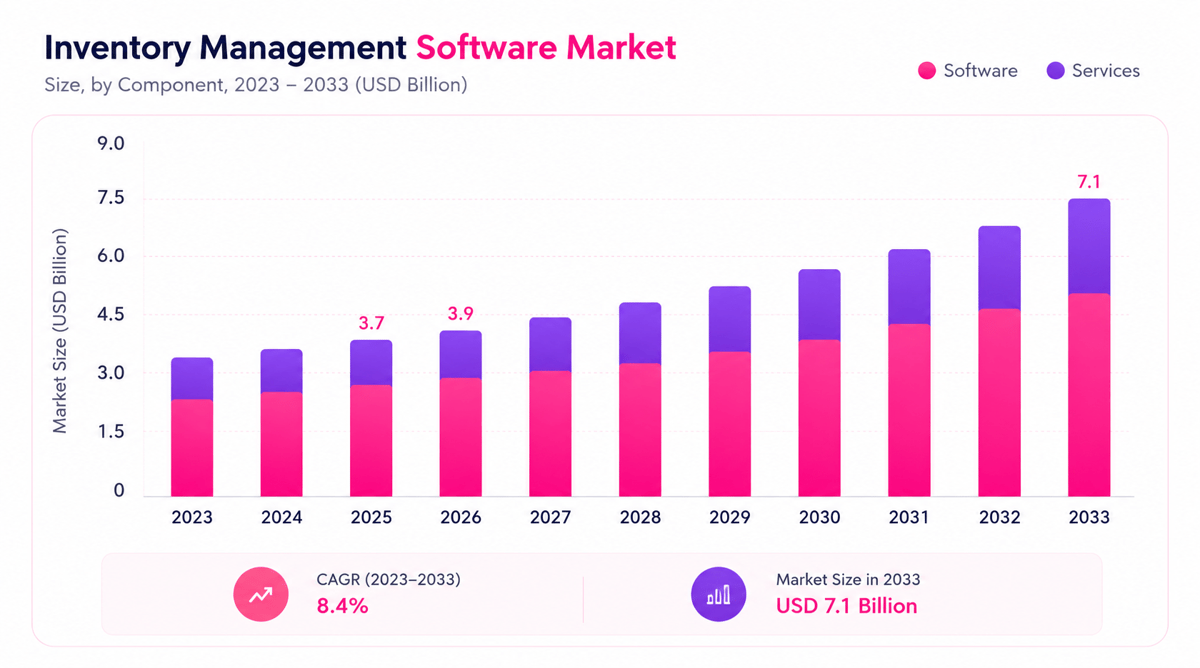
The inventory management software cost can range from a low monthly fee to a major project. That wide gap comes from users, sites, tools, data needs, and help levels. A small shop may need plain stock counts and barcode scans. A growing firm may need warehouse flows, buy rules, and accounting links.
But price alone rarely shows the full picture. The lowest inventory management software price may miss tools that stop stockouts or cut manual counts. A higher plan may cost less over time if it cuts errors, labor hours, and excess stock. So, clear cost planning starts with the work the software must handle.
Why pricing varies so widely
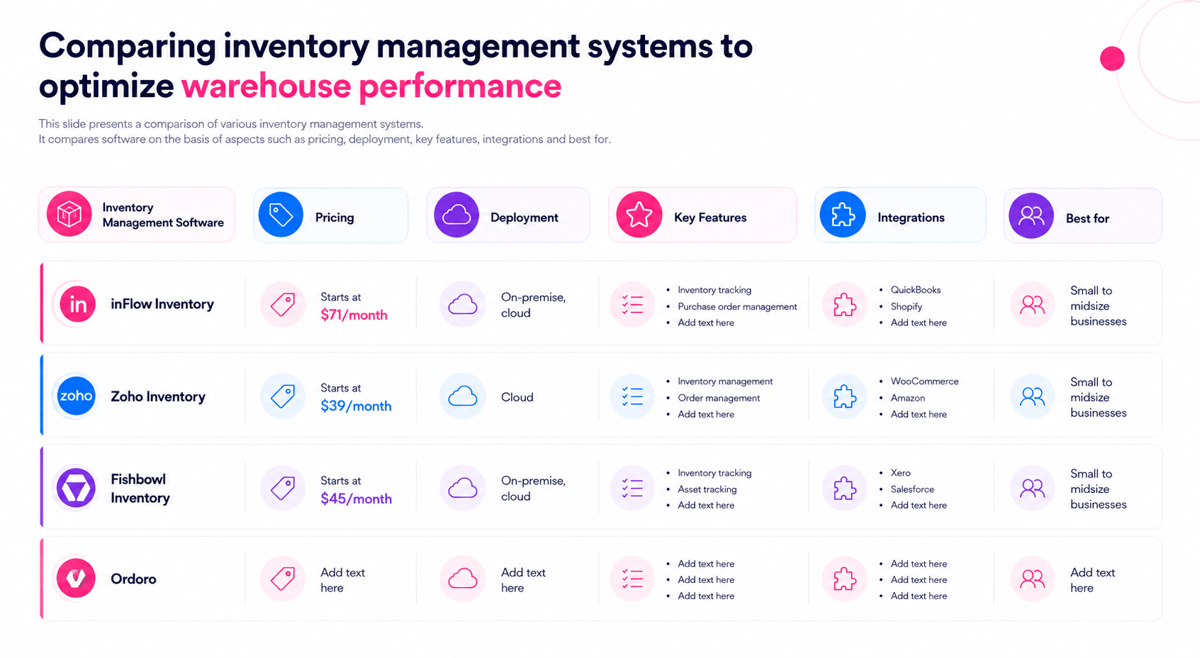
In fact, vendors build plans around varied firm needs. Some charge per user, while others charge by order volume, site count, or tool set. That makes inventory management pricing hard to compare with no shared base. Our WMS software comparison lines up plans and features of several tools side by side.
Also, the inventory management system cost depends on the setup work and the complexity of the inventory system. Data cleanup, product imports, barcode labels, staff training, and potential additional costs can change the first year budget. The number of products, locations, and stock levels you need to manage can also affect the final cost.
What a clear cost view includes
A solid check includes software fees, setup costs, help, links, and future growth. The true software cost should reflect the first year and the ongoing run rate. This view helps teams avoid plans that look cheap but create manual work.
Small retailers tend to compare the cost of shop management software for small shop needs against lost sales and stock errors. The best choice balances price, fit, and measurable savings. Strong tools help teams buy the right stock, ship faster, track inventory accurately, and cut waste.
Connect Shopify, draw your floor, pick an order - free plan, 7-day full trial, no credit card, no sales call.
What drives inventory management software cost?
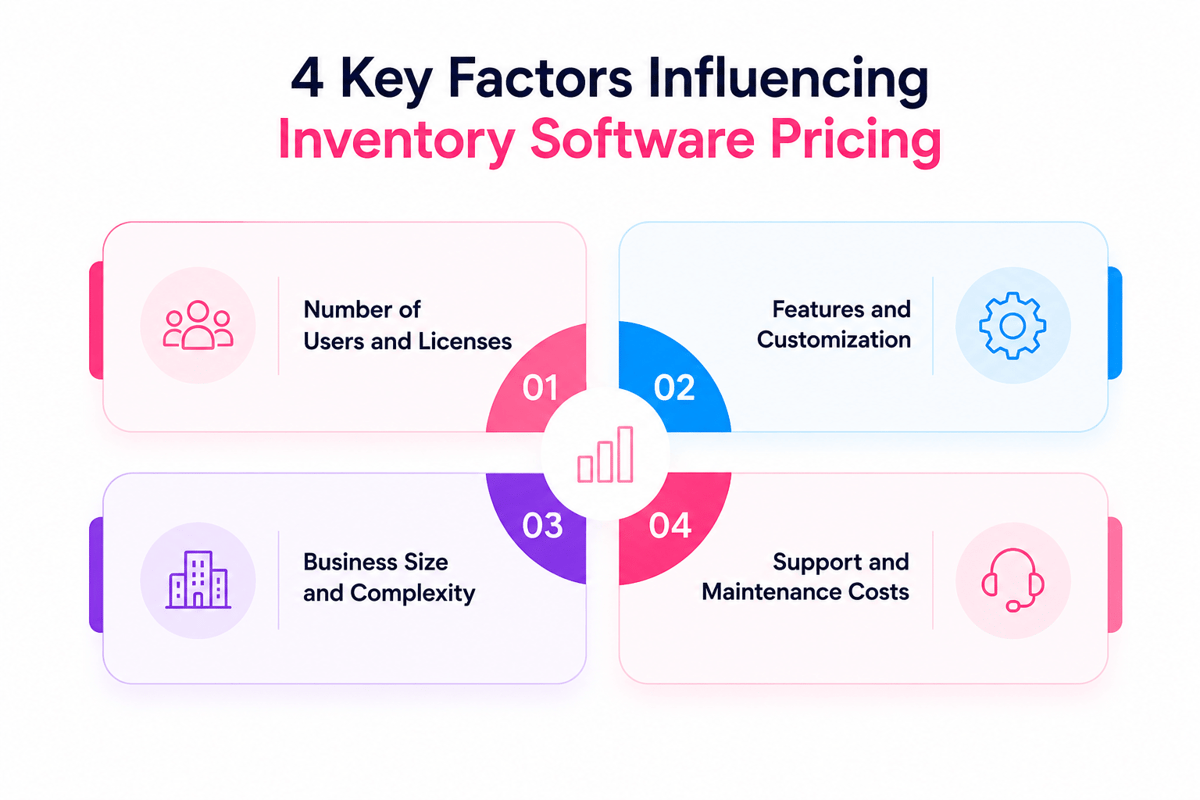
Inventory management software cost depends on more than the monthly fee. Vendors price systems around firm size, stock depth, user needs, and needed tools. A small retailer may need plain stock counts and alerts. A larger firm may need barcode scans, lot tracking, and warehouse controls.
The quoted inventory management software price tends to reflect the work the system must handle. More sites, sales channels, daily orders, and the number of users add to the data volume. That volume raises hosting needs, help demands, and setup time.
Business complexity and stock volume
For example, SKU count plays a key role in inventory management pricing. A catalog with 500 products costs less to run than one with 50,000 variants. Large catalogs need stronger search, faster sync, and cleaner reports.
Order volume also affects pricing. Higher deal counts need faster syncs across stock, sales, and buying. Multi-site firms need site-based stock rules and move tracking. Those controls can raise the total inventory management system cost.
- More users tend to raise fees or seat charges.
- A larger number of users often requires higher-tier plans.
- More sites tend to need higher plan tiers.
- More sales channels raise sync and help needs.
- More rules add report and audit tools.
Features, integrations, and support needs
Furthermore, core tools shape the base inventory software cost. Plain plans may include stock counts, buy orders, low stock alerts, and basic track inventory features. Higher tiers tend to add demand plans, serial tracking, barcode flows, support for mobile devices, and deep reports. These tools cut manual work but raise the monthly fee.
Also, links can move the price higher. Ties to ecommerce tools, accounting software, POS systems, and shipping carriers need setup and testing. Custom links tend to cost more than standard app integrations.
Finally, support levels affect pricing. Premium plans often include faster response times, dedicated onboarding, and enhanced customer support. While these services increase costs, they can reduce downtime and improve system adoption. Be sure to evaluate additional costs related to integrations, training, mobile devices, and ongoing customer support before selecting a platform.
The best check starts with clear needs, not a tool wish list. That view helps compare inventory management software cost against real savings in labor, errors, and stockouts. It also helps find affordable inventory management software. For small firms, see also warehouse management for small businesses.
Inventory management software price: common pricing models explained
Pricing models shape both the first bill and long-term spend. A low entry price can rise fast when users, orders, or sites grow. Vendors tend to price systems around access, deal volume, or tool depth.
Subscription and user-based inventory management pricing
Monthly fees remain the most common model for cloud systems. They spread costs over time and cut large upfront spend. User-based plans charge by the number of staff accounts. This model works well when only a small team handles buying, receiving, and stock checks.
Costs can rise when warehouse staff, buyers, and leads all need access. Shared logins may cut fees, but they also weaken audit trails. A monthly plan tends to make the inventory software cost easy to plan.
Tiered, usage, and one-time inventory management software cost models
Tiered plans group tools into tiers, such as basic, set, and premium. Lower tiers may cover stock counts, buy orders, and plain reports. Higher tiers tend to add barcode scans, multi-site control, and accounting links.
- Order-based pricing can fit seasonal sellers.
- Site count may raise the inventory management system cost.
- The cost of shop management software for small shop owners may stay low with plain plans.
Also, usage-based pricing links fees to deals, orders, SKUs, or site work. This model can start low, then climb during busy sales periods. Some vendors still offer one-time licenses for installed systems. These plans may need separate fees for hosting, help, upgrades, and backups.
Inventory management pricing by business size and use case
Inventory cost tends to follow firm depth more than firm size. A small shop with many stock items may pay more than a larger firm with plain needs. User count, order volume, barcode use, and links all shape the final quote.
Pricing patterns by business size
For instance, micro-firms tend to need plain stock counts, low-stock alerts, and simple reports. Their inventory software cost may range from free plans to low monthly fees. These plans work best when one or two people run stock.
Small firms tend to need buy orders, barcode scans, and sales channel sync. At this stage, the cost of inventory management software tends to rise with users and sites. Mid-size firms tend to need demand plans, role-based access, and accounting links. Large firms face higher costs due to hard flows.
Use cases that change the inventory management software price
Retail firms tend to pay for POS links and barcode tools. Ecommerce sellers may need market sync, shipping links, and return tracking. These needs can raise the inventory management software price past the base plan.
Makers tend to need bills of materials, batch tracking, and production plans. Service firms may only track parts, tools, and reorder points. Their needs can keep the cost of inventory management software lower than that of product-heavy firms.
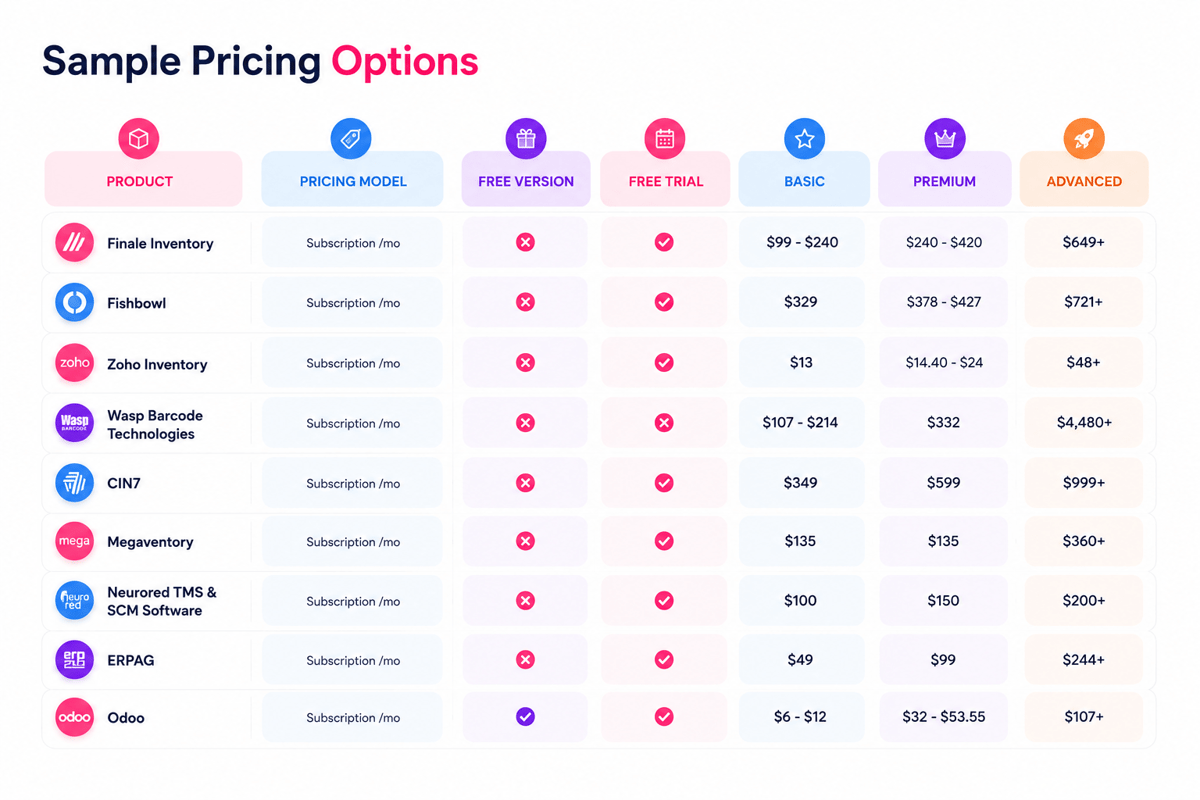
Also, the best value inventory management pricing reflects the total work the system cuts. A lower plan can cost more if staff still rely on sheets. According to Capterra’s software pricing guide, most small firms pay $50-$200 per month for inventory tools. For many growing teams, this path works best when paired with cloud-based inventory software.
Inventory management system cost: cloud vs. on-premise solutions
The deployment model has a key effect on the inventory management software cost. Cloud systems spread costs across monthly or annual fees. On-premise systems need a larger investment before teams start using them. The right choice depends on cash flow, control needs, and IT capacity.
Cloud software costs
Cloud tools tend to charge per user, site, or order volume. This model keeps the initial inventory management system cost lower. The vendor hosts the software, stores the data, and runs updates.
Most cloud plans include backups, security patches, and upgrades. These included services can cut internal IT work and shorten setup time. But long-term inventory cost may rise as the firm adds sites, channels, barcode scans, or deep reports.
On-premise software costs compared to cloud
On-premise systems tend to need server hardware, licenses, setup labor, and IT help. This makes a higher upfront inventory software cost, especially for firms with several sites or hard stock rules.
Some firms choose on-premise tools for data control and custom flows. The trade-off comes through upkeep, upgrades, security work, and staff time. An on-premise setup may suit large firms with stable flows and internal IT teams. Smaller teams tend to find cloud inventory management pricing easier to run. For small firms, this balance makes cloud tools the safer path for small business inventory management.
Inventory software cost for core features, integrations, and add-ons
Core tools tend to set the base inventory management software cost. Most vendors price their plans around user access, item volume, sites, and order work. The lowest inventory software cost can look good at first. Gaps show when teams need reports, mobile access, or multi-site control.
Core features that shape the base inventory management software price
Base plans tend to cover stock counts, item logs, and plain reports. Mid-tier plans tend to add reorder points, vendor run, and barcode flows. Enterprise plans may help lot tracking, serial counts, and deep sign-offs.
- Barcode scans can cut manual entry and speed up receipt.
- Multi-site tracking helps teams move stock with control.
- Demand reports help improve buying and reduce stockouts.
- Role-based access cuts errors from broad system rights.
Each tool affects inventory management software cost in a varied way. Some vendors bundle key tools into set plans. Others charge more once the deal volume or site count grows.
Integrations and add-ons that change the cost of the inventory management system
Links tie stock data to sales, accounting, shipping, and ecommerce systems. A basic link may come with the plan. Custom data mapping can quickly raise the cost of the inventory management system.
Common paid links include QuickBooks, Shopify, Amazon, EDI, and carrier tools. These ties can cut double entry and order delays. They also affect the total inventory management software price when vendors charge per link.
Add-ons tend to cover narrow but useful needs. Examples include deep forecasting, automated buying, label printing, and mobile warehouse apps. The right add-on depends on the cost of the live problem. A $75 monthly tool may pay for itself if it stops one shipping error per week. Strong pricing checks focus on flows, not tool lists alone. That fit tends to matter more than tool count when choosing the best inventory management software.
Cost of shop management software for small shop owners
Small shops tend to need real tools, not hard enterprise systems. The software cost for small stores tends to start around $20 per month. More complete shop systems can reach $150 to $300 monthly. The cost of shop management software for small shop owners depends on stock volume, sales channels, and staff access.
Typical monthly price ranges for inventory management software
Entry plans tend to cover barcode scans, low-stock alerts, and plain reports. The inventory management software price rises when a shop adds POS links, ecommerce sync, or serial count tracking.
- Basic stock tools tend to cost $20 to $75 per month.
- POS and stock bundles tend to cost $60 to $200 per month.
- Multi-channel shop systems tend to cost $150 to $300 per month.
These ranges make inventory management pricing easier to compare. A lower fee may still cost more if staff fix counts by hand. Staff time matters because inventory management software costs compete with rent, payroll, and stock buys.
What small shops should budget for when planning inventory software costs
The first budget line is the monthly fee. Setup costs also matter for many small stores. Barcode labels, receipt printers, data cleanup, and POS links can add upfront spend.
Small retailers also need to watch user limits and order caps. A plan may look cheap until peak staff needs access. High order volume can push a store into the next tier. For most owners, the cost of inventory software should match today’s store size and next year’s sales plans. That view keeps inventory management software costs real before comparing the best ecommerce inventory management software. Also, see our guide to personalized ecommerce experience for tips on growing store revenue alongside better stock control.
Best value inventory management software pricing: what to compare
The lowest quote rarely shows the full picture. Best value comes from the balance across price, daily fit, and measurable savings. Indeed, a fair check treats inventory management software cost as more than a monthly fee. Training time, setup work, help quality, and missed sales all affect real spend.
Compare total cost against usable value
Best value inventory management software pricing depends on how well the system solves costly problems. A cheaper plan can cost more if staff still fix stock errors by hand. Strong value tends to show in systems that cut cycle counts, stockouts, and double orders.
- The system should help live order volume with no slowdowns.
- Reports should show stock value, reorder needs, and sales trends.
- Help should match the firm’s hours and issue urgency.
- User limits should fit leads, warehouse staff, and buyers.
Match inventory management pricing to operating fit
A useful price check starts with the work the system must handle. Retail shops, firms, makers, and ecommerce sellers face varied stock risks. For example, the cost of shop management software for small shop owners tends to depend on checkout links, barcode tools, and plain buying.
Also, inventory management pricing changes when a vendor charges by user, site, order volume, or tool tier. This can shift the best choice as the firm grows. A strong vendor makes the full inventory management system cost clear before contract signing. The best choice fits today’s needs and leaves room for growth. That test becomes more key when comparing warehouse, retail, and multi-location inventory management software.
Hidden fees that can raise inventory management software cost
Hidden fees tend to change the true software cost for growing teams. The base fee may cover only plain stock tracking. Costs rise when teams need setup, data cleanup, hardware, or help. These charges can make two similar quotes look very varied.
Setup, data, and training costs in inventory management pricing
Many vendors charge for product imports, SKU cleanup, and site mapping. Hard catalogs need more time when variants, bundles, or serial counts exist. These tasks can affect the inventory management software cost before the first order ships.
Furthermore, training fees matter when teams work across stores, sites, or shifts. Some givers include logged lessons but charge for live sessions. Paid training can still save money if it cuts pick errors fast.
- Past sales data may need to undergo a cleanup before upload.
- Custom labels and barcode templates can carry design fees.
- Extra admin accounts may move the account into a higher tier.
- Mobile scanners, printers, and tablets may sit outside the software quote.
Support, integrations, and usage limits
Help rules can raise inventory management software cost after launch. Plain plans may offer email help only. Faster reply times tend to need a paid help package. Links create a second gap across listed pricing and real spend. Accounting, ecommerce, POS, and shipping ties may need paid links.
Usage limits deserve close check because growth can trigger fees. Order volume, site count, and user seats tend to set inventory management and pricing bands. Best value inventory management software pricing accounts for those limits before sales rise. That detail matters most when comparing entry tools with a barcode inventory management system for a small business.
How to estimate ROI before choosing inventory management software
ROI gives context to the full software cost. A lower price can still create weak value if errors stay high. A higher price may pay back faster when it cuts costly manual work. The check works best when it starts with live losses: stockouts, excess stock, order errors, and staff time spent on counts.
Build a practical ROI baseline for inventory management pricing
A strong base shows how stock issues affect cash flow today. Many firms track only software fees, not the cost of slow flows. That gap can hide the true inventory management software cost.
Useful base figures include monthly carry costs, lost sales, shrinkage, and labor hours. Order fix costs also matter, especially for ecommerce and retail teams. These figures turn inventory management pricing into a firm case.
- Check the monthly value of excess stock.
- Calculate lost sales from stockouts.
- Measure staff hours spent on manual stock tasks.
- Track returns caused by stock errors.
- Compare those costs with the expected software spend.
Compare payback against total cost
So, the payback period shows how fast savings cover the spend. Full cost should include setup, training, links, and help. Fee alone gives an incomplete view of inventory software cost. Hidden fees can change the ROI timeline by several months.
Small retailers should compare savings against the cost of shop management software for small shop needs. A store may gain value from faster checkout, fewer stockouts, and cleaner buy orders. The best value inventory management software pricing tends to help with fast payback. It matches live needs while leaving room for growth. A final check should test low, expected, and strong results. This range shows how risk affects the inventory management software cost. It also helps leaders choose software with clear financial upside.
Conclusion
Inventory cost makes sense when tied to clear results. Clean data, labor time, and stock control matter most. A low monthly fee can still drain profit when teams keep fixing sheet errors. A higher plan may cut stockouts, waste, and delays.
What the inventory management software price should include
A fair inventory management software price should reflect the full need. The license fee tells only part of the story. Core needs tend to include item tracking, barcode scans, buy orders, reports, and user access. Accounting, ecommerce, and warehouse links can raise the total.
The true inventory management software cost also includes setup, training, help, and data moves. For retailers, the cost of shop management software for small shops should be weighed against saved hours and fewer stock errors. Larger teams need pricing for sites, roles, and sign-off flows.
How to choose with confidence
Overall, good buying calls compare cost with real gains. Cleaner logs can cut rush buys and excess stock. Better reports help owners catch slow items earlier. That saves cash before products sit too long.
Best value inventory management software pricing does not always mean the lowest plan. The right plan matches live needs and near-term growth. Clear contracts and plain upgrade paths save the budget. Before signing, the final check should compare monthly fees, one-time costs, and expected savings. A real inventory management software cost check helps teams avoid surprise fees and choose tools that pay back through better control. For a deeper look at fit, tools, and growth planning, explore these inventory management solutions.
 Google AI
  OpenAI ChatGPT
 Frequently Asked Questions
How much does inventory management software cost?
The inventory management software cost typically ranges from free basic plans to $50–$300 per user per month for cloud-based tools. Larger businesses may pay several thousand dollars per year for advanced features, integrations, and support. The final inventory management software price depends on users, locations, automation needs, reporting, and whether the system is cloud-based or on-premise.
Is inventory management software worth the cost?
Yes, inventory management software is often worth the cost when it reduces stockouts, overstocking, manual errors, and time spent on inventory tasks. While the inventory management software cost is an upfront or recurring expense, many businesses recover the investment through better purchasing decisions, improved order accuracy, and lower carrying costs.
What are the cost-saving benefits of using inventory management software?
Inventory software can save money by improving stock visibility, reducing excess inventory, preventing missed sales, and automating manual work. It also helps businesses forecast demand and reorder at the right time. For many companies, better inventory management pricing is less about the subscription fee and more about reducing waste, labor costs, and operational mistakes.
What hidden costs are associated with inventory management software?
Hidden costs may include setup fees, data migration, employee training, hardware, barcode scanners, integrations, custom reports, and premium support. Some vendors also charge extra for additional users, warehouses, or advanced features. When comparing inventory management system costs, ask for a full pricing breakdown to avoid unexpected expenses after implementation.
What is a low-cost inventory management software option?
A low-cost inventory management software option is usually a cloud-based tool with essential features such as stock tracking, purchase orders, barcode support, and basic reporting. Small businesses may start with free or entry-level plans. The best choice depends on your inventory size, sales channels, and the cost of shop management software for small shop operations.
How do I choose the best value inventory management software pricing?
To find the best value inventory management software pricing, compare features, scalability, integrations, support, and total ownership cost. A cheaper inventory software cost may not be the best option if it lacks automation or creates extra manual work. Choose software that fits your current needs and can grow with your business.
I am an eCommerce expert with a strong focus on marketplaces like Amazon, eBay, and Etsy. Over the past decade, I have helped both startups and $1M+ revenue brands scale their sales through listing optimization, marketplace SEO, and AI-driven strategies. I also share articles and insights about eCommerce growth, marketplace operations, and multichannel selling.
You may also like

How to choose an ecommerce marketplace service provider for scalable growth
Learn how an ecommerce marketplace service provider helps businesses launch, manage, and scale a profitable ecommerce marketplace. Platform choices, vendor operations, software tools, management services, costs, and practical selection tips.

Ecommerce software solutions: features, costs and how to choose
Learn how to evaluate ecommerce software solutions for online stores, marketplaces, and retail teams. Essential features, vendor comparisons, implementation tips, and practical ways to choose software that supports growth, operations, and customer experience.

Multi-carrier shipping software: features and how to compare options
How multi carrier shipping software compares rates, prints labels, tracks orders and handles returns, and which features to check before you choose one for your store.