
Amazon sales checker: how to estimate sales of any Amazon product
 Fiftify Team
·
· 14 min read
Fiftify Team
·
· 14 min read

Selling on Amazon can feel tough. Many products compete for the same buyers. You need clear data and fast action. An Amazon sales checker gives you that edge. Many sellers also call it an Amazon product sales checker or an Amazon sales tracker.
If you want to know how to see how much a product sells on Amazon, start with sales estimates and historical data. You can review sales history, monthly sales, daily price changes, and seller rank BSR. A free Amazon sales estimator or other free tools can also help you test product ideas before buying stock.
You can pair sales data with an Amazon product ranking tool. This shows how rank changes affect sales revenue and conversion rates. A profit calculator can then factor in costs and selling fees. It helps you see whether a product has enough margin.
Better data helps you set smarter prices, plan stock, and choose products with higher profit. Learn how to track sales on Amazon to refine your selling plans.
Summary
An Amazon sales checker helps you make smart calls fast. You can check demand, track your best items, and spot drops before they hurt cash flow. It also helps you compare similar products, improve conversion rates, and plan stock based on real trends.
In this guide, you will learn what a sales checker does and why it matters for growth. We cover key tools, from an Amazon sales tracker to competitor data and reports. You will also see how an Amazon tracker works with an Amazon product ranking tool to connect sales shifts with sellers’ BSR rank.
We walk you through the setup step by step. Then we compare top tools, including Amazon sales estimator options. Finally, the FAQ covers pricing, ease of use, and data quality so you can pick the best fit and protect your margins.
Key takeaways
An Amazon sales checker helps sellers take control of daily calls. In short, it turns product signals into clear sales data you can act on.
- Check product sales so you can set real goals
- Track results with an Amazon product sales tracker and spot trends early
- Check rival activity to see what changes drive results
- Make smarter price and stock calls before you run out of items
- Boost product rank and views by fixing what already works
In this section, you will learn what to look for in an Amazon sales tracker and how to use it with a plain routine. For example, check sales data, check price moves, and then adjust ads and stock. You will also see how an Amazon product ranking tool helps sales work by showing how rank shifts match sales changes.
To sharpen your price calls after setup, explore our Amazon dynamic pricing strategy guide for 2025 tools and rival positioning insights.
If you are new to selling online, see our guide on starting an online business on Amazon or eBay to learn the basics before diving into sales data tools.
Connect Shopify, draw your floor, pick an order - free plan, 7-day full trial, no credit card, no sales call.
What is an Amazon sales checker?
An Amazon sales checker is a tool that helps sellers make smart choices fast. It shows estimated sales numbers and product performance, so you can spot what sells and what stalls. Think of it as a sales calculator for your Amazon store.
At its core, an Amazon sales checker works like an Amazon checker to check demand. As a result, you can find high-demand items, skip slow movers, and plan your stock with more trust. You can also adjust the price based on what buyers buy today, not what you hope they will buy.
Many tools also act as a sales tracker. They follow sales signals over time and flag shifts in the market. In addition, an Amazon product ranking tool can show how rank changes match sales spikes. So you can test new images, titles, or ads and see what works.
A Chrome extension version of these tools lets you check data right in your browser as you browse the Amazon marketplace. This saves time and gives you fast access to the details page data you need.
Key features of an Amazon sales checker
- Sales volume check: see the sales number for any item
- Real-time product tracking across the Amazon marketplace
- Rival and market check with an Amazon sales estimator
Whether you are launching a new item or scaling your store, an Amazon sales checker helps you act on data. That way, you stay relevant and protect your margins. Many sellers use these tools to learn how to track sales on Amazon. They do this before investing in new items or improving listings.
To take your research further, see our checks of the best Amazon product research tool options for deeper demand, rival, and price insights.
Why every Amazon seller needs a sales checker
Every Amazon seller, new or skilled, can gain an edge with an Amazon sales checker. It turns numbers into clear actions, so you can make faster calls and protect profit.
As an Amazon product sales tracker, it shows how each ASIN does day by day. Because you see sales shifts early, you can restock on time and skip both dead stock and stockouts. You also spot season spikes sooner, which helps you plan deals and bundles.
A good tool also works like an Amazon sales tracker for your rivals. You can compare price, checks, and demand. Then adjust your offer before sales drop. In addition, pairing sales data with an Amazon product ranking tool helps you link rank changes to real sales. So you know which keywords and images drive results.
Key benefits of using an Amazon sales checker
- Live updates on product sales and sales number shifts
- Smarter stock planning and control across the Amazon marketplace
- Better price calls based on live market data from your Amazon sales estimator
Using a sales checker means you stop guessing and start acting on facts. Once you have checked demand and margins, refine ad spend with our guide to amazon ppc management plans.
Combine Seller Central data with Amazon search insights. Find new item ideas. Track BSR trends. That helps you know how to track sales on Amazon with smarter calls.
Key features of top Amazon sales checker tools
Picking the right Amazon sales checker can change how you run your store. The best tools give clear numbers, so you can act fast and stay ahead of rivals.
First, look for strong sales data. A solid Amazon product sales checker shows how many units an item may sell each month. As a result, you can plan stock with trust, skip costly overstock, and stop stockouts that hurt rank and checks.
Next, use rival tracking. A good Amazon sales tracker helps you watch price shifts, promo spikes, and sales trends in your niche. Then you can adjust your price, ads, and offers before you lose sales.
Also, pay attention to the search spot. An Amazon product ranking tool shows where your listing sits for key terms. When you track rank over time, you can spot what works and fix what does not. A Chrome extension can make this even faster by showing data right in your browser on the details page.
Must-have features in a top Amazon sales checker
- Clean sales forecast with a built-in sales calculator
- Rival results tracking across the Amazon marketplace
- Product rank view and keyword spot data
Some tools also link to dashboards and other apps, which saves time and keeps your reports in one place. For example, an Amazon product sales tracker can help you compare ASINs side by side and spot winners faster.
To boost data-driven calls even further, pair your insights with an Amazon keyword search tool to find high-converting search terms.
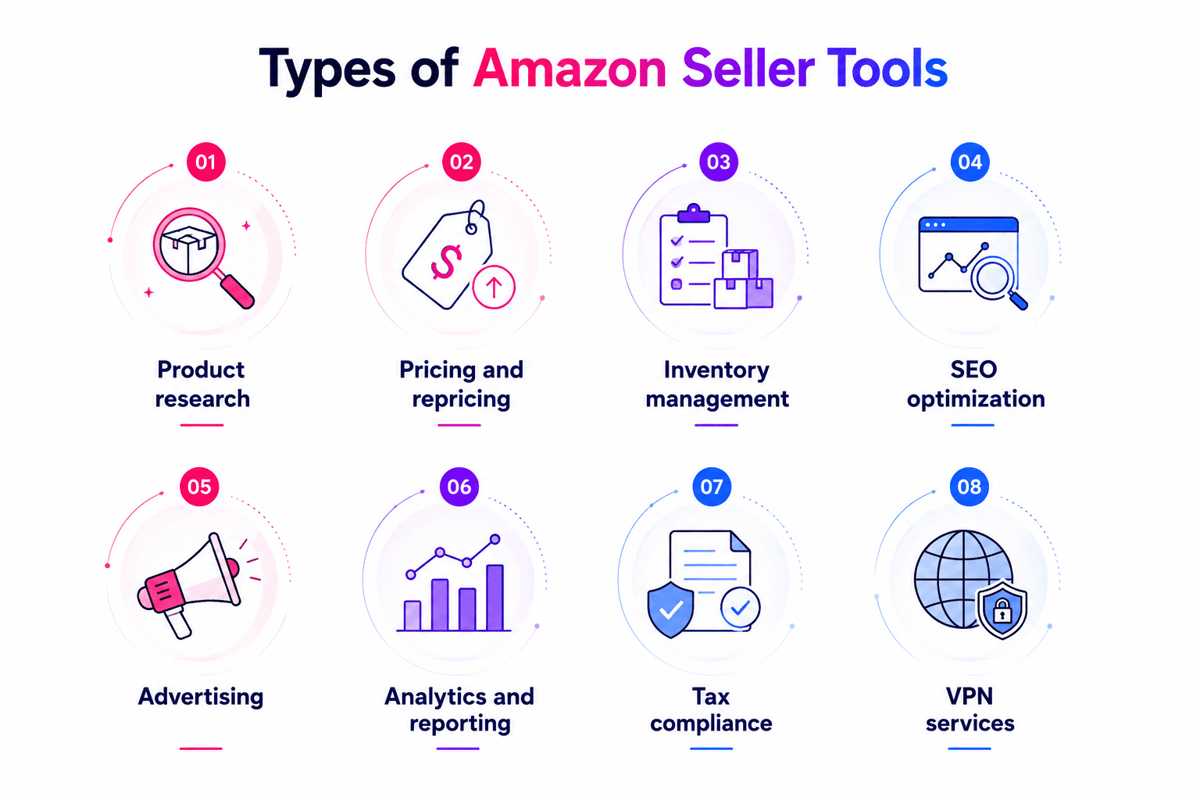
How to use an Amazon sales checker: step-by-step guide
Using an Amazon sales checker is simple. Still, you will get better results when you follow a clear flow. Use these steps to track sales, spot trends, and act fast.
1. Pick the right tool
Pick a solid Amazon product sales tracker that fits your goals. For example, look for sales data, keyword and rank info, and rival tracking. Check if a Chrome extension is available for faster browser access.
2. Set up your account
Create your account and fill in your store details. Clean inputs help the tool give better reports. Link it to your Amazon Marketplace account if the tool allows.
3. Add your products
Add the ASINs you sell and the items you want to watch. Then check each item matches the right variant, price, and market. The tool will pull the details page data and start tracking the sales numbers for each ASIN.
4. Set up tracking
Set alerts for price changes, stock issues, and sudden rank shifts. Pair your Amazon sales tracker with an Amazon product ranking tool to link rank moves to sales changes.
5. Check reports often
Check reports each week, or each day during promos. This helps you plan stock and skip missed sales. Use the Amazon sales estimator data to set real reorder points.
6. Adjust based on data
Use the numbers to sync listings, reorder stock, and apply an Amazon dynamic pricing strategy. Your Amazon product sales checker helps you test changes and measure results.
Quick setup checklist
- Pick a sales checker or an Amazon product sales tracker
- Sign up and set up your account
- Enter ASINs or item names
- Set tracking preferences and alerts
- Check sales reports often
- Fix your plan based on insights
Follow these steps, and you will get more value from your Amazon sales checker. You will cut guesswork, move faster than rivals, and protect your profit.
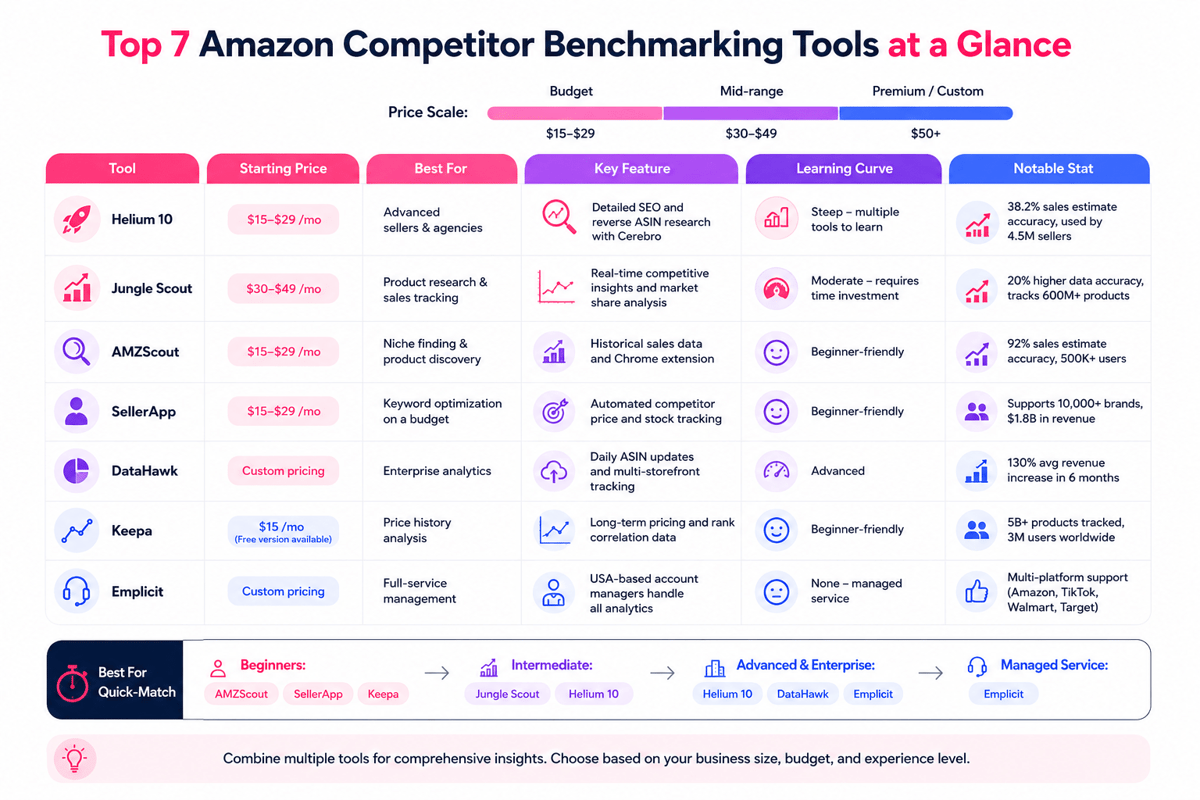
Comparing popular Amazon sales checker tools
There are many Amazon sales checker tools, and each one helps in a varied way. When you pick the right tool, you save time. You track results faster. You protect your profit.
First, compare the main jobs each tool does. Some work best as an product sales tracker that checks demand and helps you plan stock. Others act more like an Amazon product ranking tool, so you can spot rank changes and react before sales drop. No tool does all things well. So list your top needs first.
Next, check how plain the screen feels. A tool can look strong, yet still slow you down if it takes too many clicks. For daily use, pick an Amazon product sales checker you can learn fast and trust. Also, check if it has a Chrome extension or sales calculator built in.
Also, compare prices, trials, and limits. Low-cost plans tend to cap searches, while paid plans add alerts and reports. Finally, read seller checks and test support response times. Even a strong Amazon sales tracker should fit your flow, not fight it.
Top tools to consider
- Amazon Scout Sales Estimator: plain and low-cost for basic needs
Helium 10: a full suite with strong analytics and keyword tracking
- Jungle Scout: great as the best Amazon product research tool, and for Amazon sales tracker tools
- Viral Launch — offers deep market data and rival insights
Quick comparison tips
- Match tools with your goals
- Pick a tool with a plain screen
- Compare price plans and trial options
- Read seller checks for real data
With the right Amazon sales checker, you can track results, spot trends early, and make better calls each week. To learn more about seller profiles and rival research, see how to look up Amazon sellers.
Leveraging sales data for smarter inventory and pricing decisions
Sales data gives Amazon sellers a clear direction. When you use it often, you can buy stock with trust and set prices with less guesswork. A strong Amazon sales checker helps you see what sells, when it sells, and what drives profit.
First, check your trends each week. Look for spikes, slow spells, and repeat buyers. Then plan reorder points before you hit a stockout. This plain habit also helps you skip overbuying, which cuts storage fees and cash tied up in stock. A solid sales tracker makes these trends easy to spot.
Next, use sales data to guide price. Track your rate and watch how demand shifts after a price move. Also, check rival prices. That way, you stay in the game with no race to the bottom. A good Amazon sales tracker can show these shifts fast. Use it as a sales calculator to find the price point that lifts both sales and margin.
How sales data helps
- Spot peak sales periods and plan stock well
- Adjust price based on live market trends from your Amazon sales estimator
- Watch the rival price with an Amazon product sales checker
- Find gaps for discounts or promos based on the sales numbers
Also, link sales insights to rank changes. When sales rise, rank lifts. Then you can scale ads and restocks faster. An Amazon product ranking tool helps you link demand to view and protect momentum.
To simplify this flow, explore our list of AMZ tools that run sales tracking, profit check, and stock planning.
Boosting product rankings and visibility with sales checkers
Lifting your product’s view on Amazon drives more clicks and sales. An Amazon sales checker shows where your listing sits in search and what changes move it up or down.
Your sales rank shifts based on sales speed, checks, price, and listing quality. A strong Amazon sales tracker makes these signals easy to spot. So you can act fast and stay ahead. The Amazon Marketplace rewards listings that maintain steady sales and clean data.
To lift your product rankings, do these things:
- Writing clear titles and bullets that match real buyer terms
- Adding strong images and answering key questions on the details page
- Earning more checks by fixing the pack, support, and follow-up messages
- Using live sales data to test small changes and keep what turns
For deeper insight, pair your checker with an Amazon product ranking tool. This mix shows keyword shifts and search spot changes. It reveals winners in your niche too. You can also use an Amazon product sales checker to track top rivals, compare prices, and spot gaps you can fill.
Common mistakes to avoid when using sales checkers
Amazon sales checker tools can help you spot winning items and plan stock. But many sellers get weak results as they use the data the wrong way.
First, do not trust data alone. An Amazon product sales tracker gives a solid start, but demand shifts with seasons, ads, and new rivals. So, check the data with checks and price history. Do this before you buy stock.
Next, do not collect data with no clear goal. Turn numbers into actions: adjust price, fix your title, or change your main image. Also, check trends each week, not once a month, as the market moves fast.
Common errors to watch
- Focusing only on sales data and skipping a quick market check
- Ignoring syncs and new tools in your Amazon sales checker
- Missing rival moves and Amazon product ranking tool data
- Not checking results across your Amazon sales tracker and real store reports
To skip these issues, learn how to track sales on Amazon often and match data to real results. Pairing a sales checker with a sales calculator helps you check calls using real costs, not just top-level data.
Conclusion: take your Amazon business to the next level
Using an Amazon sales checker helps you run your store with more control. You can see sales trends, spot slow items, and plan restocks before you run out. As a result, you waste less cash and keep more items in stock when buyers want them.
To get even more value, pair your checker with an Amazon sales tracker so you can watch changes day by day. Then use an Amazon product ranking tool to see how your keyword moves affect views. If you need deeper data, an Amazon sales estimator can help you size demand before you place a big order. These tools work best when you use them as one system across the Amazon marketplace.
Together, these tools help with smart pricing, better timing, and clearer goals. Also, link your data with a strong Amazon listing tool to lift titles, images, and bullets. When you act on real numbers, you skip guesswork and scale faster.
Start using a checker today. Check results each week and keep testing small changes until profits grow. For more ways to research sellers and rivals on the Amazon marketplace, see how to look up Amazon sellers.
 Google AI
  OpenAI ChatGPT
 Frequently Asked Questions
What is the purpose of a sales checker?
Sales checkers help analyze product sales data to make informed decisions about pricing, inventory, and marketing.
Are sales checkers difficult to use?
Most tools offer user-friendly interfaces and guides. Familiarizing yourself with features can ease the learning curve.
Do sales checkers require a subscription?
Some tools are free, but premium features may require a subscription. Evaluate your needs and budget before choosing.
Here's a quick list of common inquiries:
- How accurate are sales estimates?
- Can I track multiple products?
- Is customer support available?
Sync inventory in real time, manage orders, and run warehouse operations across Amazon, eBay, Etsy, Shopify, and other sales channels. From barcode scanning to organized storage and faster fulfillment, Fiftify helps reduce errors, prevent overselling, and support business growth. Explore our articles for insights on warehouse management, inventory control, and multichannel operations.
You may also like
eBay stock management software: prevent overselling across channels
Choosing the right eBay stock management software helps sellers effortlessly avoid overselling, sync multi-channel listings in real time and improve order accuracy. Discover the essential integration features and practical tips to scale your business.

Starting an online business on Amazon or eBay: pros and challenges
Starting an online business on Amazon or eBay. Compare pros and cons, and learn tips to pick the right platform for your e-commerce journey.

Ecommerce marketplace management: channel mix, listings and operations
Ecommerce marketplace management helps brands centralize listings, inventory, pricing, orders, and advertising across major channels. This guide explains online marketplace management workflows, tools, and KPIs to reduce errors, protect margins, and scale revenue.