
Scanners for Inventory: A Practical Guide to Faster, More Accurate Warehouse Operations
 Emily Carter
·
· 17 min read
Emily Carter
·
· 17 min read 
Warehouse clean data often breaks down at the point of entry. A missed digit, late count, or unread label can create stock errors across receiving, picking, packing, and restocking. Scanners for inventory turn each scan into a checked data point, so teams work from live stock logs in place of guesses.
Strong scanners do more than read labels. They link the floor to inventory software, cut manual typing, and help workers check each item before it moves. The right setup can shorten cycle counts, cut mis-picks, and save the time spent fixing stock gaps.
Clean Data Starts at the Scan With Scanners for Inventory
Stock control depends on clean data at every handoff. Scanners for inventory give warehouse teams a faster way to capture item, lot, bin, and order details. Each scan makes a log that backs better counts and fewer fights.
However, manual entry still works in small, plain ops. Growth changes that fast. More SKUs, more spots, and tighter ship windows make warehouse scanners a real need rather than a nice add-on.
The Right Inventory Devices Shape the Workflow
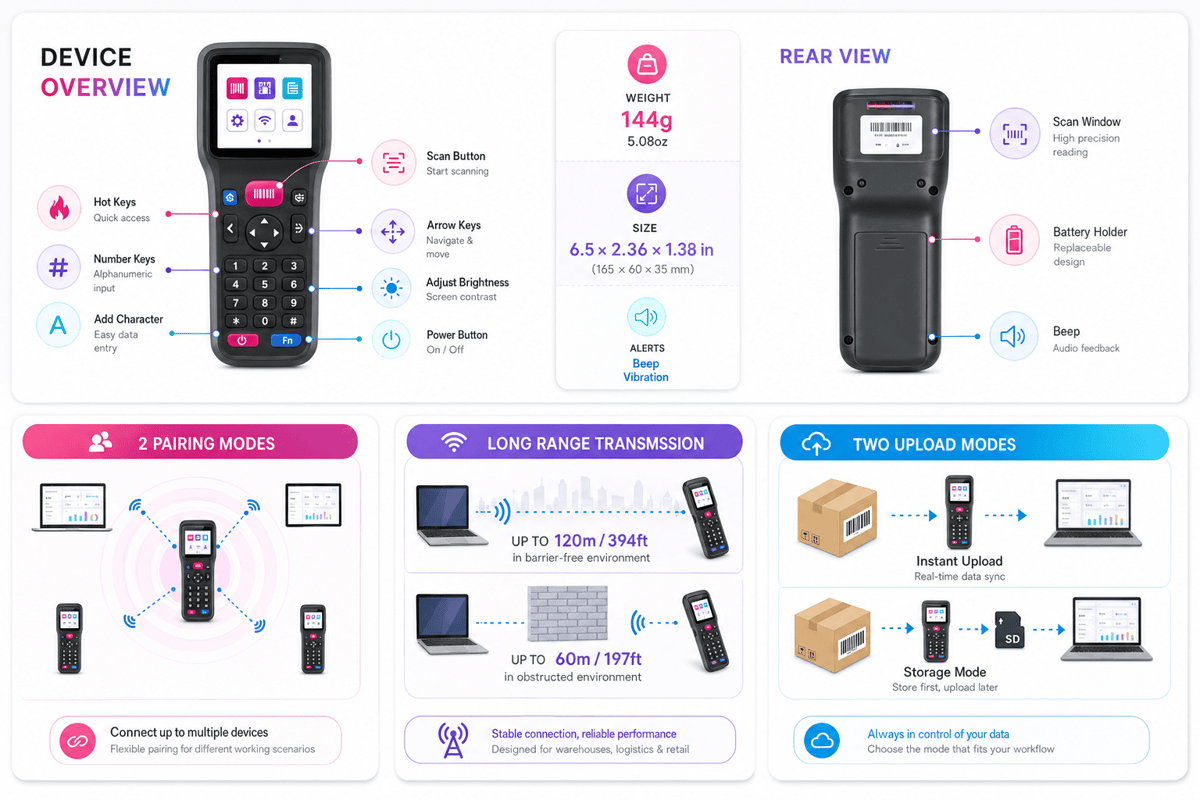
Different flows need varied inventory devices. Inventory scanner guns suit fast scan volume on busy warehouse floors. Handheld inventory scanners fit teams that need mobility, clear screens, and plain task prompts.
Scanners for inventory give the most value when they match the real work. A tough warehouse barcode scanner can help with receiving, picking, returns, and cycle counts without slowing workers down. Better scans make better logs, and better logs help faster calls.
Connect Shopify, draw your floor, pick an order - free plan, 7-day full trial, no credit card, no sales call.
Why Scanners for Inventory Matter in Modern Warehouses
Modern warehouses move too fast for paper counts and late syncs. Scanners close the gap between real work and system logs. Each scan checks an item, spot, count, and time. Teams see stock shifts while work happens, not hours later.
In fact, that speed matters when orders share the same stock pool. A missed pick or late receipt can make backorders fast. Warehouse barcode scanners help workers capture data at the point of work. The log shows the shelf, bin, cart, or dock door.
Scanners for Inventory Bring Clean Data to the Point of Work
Manual entry carries risk with every typed SKU or count. Scanners cut those touches and catch mismatches sooner. A scan can check the right item before packing. It can also flag an item placed in the wrong bin.
So, better data helps better labor calls. Leads can see open picks, done moves, and cycle count logs. Warehouse scanners also cut rework from lost stock. Fewer searches mean more time spent on ship work. Faster scanning matters most when teams can trust each stock log.
Speed Across Daily Warehouse Tasks
Inventory scanner guns and handheld inventory scanners speed up receiving, putaway, picking, packing, and counts. Workers no longer write counts and add them later. The scan sends the deal straight to the stock system. That cuts lag across warehouse work and open stock.
For growing teams, scanners for inventory make a shared source of truth. A warehouse barcode scanner helps keep track of receiving, picking, and counting sets. Barcode scanners for warehouse inventory also make a cleaner check trail. Leads can check who scanned each move and when it happened.
At scale, scanners help plans past the warehouse floor. Buying sees stock sooner, and sales can promise with more trust. When scan data flows into linked software, each deal makes the log stronger. That link turns scans into trusted stock logs inside a barcode warehouse management system.
Types of Warehouse Barcode Scanners and Handheld Inventory Scanners
Warehouse teams use varied scanner types as tasks shift by zone, speed, and scan range. The right scanners for inventory help teams capture clean data at each move point.
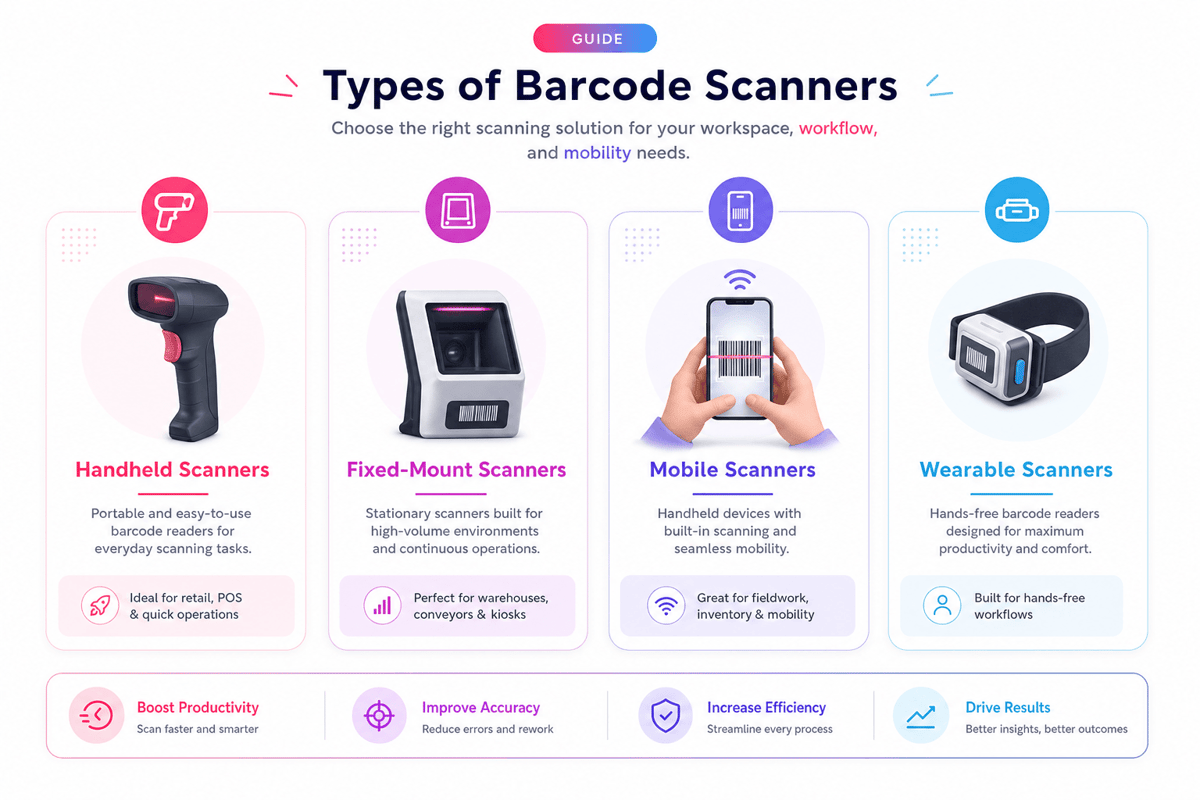
Warehouse barcode scanners help with receiving, putaway, picking, packing, and cycle counts. Each device style fits a varied mix of volume, mobility, toughness, and user comfort.
Common Warehouse Barcode Scanner Form Factors
Handheld inventory scanners remain the most common pick in busy warehouses. Workers can carry them across aisles, scan labels at arm’s length, and check counts with no return to a station.
Inventory scanner guns suit fast scans in receiving and pick zones. Their trigger grip cuts hand strain during repeat scans, which helps teams run large order batches with fewer slips.
Fixed-mount scanners work well on belts, pack lines, and sort points. A fixed warehouse barcode scanner reads labels as goods move past, which cuts manual scans at repeat check points.
Connectivity and Scanning Methods for Scanners for Inventory
Scanner link affects speed, range, and data flow. Corded units suit stations, while wireless ones help receiving docks, bulk storage, and mobile cycle counts. Handheld barcode scanners for inventory often link through Wi-Fi, Bluetooth, or a mobile unit. Wi-Fi helps live syncs, while batch mode holds scans when the cover drops.
Computer inventory scanners mix scan tools with a screen, keypad, system, and warehouse software. These inventory devices help workers view tasks, check counts, and fix gaps at the point of work.
The best barcode scanners for warehouse inventory match each flow rather than one set need. Strong gains come from matching scanners for inventory to task speed, scan range, network coverage, and your barcode inventory system.
Inventory Scanner Guns vs. Handheld Inventory Scanners
Inventory scanner guns and handheld inventory scanners often fix the same data grab issue. The key gap sits in shape, comfort, and flow fit. Both types of scanners for inventory can cut typing slips and speed up stock counts.
In practice, a scanner gun uses a pistol grip and trigger. Many teams favor it for high-volume scans at receiving docks or pick faces. Handheld units may look more like phones, tough tablets, or small terminals.
Where Scanner Guns Fit Best
Inventory scanner guns work well when workers scan many labels each shift. The grip helps fast aim, even with gloves. A clear trigger also helps new users scan with less training.
Gun-style scanners for inventory can also help with a longer scan range. That matters when labels sit on high racks or shrink-wrapped pallets. A tough warehouse barcode scanner can take drops, dust, and cold storage better than a plain office unit.
Where Handheld Models Fit Best
Handheld inventory scanners give workers more screen space and task view. The unit can show item detail, count prompts, and gap notes. That helps when staff need more than a plain scan reply.
The tradeoff comes from speed and comfort. A phone-style scanner may feel flexible, but repeated scans can strain the wrist. Gun-style warehouse scanners usually feel better during long scan runs.
Scanners should match the task before the brand. Gun-style units fit fast, repeat scan work. Handheld units fit mixed tasks that require more screen use. For many teams, that fit makes a cleaner path to clean warehouse inventory tracking.
Handheld Barcode Scanners for Inventory: Key Features to Compare
Handheld barcode scanners can look alike at first glance. The real gaps show in daily warehouse work, where speed, range, comfort, and data flow shift every scan.
Strong scanners for inventory cut missed scans, double logs, and manual fixes. They also help teams move through receiving, picking, counts, and returns with fewer delays.
Scanning Performance and Comfort
Scan range matters most when teams handle mixed warehouse tasks. Short-range handheld inventory scanners work well at pack stations, while long-range units suit racks, pallets, and hard-to-reach labels.
- Fast scan tools help workers grab hurt or curved labels
- Bright aim lights help clean scans in low light
- Light cases cut hand strain during full-shift use
- Clear feedback tones check scans with no slowing of the task
Also, comfort needs close check as small build issues grow over time. Well-set inventory scanner guns cut wrist strain during cycle counts and high-volume picking.
Connectivity, Data, and Toughness
Link shapes how fast scan data reaches stock systems. Bluetooth units suit stations, while Wi-Fi-set warehouse scanners help live syncs across larger sites. Furthermore, battery life shifts shift flow. Solid scanners for inventory should last through peak work with no mid-shift charge or unit swaps.
So, toughness helps both uptime and budget. A tough warehouse barcode scanner should take drops, dust, and heat shifts usual in warehouse aisles. Also, software fit carries equal weight. Some computer inventory scanners link straight to warehouse systems, while other inventory devices need extra setup to match fields, users, and flows.
The best fit often balances scan speed, tough build, and clean system data. When those parts work as one, scanners give teams a solid path toward mobile inventory management.
Barcode Scanners for Warehouse Inventory by Workflow
The best scanners for inventory match the move of each task. A receiving dock, pick face, and count zone each make varied scan needs. When units fit the flow, teams capture cleaner data with fewer stops.
In fact, flow fit affects speed more than scan range alone. Tough warehouse barcode scanners may read far labels, but poor screen prompts still slow users. The right setup guides each scan toward the next warehouse step.
Receiving, Putaway, and Restock With Warehouse Scanners
Receiving teams need fast grab across pallets, cartons, and mixed shipments. Scanners should check buy orders, lot codes, and counts at the dock. This cuts later fixes in the stock system.
Also, putaway work gains from clear spot checks. Warehouse scanners can check the item, bin, and unit before stock moves. That check stops stock from going to the wrong aisle or level.
So, restocking often takes place under time pressure. Inventory scanner guns help workers check short picks and refill needs fast. A trigger-style unit also works well with gloves and moving carts.
Picking, Packing, and Counting With Scanners for Inventory
For pickers, scanners for inventory need fast replies and plain prompts. Batch picking may need larger screens and clear item pics. Zone picking often favors light handheld inventory scanners that stay comfy all shift.
Also, pack teams need scan checks before labels and forms are printed. Barcode scanners for warehouse inventory can match order, carton, and ship data. This catches swapped items before they reach the ship lane.
Cycle counting depends on steady scans, clean spots, and clear gaps. Scanners should flag unknown items without halting the count. Leads can check gap data while the count team keeps moving.
Daily warehouse work runs best when scanners for inventory mirror each task. Computer inventory scanners help fixed stations when mobile screens add little. Other zones gain more from mobile inventory devices tied to physical inventory count software.
Computer Inventory Scanners and Software Integration
Computer inventory scanners link real stock moves to live logs. They grab each scan, then pass that data into the warehouse software. Teams gain more from scanners for inventory when the software checks each step. A scan should check the item, spot, count, user, and time.
How Scanner Data Reaches Core Systems
Most warehouse barcode scanners link through Wi-Fi, Bluetooth, mobile signal, or charge stands. Live scans sync logs as work happens. So, batch mode holds scans till the unit links again. That fit can work in cold rooms, yards, or low-signal zones.
A warehouse barcode scanner may send data to a WMS, ERP, or stock app. The best links map each scan to a clear firm event. For receiving, scanners can check buy orders before the stock becomes open. For picking, the same scan can hold stock for an order.
Software Fit and Data Quality
The strongest setup pairs handheld inventory scanners with screens that match each task. A receiving screen asks for the buy order, item, count, and state. Inventory scanner guns need clean item files, clear labels, and clear spot codes. Bad code makes gaps that slow every team.
Furthermore, software rules help catch these issues at scan time. Double SKUs, end-dated lots, and wrong spots should trigger clear flags. Scanners for inventory also need user rights that match roles. A picker may check a move, while a lead OKs count shifts.
Link picks shape device calls too. Android-based warehouse scanners often run native WMS apps with guided flows. The right software turns inventory devices into control points, not just data entry tools. Well-linked barcode scanners for warehouse inventory cut key slips and show gaps sooner. With clear rules, scanners for inventory help teams trust the data behind warehouse stock location systems.
Choosing the Right Warehouse Barcode Scanner for Your Team
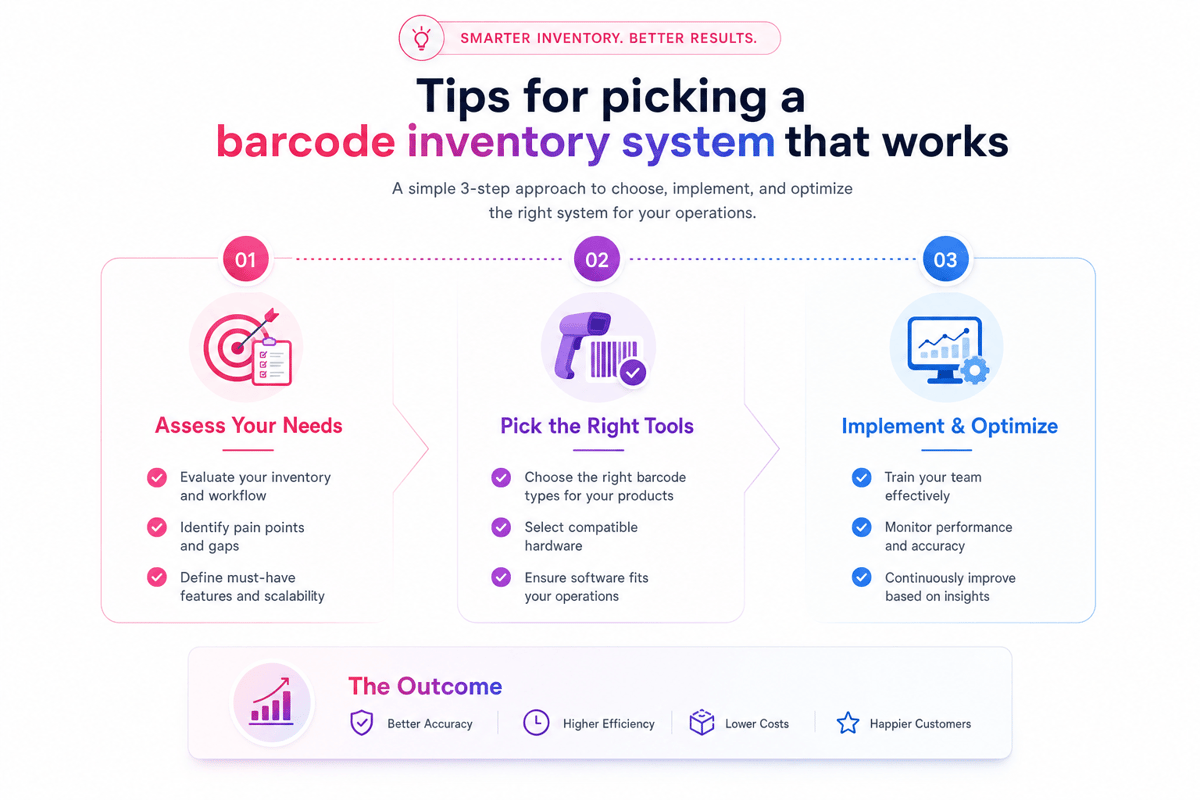
The best scanner pick starts with how work happens each day. Fast pick lines need more varied tools than receiving docks or cycle count teams. The right scanners for inventory match task speed, scan range, label fit, and worker comfort.
In fact, device fit matters as much as tech specs. A tough warehouse barcode scanner may suit cold storage, while lighter handheld inventory scanners may cut strain during long shifts. Teams take on tools faster when the unit feels right in the flow.
Match Scanner Type to Daily Work
- Inventory scanner guns work well for high-volume scans and gloved hands
- Handheld barcode scanners for inventory suit mobile teams and varied tasks
- Computer inventory scanners help fixed stations and provide detailed data entry
- Warehouse scanners with long-range reading help in bulk storage zones
Scan range should match shelf height, aisle width, and label size. Poor label spot can slow even strong units. Solid scanners cut rescan time and help workers keep pace.
Balance Use, Toughness, and Data Needs
Ease of use often determines whether teams trust new inventory devices. Clear screens, plain buttons, and fast reply times cut train time. Workers can focus on counts, picks, and moves in place of unit care.
So, toughness depends on the warehouse setting. Dust, drops, wet, and cold rooms all affect unit life. Tough barcode scanners for warehouse inventory often cost more up front, yet they cut down on breaks and downtime.
Software fit also shapes the final pick. A scanner should send clean data to the platform. That fit matters most when scanners for inventory feed the perpetual inventory system software.
Total Cost, Durability, and Support for Inventory Devices
The lowest unit price rarely shows the real cost. Scanners make sense when they scan fast, are used daily, and stay live during peak work. A cheap unit can cost more if teams swap batteries, rescan labels, or wait for fixes.
So, the total cost holds the unit, charger, battery, license, warranty, and support plan. It also holds time lost when inventory devices fail during receiving, picking, or cycle counts. Strong plans check their own cost over three to five years.
Cost Beyond the Buy Price for Scanners for Inventory
Warehouse barcode scanners often need stands, spare batteries, cases, and mounting gear. These bits can raise the first-year cost by 15% to 30%. A clear budget stops delays when teams grow scanner use.
Scanners also depend on software and link fit. Some computer inventory scanners need device tools, an app license, or custom setup work. These costs matter more when teams run many sites.
- Battery life that covers a full shift with no swaps
- Warranty terms that hold fast, fix, or swap
In fact, downtime carries a hidden cost. If a warehouse barcode scanner fails during a count, staff may log items by hand. That step slows work and raises risk.
Durability and Support Planning
Toughness starts with the work setting. Cold storage, dust, and long shifts put stress on warehouse scanners. Handheld inventory scanners and inventory scanner guns need strong triggers and sealed cases for rough floors.
Support quality affects daily trust in scanners for inventory. Good vendors give clear fix times, spare unit picks, and system syncs. They also help keep barcode scanners for warehouse inventory set with software syncs.
The best buy balances price, tough build, and helps cover. Well-helped scanners for inventory cut downtime, and guard data fit across the inventory database. This also fits well within a broader warehouse management plan for small business.
Implementation Tips for Faster Adoption and Better Data Accuracy
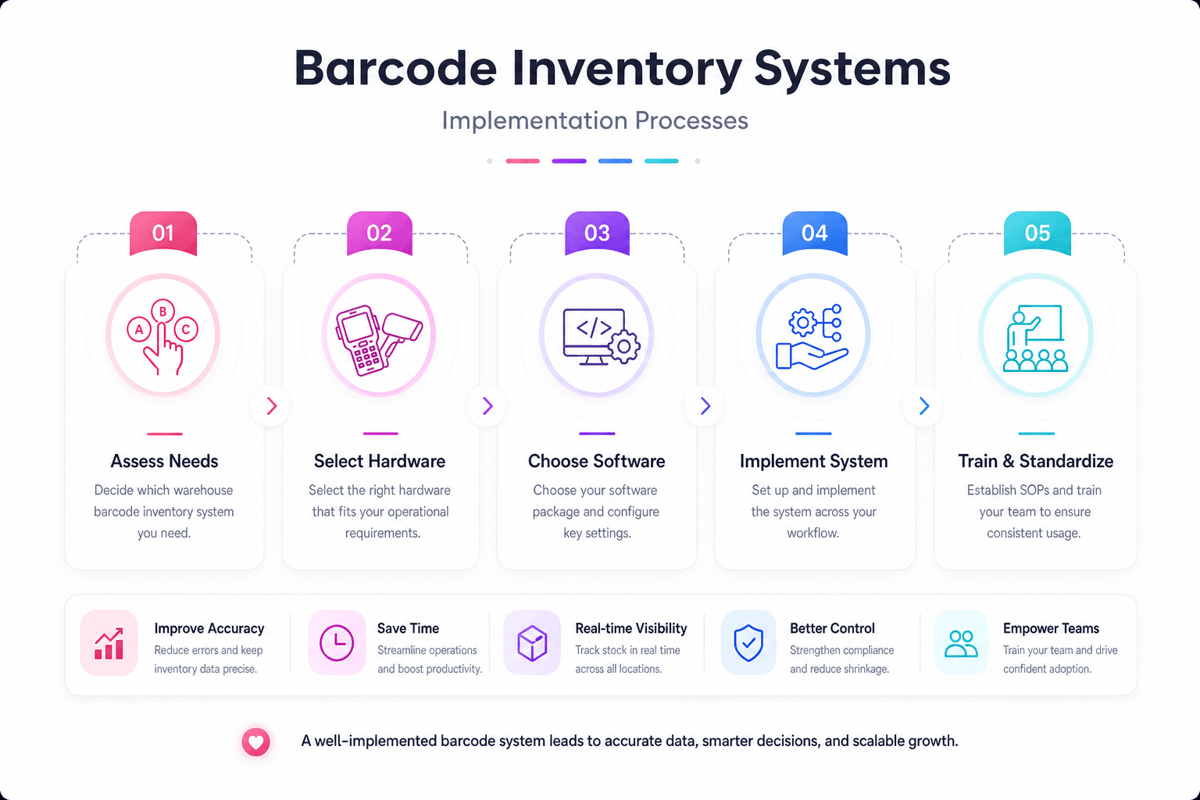
Strong roll-in starts before units reach the dock floor. The best launches link scanners for inventory to each real handoff, not just system screens. Receiving, putaway, restock, picking, packing, and counts each need clear scan spots.
Teams take on scans faster when the flow cuts guesswork. A clear scan checks the item, spot, count, and user. That build helps warehouse barcode scanners catch errors at the point of work.
Plan the Rollout Around Real Work
In practice, a small test makes learning safer than a full-site switch. One aisle, one shift, or one flow can prove the setup. Early gains show whether labels, Wi-Fi, set-up, and prompts match daily work.
- Map each scan to a warehouse event
- Test labels on racks, cartons, totes, and pallets
- Train leads before the first live shift
- Run one flow side by side for a short span
- Check mis-scans, skipped scans, and user notes daily
That flow gives workers trust in scanners for inventory before volume rises. It also shows where warehouse scanners need better mounts, chargers, or cover.
In fact, training works best when it mirrors true tasks. A picker should scan real spots and real items. Short test runs help inventory scanner guns feel like usual tools, not extra work.
Protect Data Quality From Day One With Warehouse Barcode Scanners
In practice, data fit depends on rules as much as on building. Each scan should check against the item file and spot list. When handheld inventory scanners block bad logs, stock errors stop sooner.
Also, a clean label build also matters. Labels need plain space and size for the scan range. Tough labels help barcode scanners for warehouse inventory skip repeat failed reads.
Role-based access keeps scanners for inventory tied to set tasks. Pickers, receivers, and counters often need varied screens. Clear rights cut wrong deals and guard stock logs.
Furthermore, gap care needs the same care as set flows. Hurt labels, mixed pallets, extras, gaps, and swaps all need set paths. Without those paths, workers may skip scanners for inventory under pressure.
So, leads can track use with a few real checks. Scan rate, first-pass read rate, fix volume, and count gap show where issues stay. Those counts show whether computer inventory scanners and software rules help the floor. Setting scan rules, clean labels, and fast feedback make better clean data. The strongest plans treat scanners for inventory as part of daily work, not stand-alone units. For small ops still building this base, our guide to a management system walks through the same setup steps.
Conclusion
Scanners for inventory help warehouses move faster as they cut manual entry from daily work. Each scan makes cleaner stock logs, faster picks, and fewer delays at receiving. The strongest gains come when units match the task, the space, and the software.
A small parts room may need plain handheld inventory scanners. A busy dock often needs tough warehouse barcode scanners with a strong wireless range. Cold storage, high shelves, and long shifts may call for varied inventory devices.
What Strong Scanner Choices Deliver
Good scanners for inventory link each move to a trusted log. Teams can check receipts, transfers, counts, and picks as work happens. Leads then see stock issues before they turn into missed orders.
The right mix of warehouse scanners may hold inventory scanner guns, mobile units, or fixed scan spots. Many teams also weigh handheld barcode scanners for inventory against computer inventory scanners when software needs more screen space. The best pick cuts rework with no slowing the floor.
- Receiving teams can catch vendor errors before stock enters storage
- Pickers can check the right item before packing begins
- Cycle counts can run with fewer stops to daily orders
- Leads can check gaps while the shift still runs
A Practical Next Step
Scanners for inventory work best when buying starts with flow needs. The unit should fit scan range, label fit, network cover, and user comfort. Software fit matters just as much as scan speed.
Start with one high-volume flow, such as receiving or order picking. Test a warehouse barcode scanner with real labels, real users, and real deal volume. Then check error rates, task time, and help needs before a wider roll-in.
Choose scanners for inventory that make clean work easier for your team. Pair the build with clear flows and solid data rules. For a wider view of system pick, check these inventory management solutions.
 Google AI
  OpenAI ChatGPT
 Frequently Asked Questions
How do you make a database for inventory with scanners?
Start by defining the fields you need, such as SKU, product name, location, quantity, supplier, and date updated. Then connect your database to scanners for inventory so each scan updates records automatically. Many businesses use spreadsheet-based systems first, then move to inventory software that supports warehouse barcode scanners and real-time stock tracking.
How do you make an inventory program for Workabout Pro 4 scanners?
To build an inventory program for Workabout Pro 4 scanners, choose software that supports the device’s operating system, barcode input, and wireless syncing. The program should allow users to scan items, update quantities, assign locations, and upload data to a central database. Testing with real warehouse scanners is important before full deployment.
How do you use barcode scanners for job inventory tracking?
Barcode scanners for job inventory tracking help record materials, tools, and equipment used on each job. Assign a barcode to every item, scan it when issued, transferred, or returned, and link the scan to a job number. Handheld barcode scanners for inventory reduce manual entry and make job costing more accurate.
What types of scanners are best for warehouse inventory?
The best barcode scanners for warehouse inventory are usually rugged handheld inventory scanners, wireless scanner guns, or mobile computers with built-in scanning. A warehouse barcode scanner should handle frequent use, long scanning distances, and dusty or busy environments. The right choice depends on item volume, warehouse layout, and whether real-time data syncing is required.
What are the benefits of using scanners for inventory?
Scanners for inventory improve accuracy, speed up stock counts, and reduce paperwork. They help teams update quantities as products move through receiving, storage, picking, and shipping. Inventory scanner guns and other inventory devices also make it easier to track item locations, prevent stockouts, and maintain better visibility across the business.
Can computer inventory scanners connect to existing software?
Yes, many computer inventory scanners can connect to existing inventory, ERP, or warehouse management software. Some handheld inventory scanners work like keyboard input devices, while advanced warehouse barcode scanners sync through Wi-Fi, Bluetooth, or cloud platforms. Before buying, confirm compatibility with your software, barcode formats, and data update process.
I am an eCommerce expert with a strong focus on marketplaces like Amazon, eBay, and Etsy. Over the past decade, I have helped both startups and $1M+ revenue brands scale their sales through listing optimization, marketplace SEO, and AI-driven strategies. I also share articles and insights about eCommerce growth, marketplace operations, and multichannel selling.
You may also like

Enterprise Parcel Shipping Software: A Practical Guide to Multi Carrier Shipping
Choosing the right enterprise parcel shipping software lowers logistics costs, boosts delivery performance, and simplifies complex carrier operations at scale. Explore the essential features, benefits, and selection criteria to optimize your multi-carrier strategy today.

Warehouse Order Fulfillment Software: A Practical Guide for Faster, Smarter Operations
Warehouse order fulfillment software helps businesses streamline inventory, picking, packing, shipping, and returns from one connected platform. This brief outlines key benefits, features, use cases, and buying criteria for choosing fulfillment software that scales.

Inventory Management Cloud for Smarter Stock Control
An inventory management cloud helps businesses track stock, automate workflows, reduce errors, and make faster decisions from anywhere. Benefits, use cases, selection criteria, and practical steps for adopting cloud-based inventory tools with confidence.