
Inventory Management Cloud for Smarter Stock Control
 Daniel Brooks
·
· 17 min read
Daniel Brooks
·
· 17 min read 
Stock control fails when teams work from old data. A warehouse screen may show five units on a shelf while online orders have already claimed them. That gap leads to backorders, rush buying, and missed sales. An inventory management cloud closes that gap with shared, live stock data across every team.
Sales, buying, warehouse, and finance staff all see the same counts. Calls move faster as the system shows real activity. Most firms feel the switch within the first week — fewer phone queries, fewer stock fights, and fewer end-of-day fixes.
Why Stock Control Needs an Inventory Management Cloud Model
Old stock tools often rely on local files or manual syncs. Those systems work for small, simple ops. But they strain when products, channels, and spots grow. They strain when products, channels, and spots grow. Cloud-based inventory management links stock records across the whole firm. A sale can cut open stock right away. A buy order can sync expected supply before goods arrive.
In practice, the value comes from timing and trust. A live inventory cloud helps teams act on current data, not yesterday’s count. That shift cuts guesswork during busy periods. A modern cloud setup also supports remote access. Owners, managers, and buyers can check stock from any spot. That matters when calls happen outside the warehouse.
What Smarter Control Looks Like
Smarter stock control starts with clear view. A cloud-based inventory management solution can show what is in stock, reserved, damaged, or on order. Each status helps teams avoid shortages. Also, for growing teams, clean data affects cash flow as much as service. Excess stock ties up cash. Too little stock pushes buyers toward rivals.
A strong inventory management cloud gives small and mid-sized firms more control with no heavy systems work. This makes cloud-based inventory management needs for small firms easier to handle. Teams can track moves, spot demand shifts, and plan buys with better data. Cloud-based inventory control also makes a cleaner audit trail. Each stock change links to an order, receipt, or transfer.
What Is an Inventory Management Cloud?
An inventory management cloud is online software that tracks stock, orders, vendors, and warehouse work in one shared system. Teams access it through a browser or app rather than a local server. The system syncs stock records as sales, returns, transfers, and receipts occur.
An old stock system often sits on one computer or network. A cloud-based tool stores data in a secure online space, so ok’d users see the same counts from varied spots. This helps teams avoid copied files, late syncs, and manual stock counts. For a wider view of what these platforms include, see the complete guide to inventory management software.
Core Role of Cloud-Based Inventory Management in Stock Control
Cloud-based inventory management gives each item a live record. That record can include stock on hand, reorder points, vendor details, costs, and sales history. Managers can check these details before buying more stock or moving items across sites.
Clean stock data matters more as order volume grows. Ecommerce sales growth can expose weak stock flows within weeks, especially when sales channels do not share data. A linked inventory cloud helps teams match demand with open supply. Also, a cloud-based inventory management solution often links with ecommerce tools, accounting apps, barcode scanners, and ship systems. These links cut repeated data entry and lower typing errors.
How Inventory Management Cloud Differs From Basic Tracking
Basic tracking records what a firm owns. An inventory management cloud shows how stock moves across the firm. It can flag slow-moving items, low stock, excess, and order delays before they create higher costs.
For smaller firms, cloud-based inventory management tools can replace split sheets with no heavy IT work. A plan also keeps startup costs lower than many server-based systems. Teams gain live stock data with no hardware. Cloud-based inventory control also supports better calls across buying, sales, and fill. For teams with several warehouses or stores, this base often supports multi-location inventory management software.
Connect Shopify, draw your floor, pick an order - free plan, 7-day full trial, no credit card, no sales call.
How Cloud-Based Inventory Management Works
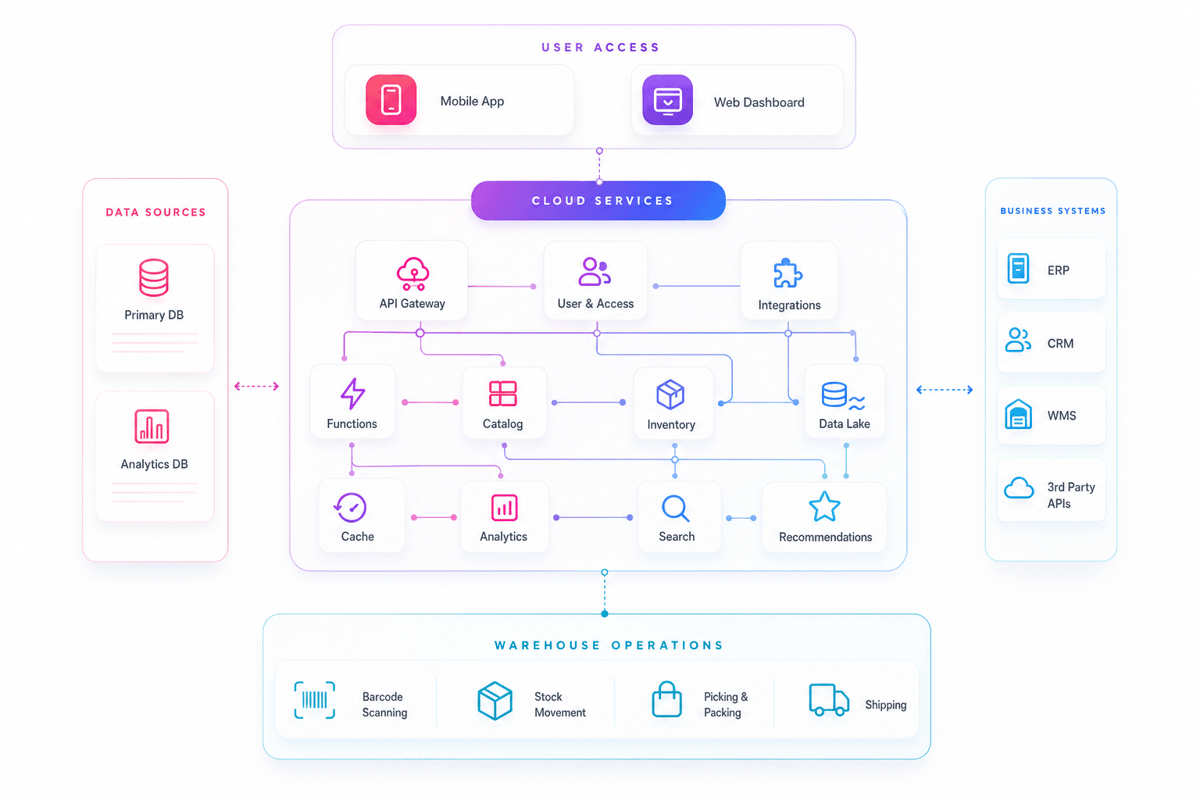
A modern inventory management cloud links stock records, sales channels, warehouses, and buying tools. Each move syncs the same live database, so teams work from current counts instead of old sheets. Instead of waiting for batch reports, staff sees stock changes as they happen.
Data Flow Across Sales and Stock
Each deal makes a record with item, count, spot, user, and time details. This trail helps teams find errors fast and check what changed. The system then compares open stock with active orders and buy plans. When stock falls below a set level, it can flag a reorder need before gaps affect sales.
Strong cloud-based inventory management also splits stock by status. Teams can see what sits on hand, what buyers already claimed, and what stays in transit. Also, a good cloud-based inventory management solution uses rules to guide routine calls. These rules can trigger low-stock alerts, hold units for orders, or suggest restock based on recent demand.
Alerts, Links, and Integrations in the Inventory Cloud
The system gives managers a clear view across spots with no split files. That matters when teams sell through stores, markets, wholesale accounts, and direct online channels. As orders grow, cloud-based inventory control keeps stock data close to the work.
The same live view also gives warehouse and field teams the base for mobile inventory management. Furthermore, the inventory management cloud links with ecommerce tools, accounting systems, barcode tools, and shipping software. These links cut double entry and lower the risk of wrong records.
Key Benefits of an Inventory Cloud for Growing Businesses
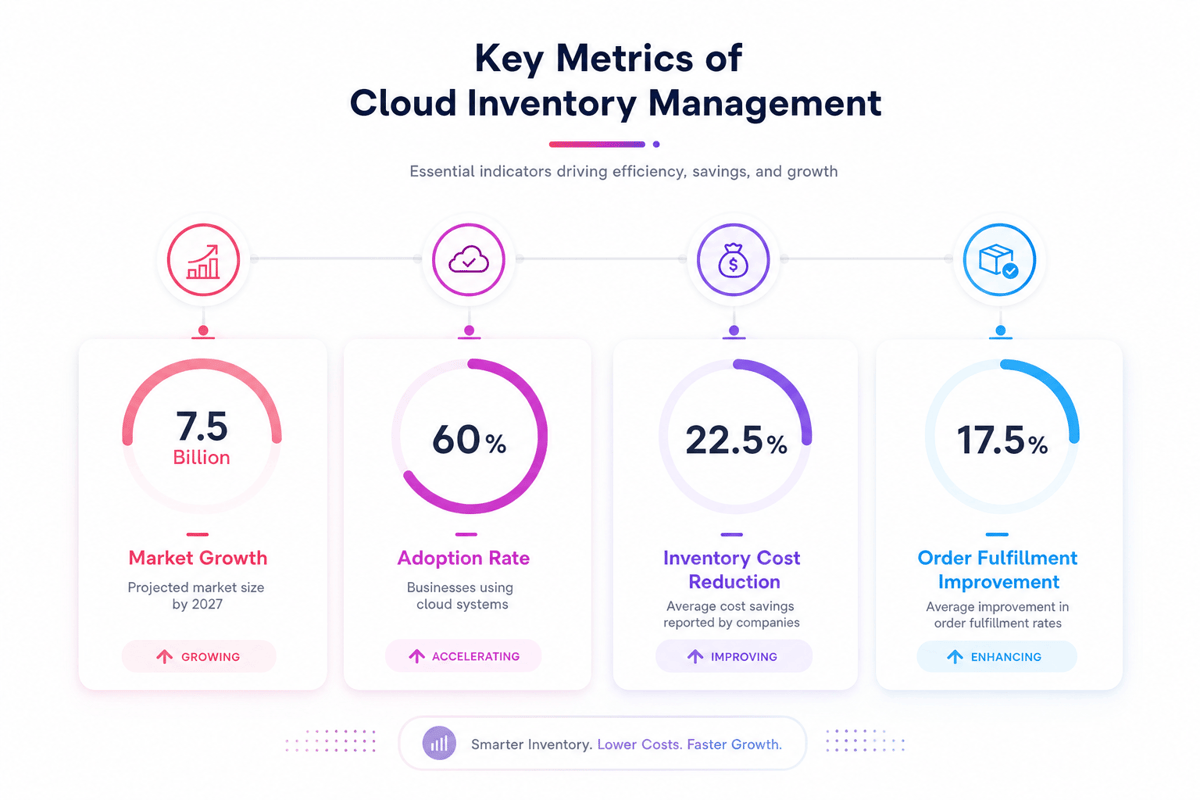
A growing firm often outgrows sheets before leaders expect it. An inventory management cloud gives teams one shared view of stock, orders, and moves across every sales channel. In fact, the main gain comes from faster, cleaner calls.
When stock data syncs in real time, buyers can reorder sooner, warehouse teams can pick with fewer errors, and managers can spot slow-moving items before cash gets trapped. Also, the same view helps cloud-based inventory management small firm teams scale without adding headcount at the same pace.
Real-Time Cloud-Based Inventory Management View Across Stock
Cloud-based inventory management links stock records across warehouses, stores, vendors, and ecommerce tools. That shared view cuts guesswork when demand shifts or a key item sells faster than planned. An inventory management cloud also helps teams work from the same data.
Sales staff can check open stock, buying teams can review reorder needs, and finance teams can track stock value with no waiting for manual syncs. The system shows that gap before new buying starts.
Lower Costs and Faster Calls
A cloud tool cuts many hidden costs tied to manual stock control. Teams spend less time fixing counts, checking sheets, and tracing order errors after buyers complain. A strong cloud platform also supports better buying habits.
- Lower carry costs from fewer overstocked items
- Faster order work with cleaner stock records
- Fewer stockouts when seasonal or promo-driven demand
- Better cash planning through clearer stock value
The tool also supports stronger control as ops grow. With cloud-based inventory control, teams can track moves, review gaps, and cut manual checks. For many teams, it also makes the ops discipline needed for perpetual inventory system software. For a full view of cloud stock benefits, see the guide to cloud-based inventory software solutions.
Inventory Management Cloud vs. Traditional Inventory Systems
Old stock systems often rely on local servers, sheets, or desktop tools. Teams usually access data from one spot, which slows calls across warehouses, stores, and offices. An inventory management cloud gives each ok’d user the same live stock data from any linked device.
In fact, the main gap sits in how each system handles change. Older systems often need manual syncs, file moves, or end-of-day syncing. A cloud-based inventory management solution records stock moves as they happen, so teams see fresher data with fewer gaps.
Speed, Control, and Data Access
An old system can work well for one site with stable demand. Problems grow when sales channels, vendors, or storage spots expand. An inventory management cloud supports that growth with no tying every task to one office network.
Also, real-time access changes how teams handle gaps. A stockout, late receipt, or wrong count appears sooner in the system. With cloud-based inventory control, managers can act before the issue reaches buyers. Also, old tools often create split versions of the truth. One team may sync a sheet while another works from old reports. Cloud-based inventory management cuts that risk by storing records in one shared system.
Cost, Scale, and Daily Work
Local systems often carry hidden costs beyond the software fee. Hardware, backups, syncs, and support can add pressure over time. A cloud setup shifts much of that work to the provider.
Furthermore, smaller firms gain a practical benefit from this model. Cloud-based inventory management small business tools often start with core stock tracking, then add tools as needs grow. That structure helps owners avoid buying more system than they need. Old systems still fit some firms with strict local control needs. Yet most growing firms value faster setup, remote access, and simpler reports. A clear check should include support, training, links, and inventory management software cost.
Cloud-Based Inventory Management Solution: Features to Look For
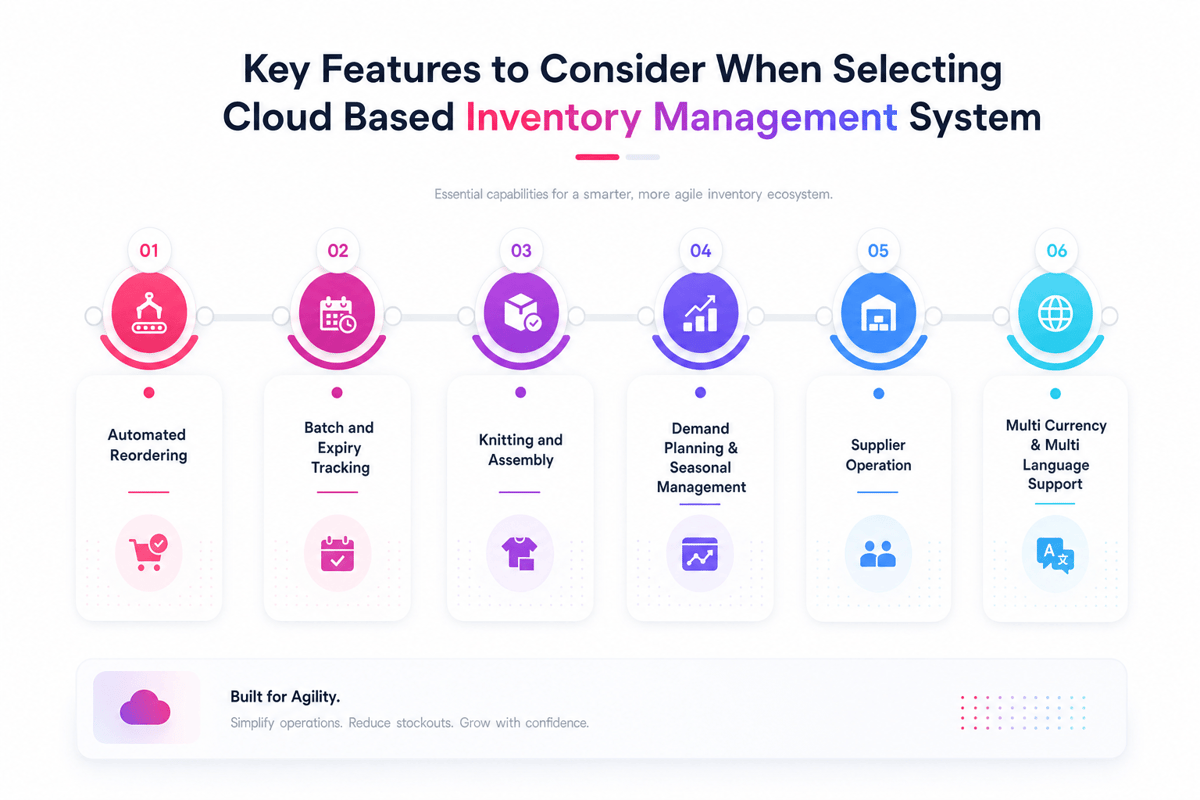
The right inventory management cloud should do more than store counts online. It should link buying, sales, warehouse work, and reports in one place. The best fit depends on order volume, product mix, and team structure.
Core Stock and Order Features
Real-time stock tracking sits at the center of cloud-based inventory management. Each sale, return, receipt, and transfer should sync counts within seconds. Fast syncs help teams avoid selling items that no longer exist. A strong inventory management cloud supports reorder points, safety stock, and low-stock alerts.
- Multi-spot tracking for warehouses, stores, and remote stock areas
- Buy orders work with vendor details and expected dates
- Lot, serial, or batch tracking for regulated items
- Returns work that syncs stock and cost records
- Role-based access, so staff see only relevant tools
Order routing matters when sales come from several channels. An inventory cloud should assign stock from the right spot. That choice can cut ship time and lower freight costs. For more on top platforms, see the top 5 inventory management software options.
Data, Links, and Control
Reports should show more than current stock levels. A useful inventory management cloud shows aging stock, turnover, margin, and demand patterns. These views help managers spot slow sellers before storage costs rise.
Links keep stock records in sync with the wider firm. A strong inventory management cloud links with ecommerce tools, accounting apps, shipping software, and point-of-sale systems. Clean links cut manual re-entry and lower invoice errors. Also, security and audit trails deserve close review. A solid cloud-based inventory control setup records who changed counts, costs, and item data.
Mobile access can make the system more useful on the floor. Staff can receive goods, count stock, and confirm picks from handheld devices. For cloud-based inventory management small firm needs, this can replace paper sheets with no complex hardware. These controls grow stronger when teams pair the tool with a barcode inventory system.
Cloud-Based Inventory Management Small Business Use Cases
Small firms often feel stock problems before larger ones do. One missed reorder can delay sales, repairs, or production. An inventory management cloud gives teams current stock data with no large IT setup. Use cases vary by model, but the pattern stays clear. Owners need faster counts, cleaner buying, and fewer surprises.
Retail and Ecommerce Stock Planning
Retailers use cloud-based inventory management to track stock across stores, warehouses, and online channels. Sales sync stock counts as orders move through the system. The inventory management cloud then shows which items need restock first.
Also, online sellers face fast demand shifts and frequent stockouts. Clean buy history supports data-driven stock control across all spots. With an inventory cloud, owners can spot slow movers before cash gets tied up. Furthermore, small retailers gain clearer season planning. The system can show which items sold well last year. That view helps buyers order closer to real demand.
Buying, Production, and Field Teams
Wholesalers often handle large item lists with thin margins. A cloud-based inventory management solution links buy orders, sales orders, and open stock. The inventory management cloud helps buyers avoid double orders and late restock.
Also, light makers use cloud tools to track raw parts and finished goods. Teams can see whether parts exist before planning work. That view cuts stalled jobs and urgent vendor calls. Furthermore, service teams gain from shared stock records. Techs can record parts used for each job. Office staff then see van stock, warehouse stock, and reorder needs in one place. As sales channels expand, an inventory management cloud makes the base for multi-channel inventory management.
How Cloud-Based Inventory Control Improves Accuracy and Visibility
Cloud-based inventory control gives teams a live view of stock moves. Each sale, return, transfer, and receipt syncs the record fast. This cuts the gap between actual stock and system data. An inventory management cloud also makes one shared source of truth. Store teams, warehouse staff, and finance users see the same counts.
Real-Time Data Cuts Stock Errors in Cloud-Based Inventory Control
Manual counts often fail when stock moves across several spots. A cloud-based inventory management solution records activity as it happens. Teams can see where stock sits and how fast it moves. Barcode scans and mobile syncs cut typing errors. Lot counts, serial counts, and end dates stay tied to each item. An inventory management cloud keeps those details visible when daily work.
Furthermore, better data helps stop overselling. Sales teams can check open stock before confirming an order. So, buying teams can reorder based on current demand, not old reports. Also, cloud-based inventory management supports cleaner reports across branches. A manager can compare stock levels by site with no waiting for emailed files.
Clear Inventory Cloud View Supports Faster Calls
The cloud tool shows patterns that sheets often hide. Managers can review slow-moving stock, fast sellers, and low-stock items. These signals help teams act before gaps affect orders. For a cloud-based inventory management small firm, this view can protect cash flow. Excess stock ties up cash that could support payroll or sales.
An inventory management cloud links daily stock work with wider firm data. That link gives leaders a clearer path from stock control to business accounting and inventory management software. For warehouse-specific setup, also see the guide to warehouse management and inventory software.
Implementation Tips for Moving to an Inventory Management Cloud
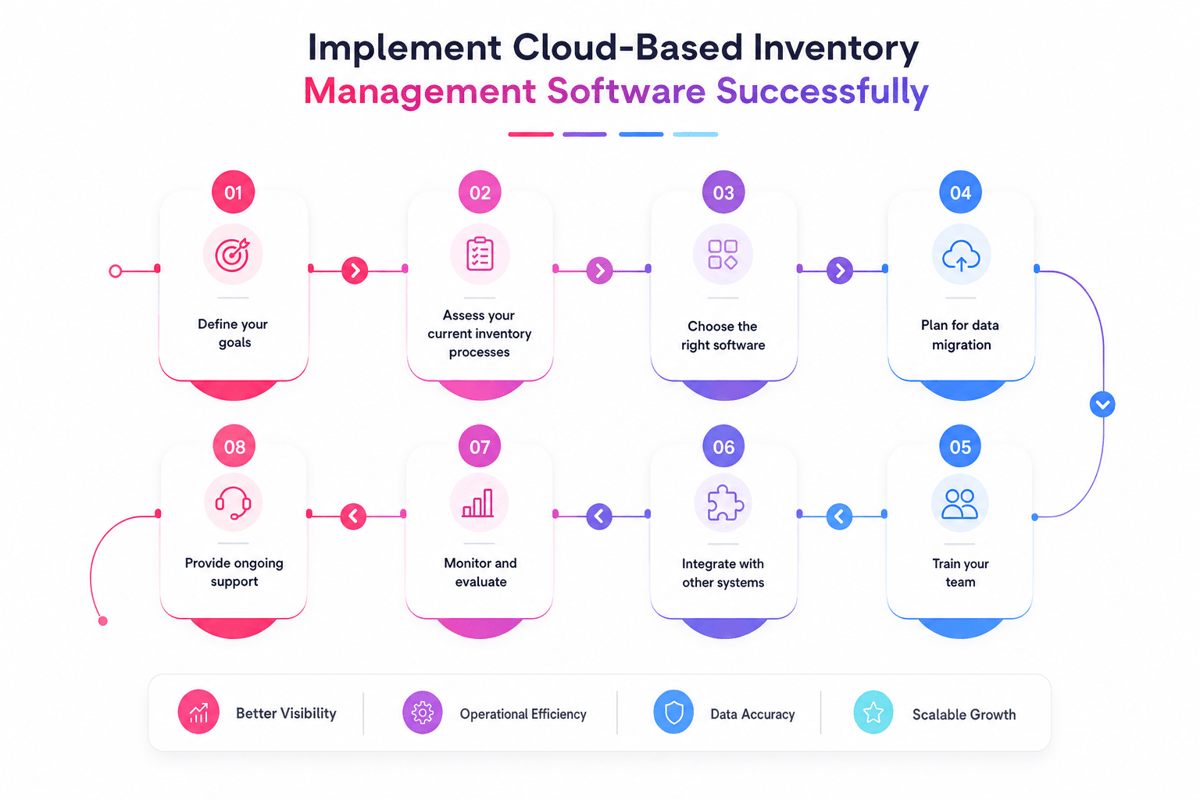
A move to an inventory management cloud works best with clear scope. Item data, spots, roles, and workflows need review before migration starts. That early work cuts errors when getting, picking, and restocking. The project also needs one owner from ops. Finance, sales, and warehouse teams can support calls, but one owner keeps choices clear.
Plan Data and Process Migration
Clean data makes the base for reliable stock control. Double SKUs, old vendor codes, and missing units of measure cause early problems. Clean item data also supports cloud supply chain responsiveness across buying, sales, and fill. Better records help teams trust the new inventory cloud faster.
Also, a phased rollout often works better than a full switch. One warehouse, store, or item group can move first. The team can test counts, transfers, reorder points, and reports in live use.
- Map current workflows before system setup begins
- Review SKU names, barcodes, units, and stock spots
- Test buy orders, getting, transfers, and cycle counts
- Check user roles before teams gain system access
Stage the Rollout and Training
Furthermore, training works best when it follows real tasks. Warehouse teams need practice with scanning, fixes, and gaps. Buyers need clear views of demand, lead times, and reorder alerts. A cloud-based inventory management solution should also link with core systems. Accounting, ecommerce, shipping, and point-of-sale data should move with no manual re-entry.
So, small teams gain more value when setup stays plain. For cloud-based inventory management, small firms need fewer custom fields; often, this means faster take-on. After launch, managers should compare system counts with physical counts often. Early checks reveal training gaps, bad barcodes, and process drift. Strong cloud-based inventory control depends on steady review, not one setup event. A clean import gives the platform a trusted inventory database. For small warehouse setups, see also the guide to warehouse management for small business.
Common Mistakes to Avoid With Cloud-Based Inventory Management
An inventory management cloud can expose weak stock habits fast. Poor data, unclear ownership, and rushed setup often create the same errors teams hoped to remove. Strong results come from clean rules and steady review.
Data and Setup Errors in Inventory Management Cloud Rollouts
In practice, old item records often carry hidden problems into new systems. Double SKUs, missing units of measure, and outdated vendor codes can distort counts from day one. A clean inventory management cloud setup depends on careful data review before launch. Teams that skip this step may see wrong reorder points and false stock levels.
Also, another common mistake involves setting broad user access. Warehouse staff, buyers, and finance teams need varied controls. Clear roles cut accidental edits and protect key stock records. Some firms also copy old workflows into a cloud-based inventory management solution. That limits value. Cloud tools work best when teams adjust approvals, getting steps, and cycle counts around real-time data.
Process and Adoption Gaps With Cloud-Based Inventory Management
In practice, many teams treat the inventory management cloud as a software project only. In practice, it changes daily work across buying, sales, and warehouse ops. Training often gets too little time. Staff may scan items late, skip reason codes, or keep side sheets.
Furthermore, stock rules need regular review. Fast-moving items, seasonal demand, and vendor delays can change reorder needs within weeks. Static settings can create stockouts even when the system works correctly. Small firms face a related risk with complex setup. A plain inventory cloud model often works better at first. Too many spots, custom fields, and approval layers can slow take-on. A cloud-based inventory management rollout gains traction when teams link system data to clear calls.
Conclusion
An inventory management cloud gives stock teams a shared source of truth. It links buying, storage, sales, and reports in one live system. As a result, that structure helps teams cut stockouts, trim excess stock, and act sooner.
In contrast, old tools often hide problems until teams count stock. A modern inventory cloud shows moves as they happen. So, leaders can spot slow sellers, demand shifts, and supply gaps faster. Strong cloud-based inventory management supports better calls as data stays current. Staff can check stock levels from warehouses, stores, or mobile devices.
Smarter Control Starts With Visibility
A solid cloud-based inventory management solution also cuts manual work. Barcode scans, reorder alerts, and synced sales data limit typing errors. So, fewer errors mean cleaner records and fewer rushed buys. For growing firms, the value comes from scale. A cloud-based inventory management small firm setup can start lean. The same system can support more users, sites, and items later.
Next Step for Better Stock Calls
The right inventory management cloud should match current workflows and future growth. Teams need clean item records, reliable links, and reports people use. Cloud-based inventory control works best when teams agree on process. Clear reorder points, count plans, and user roles keep data trusted. In short, the software then supports discipline instead of hiding gaps.
First, review current stock pain points before picking a system. Find where delays, errors, or blind spots cost the most. Also, ask each team where their data breaks first. Choose an inventory management cloud that fits real ops needs. For a broader check of tools, explore these inventory management solutions.
 Google AI
  OpenAI ChatGPT
 Frequently Asked Questions
What is cloud-based inventory management?
Cloud-based inventory management is the process of tracking, controlling, and updating stock through online software instead of local spreadsheets or on-premise systems. An inventory management cloud platform gives teams real-time access to inventory data, orders, suppliers, and warehouse activity from any connected device.
Can cloud computing manage inventory and shipping?
Yes, cloud computing can manage both inventory and shipping in one connected system. A cloud-based inventory management solution can track stock levels, update orders, generate shipping labels, and sync data with sales channels. This helps businesses reduce manual work and avoid delays caused by disconnected tools.
How does cloud inventory management improve efficiency?
Cloud inventory management improves efficiency by automating stock updates, purchase orders, reorder alerts, and reporting. Teams can see accurate inventory data in real time, which reduces errors and prevents overselling. With cloud-based inventory control, businesses can make faster decisions and improve coordination across warehouses, stores, and suppliers.
How does cloud-based inventory management work?
Cloud-based inventory management works by storing inventory data on secure online servers. When products are received, sold, moved, or returned, the system updates records automatically. An inventory management cloud platform can also integrate with ecommerce stores, accounting software, barcode scanners, and shipping tools to keep operations aligned.
How do you implement a cloud-based inventory management system?
To implement a cloud-based inventory management system, start by reviewing current inventory processes and identifying key needs. Then choose software that fits your order volume, locations, integrations, and reporting requirements. Clean your product data, train users, connect sales channels, and test workflows before fully switching to the new system.
Why use cloud inventory management instead of an on-premise system?
Cloud inventory management is often easier to scale, update, and access than an on-premise system. Businesses do not need to maintain local servers, and software updates are usually handled by the provider. For cloud-based inventory management small business users, this can lower upfront costs while improving visibility and flexibility.
I specialize in building scalable eCommerce systems powered by AI and automation. My work focuses on growing sales across Amazon, eBay, and Etsy through technology integration, data-driven strategies, and performance optimization. I also publish articles and insights about eCommerce technology, warehouse operations, and multichannel growth.
You may also like

Enterprise Parcel Shipping Software: A Practical Guide to Multi Carrier Shipping
Choosing the right enterprise parcel shipping software lowers logistics costs, boosts delivery performance, and simplifies complex carrier operations at scale. Explore the essential features, benefits, and selection criteria to optimize your multi-carrier strategy today.

Warehouse Order Fulfillment Software: A Practical Guide for Faster, Smarter Operations
Warehouse order fulfillment software helps businesses streamline inventory, picking, packing, shipping, and returns from one connected platform. This brief outlines key benefits, features, use cases, and buying criteria for choosing fulfillment software that scales.
Logistics Management Software Solutions for Smarter Operations
Learn how logistics management software solutions help businesses improve shipping, tracking, transportation planning, and supply chain visibility. Key features, benefits, software comparisons, use cases, and practical selection tips.